
 OpenMV MicroPython
 2.7. Lists#
A list is a mutable, ordered sequence of values. Unlike strings and bytes, lists can hold values of any types, and you can change, add, or remove items in place.
2.7.1. Creating lists#
Square brackets create a list literal:
empty   = []
nums    = [1, 2, 3]
mixed   = [1, "two", 3.0, True, None]    # any types
nested  = [[1, 2], [3, 4], [5, 6]]       # lists of lists
The list constructor builds a list from any iterable:
>>> list("abc")
['a', 'b', 'c']
>>> list(range(5))
[0, 1, 2, 3, 4]
2.7.2. Length, indexing, and slicing#
len() returns the number of items. Indexing and slicing work the same way as strings – positions start at 0, negative indices count from the end, and a slice outside the valid range silently clips rather than raising:
>>> nums = [10, 20, 30, 40, 50]
>>> len(nums)
5
>>> nums[0]
10
>>> nums[-1]
50
>>> nums[1:4]
[20, 30, 40]
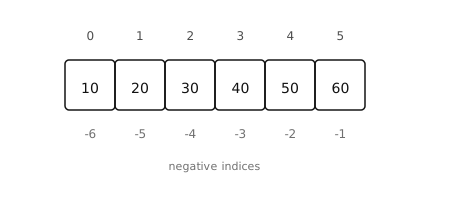
Positive indices count from the front; negative indices count from the end.#
The slice syntax is shorthand for a slice object that Python builds behind the scenes. nums[1:4] is the same as nums[slice(1, 4)]. You rarely construct one by hand, but slice() is occasionally useful for storing a slice as a value to reuse:
head = slice(0, 3)
print(nums[head])             # [10, 20, 30]
print(letters[head])          # first three letters, same slice
2.7.3. Mutating a list#
Lists support indexed and sliced assignment in place:
>>> nums = [10, 20, 30]
>>> nums[0] = 99
>>> nums
[99, 20, 30]
>>> nums[1:3] = [200, 300, 400]    # slice can change the length
>>> nums
[99, 200, 300, 400]
The most common list methods:
list.append()– add a single item to the end.list.extend()– append every item from an iterable.list.insert()– insert at a given position.list.remove()– delete the first occurrence of a value.list.pop()– remove and return an item (last by default).list.clear()– remove every item.list.sort()– sort in place. Passreverse=Truefor descending order.list.reverse()– reverse in place.
>>> nums = []
>>> nums.append(1)
>>> nums.extend([2, 3])
>>> nums.insert(0, 99)
>>> nums
[99, 1, 2, 3]
>>> nums.pop()
3
>>> nums.sort()
>>> nums
[1, 2, 99]
These methods modify the list in place and return None. Writing
nums = nums.sort() # nums is now None -- common bug
is almost never what you want; the original nums has been sorted, but the assignment then overwrites the name with the return value. Either call nums.sort() on its own line, or use the built-in sorted() to get a new sorted list back without mutating the original.
2.7.4. Operators#
+concatenates two lists into a new list.*repeats a list.intests membership.
>>> [1, 2] + [3, 4]
[1, 2, 3, 4]
>>> [0] * 5
[0, 0, 0, 0, 0]
>>> 3 in [1, 2, 3]
True
2.7.5. Iterating over a list#
A for loop walks the items in order:
for n in [10, 20, 30]:
    print(n)
2.7.6. Aliasing and mutation#
A list is a single value in memory; several names can point at the same list. Mutating through one name is visible through every other name that points at the same list.
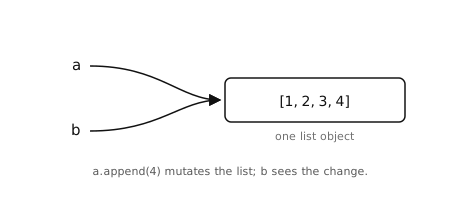
a and b both point at the same list. Mutating through either name changes what every other name sees.#
>>> a = [1, 2, 3]
>>> b = a
>>> a.append(4)
>>> b
[1, 2, 3, 4]                # same object, change is visible
To make an independent copy, slice the whole list or call the list constructor:
>>> c = a[:]                # or list(a)
>>> a.append(5)
>>> c
[1, 2, 3, 4]                # c is unaffected
This only copies the top-level list; nested lists are still shared between the original and the copy.