
 OpenMV MicroPython
 2.12. Loops#
A loop runs the same block of code repeatedly. Python has two forms: while, which keeps going as long as a condition stays true, and for, which walks through the items of a sequence.
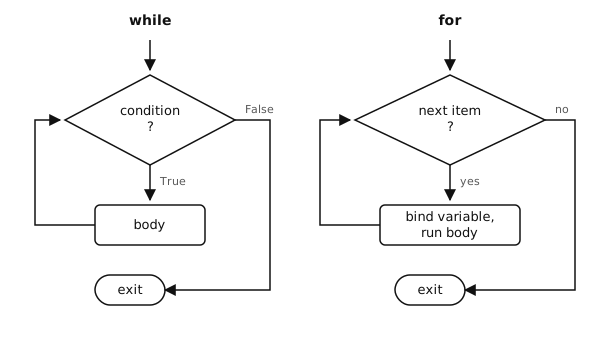
while keeps testing a condition; for walks a sequence until it is exhausted.#
2.12.1. while loops#
A while loop tests its condition before each iteration and runs the body until the test becomes false:
count = 0
while count < 5:
    print(count)
    count += 1
Output:
0
1
2
3
4
If the condition is true at the start and never becomes false, the loop runs forever. while True: is the standard idiom for a main loop, exited explicitly with break:
while True:
    step()
    if done():
        break
2.12.2. for loops#
A for loop walks the items of an iterable – a list, tuple, string, bytes, dict, or anything else that supports iteration:
for fruit in ["apple", "banana", "cherry"]:
    print(fruit)
Output:
apple
banana
cherry
The same shape works on a string, where each item is a one-character string:
for letter in "OpenMV":
    print(letter)
Output:
O
p
e
n
M
V
Iterating a dict directly yields its keys, in insertion order:
for key in {"a": 1, "b": 2}:
    print(key)
Output:
a
b
Each pass binds the loop variable (fruit, letter, key) to the next item. After the loop ends, the variable keeps the value from the final iteration.
2.12.3. range#
For loops over a numeric range, use range():
range(stop)– 0, 1, …, stop - 1.range(start, stop)– start, start + 1, …, stop - 1.range(start, stop, step)– with a custom step (negative values count down).
for i in range(5):           # 0, 1, 2, 3, 4
    print(i)

for i in range(2, 8, 2):     # 2, 4, 6
    print(i)

for i in range(10, 0, -1):   # 10, 9, ..., 1
    print(i)
range() produces values lazily – it does not build a list in memory. To get an actual list, wrap it: list(range(10)).
2.12.4. enumerate#
When the loop needs both the index and the item, enumerate() yields (index, item) pairs:
for i, name in enumerate(["a", "b", "c"]):
    print(i, name)
# 0 a
# 1 b
# 2 c
Start the index at something other than zero by passing a second argument: enumerate(items, start=1).
2.12.5. zip#
To walk two (or more) iterables in lock-step, use zip(). It yields one tuple per position and stops at the shortest input:
names  = ["alice", "bob", "carol"]
scores = [88, 92, 70]

for name, score in zip(names, scores):
    print(name, score)
Output:
alice 88
bob 92
carol 70
2.12.6. Inline assignment with :=#
The walrus operator := is an assignment that is also an expression. It binds a name and evaluates to the same value at the same time. In a while loop, this collapses the common “read, check, body” pattern into one line:
# without walrus
value = next_value()
while value is not None:
    process(value)
    value = next_value()

# with walrus
while (value := next_value()) is not None:
    process(value)
The two forms do the same thing. Reach for := when the duplication of the assignment genuinely hurts readability; do not reach for it just to be clever. The parentheses are required in most positions to keep the expression unambiguous.