
 OpenMV MicroPython
 2.4. Strings#
A string is a sequence of Unicode characters written between quotes. Single quotes and double quotes are equivalent – pick the style that lets you avoid escaping the quotes that appear inside the text:
name    = "OpenMV Cam"
company = 'OpenMV, LLC'
message = "She said \"hi\""        # both styles can be used
same    = 'She said "hi"'
Triple-quoted strings ("""...""" or '''...''') span multiple lines and preserve the newlines literally:
banner = """boot ok
firmware v1.28
"""
print(banner)
Output:
boot ok
firmware v1.28
2.4.1. Escape sequences#
Inside a regular string, \ introduces a special character:
\n– newline\t– tab\\– a literal backslash\'/\"– a literal quote (when it would otherwise end the string)\xHH– the character with hex codeHH\uHHHH– the Unicode codepointHHHH
When a string contains many backslashes, prefix the literal with r to make it a raw string. Backslashes are then taken literally – \n stays two characters long instead of being replaced with a newline:
win_path = r"C:\Users\OpenMV\camera.py"
literal  = r"\n is two characters, not a newline"
2.4.2. Concatenation and repetition#
Two strings are joined with +; a string is repeated with *:
greeting = "Hello, " + name + "!"
line     = "-" * 40              # 40-character separator
Repeated + in a loop allocates a fresh string on every iteration. For building larger strings from many pieces, use str.join().
2.4.3. Length, indexing, and slicing#
len() returns the number of characters in a string. Indexing with [] returns a one-character string at the given position; negative indices count from the end:
>>> s = "OpenMV"
>>> len(s)
6
>>> s[0]
'O'
>>> s[-1]
'V'
A slice s[start:stop] returns the substring from position start up to but not including stop. Either end can be omitted to mean “the beginning” or “the end”, and an optional third value s[start:stop:step] lets you skip characters.
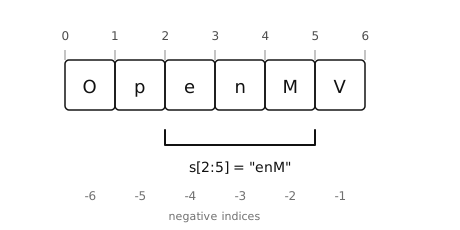
Slice positions sit between characters. s[2:5] selects the characters in positions 2, 3, and 4.#
>>> s = "OpenMV"
>>> s[2:5]
'enM'
>>> s[:3]
'Ope'
>>> s[3:]
'nMV'
>>> s[::-1]
'VMnepO'                     # whole string, reversed
An out-of-range slice silently returns whatever portion exists – s[100:200] is the empty string "", not an error. Indexing out of range, on the other hand, raises IndexError.
2.4.4. Immutability#
Strings cannot be modified in place. Operations that look like they mutate a string actually return a new string and leave the original alone:
>>> name = "OpenMV"
>>> name.upper()
'OPENMV'
>>> name
'OpenMV'                     # unchanged
To “change” a string, rebind the name to the new value: name = name.upper().