
 OpenMV MicroPython
 13.1.15. The settings editor#
Many camera applications need a handful of settings a non-programmer can change – a threshold, a mode, a Wi-Fi password – without touching the script. The OpenMV Cam Settings Editor is the IDE’s tool for that: a JSON file describes the controls, the editor turns that description into a form, and your script reads the saved values back with json.load(). The file is both the configuration and the definition of its own editor, so the same config that stores the values also lays out the GUI for editing them.
The Tools → OpenMV Cam Settings Editor submenu holds its three actions.
Open OpenMV Cam Settings Config File reads the config from the connected camera’s drive and opens it in the editor; saving writes it back to the camera.
Open Config File does the same for a
.jsonfile on your computer, for preparing a configuration offline.Create Default Config writes a starter configuration to disk and opens it – an example that exercises every control type, ready to strip down to the settings your own application needs.
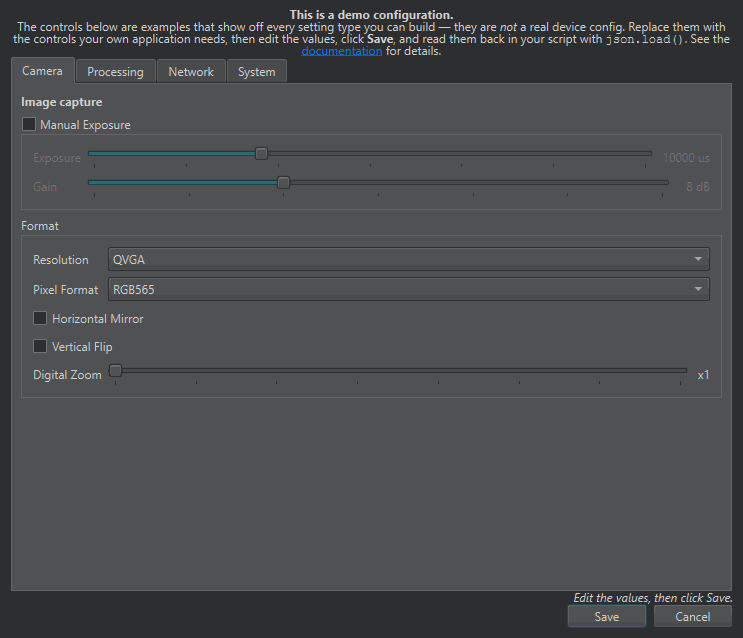
The settings editor with the default configuration open – the JSON file’s controls laid out as a form (tabs, sliders, dropdowns, checkboxes), with Save and Cancel at the bottom.#
13.1.15.1. Anatomy of a config file#
A config file is a single JSON object with two keys:
title (string, optional) – the editor window’s title. Defaults to
OpenMV Cam Settings Editor.controls (array, required) – the list of control objects the editor renders, in order, as rows of a form. This is the whole GUI.
{
  "title": "Camera Settings",
  "controls": [
    { "type": "slider", "name": "threshold", "label": "Threshold", "value": 50 },
    { "type": "checkbox", "name": "draw_overlays", "label": "Draw Overlays", "value": true }
  ]
}
Each entry in controls is one control – a text field, a number, a checkbox, a dropdown, a slider, a group, a tab strip, a static label, and so on. Its type selects the widget; the rest of the object configures it. Any keys the editor does not recognise are left untouched when the file is saved, so you can keep your own metadata in the file alongside the controls.
13.1.15.3. Saving and reading values#
A control that holds a value – a checkbox, a slider, a text field – carries it in a value key. When you click Save, the editor writes each control’s current value straight back into that same control object, in place, and rewrites the file. The file keeps its structure: nothing moves, only the value keys change. There is no separate flat map of name to value – the values live inside the controls, right where they are defined.
That is why the layout matters to your script. The controls and tabs arrays keep the order you built them in, so the file cannot be indexed by name like a dictionary – config["controls"]["threshold"] does not work. This small helper bridges the gap: give it the path of names down to the value you want, and it walks the tree for you.
import json


def find(node, *path):
    """Return the control at a path of names; read its value with
    ["value"]. The tab strip and any unnamed group are transparent,
    so you list only the tabs and controls you gave a name."""
    for key in path:
        match = _child(node, key)
        if match is None:
            raise KeyError(key)
        node = match
    return node


def _child(node, key):
    for member in node.get("controls", []) + node.get("tabs", []):
        if member.get("name") == key or member.get("title") == key:
            return member
        if "name" not in member and ("controls" in member or "tabs" in member):
            match = _child(member, key)   # see through an unnamed group / the tab strip
            if match is not None:
                return match
    return None


with open("config.json") as file:
    config = json.load(file)

threshold = find(config, "threshold")["value"]
Each step in the path is a control’s name, or a tab’s title (a tab takes no name of its own, though you may add one and it is kept). The tab strip and any group you did not name are transparent – find steps through them – so you list only the tabs and the controls you labelled, close to a nested config[...][...] lookup. A named group is a step of its own, so find can also return its checkbox value. Give every control a unique name so a path is never ambiguous. The Full example reads values out of the nested demo layout.
Because the config is plain JSON, nothing in your script depends on the editor – the editor only writes the file your script already reads. A device can carry its configuration and a friendly way to change it while the script stays a plain reader of values.
One control type enforces its input on Save: a lineedit with a mask or regex refuses to let the editor save while its text is invalid or incomplete, and names the fields to fix. Every other control constrains input as you edit – a slider cannot leave its range, a spinbox clamps to its bounds – so a saved file is always valid.
13.1.15.4. Config file reference#
The control types are documented on the pages below, grouped by what they do.