
 OpenMV MicroPython
 13.1.17. The threshold editor#
Colour tracking with find_blobs() lives and dies by its threshold tuple – the six LAB numbers (or two grayscale numbers) that decide which pixels count as the target. The threshold editor, under Tools → Machine Vision → Threshold Editor, turns finding those numbers from guesswork into a visual adjustment: drag sliders, watch which pixels light up, copy the tuple out when the target is solid white and everything else is black.
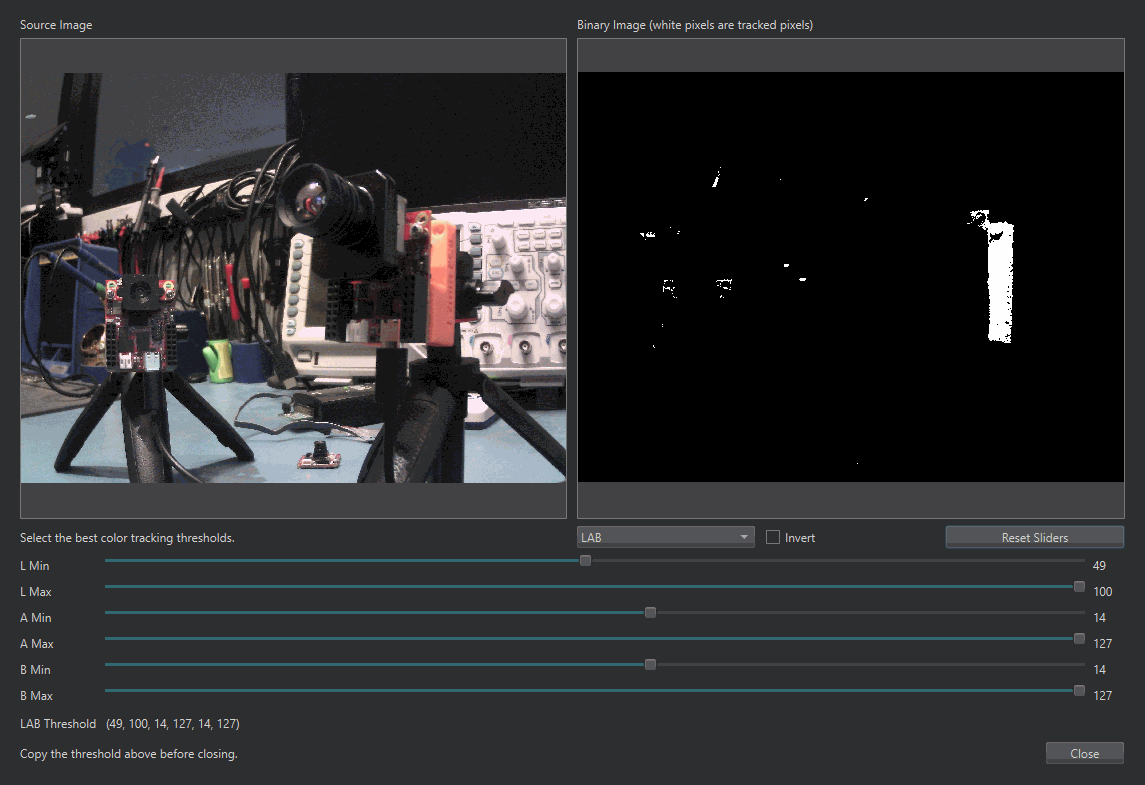
The threshold editor mid-tune: the binary preview on the right shows what the threshold tuple at the bottom currently tracks.#
The editor opens against either the live frame buffer or an image file from disk. It shows the source image and a binary preview side by side – white pixels in the preview are the pixels the current threshold tracks – with a min and max slider per channel underneath. Choose grayscale or LAB with the selector, drag the sliders until the binary preview isolates the target, and copy the threshold tuple from the output field into your script. An Invert checkbox flips the selection, and Reset Sliders starts over from wide-open.
The practical procedure: point the camera at the real scene under the real lighting, run a script so the frame buffer holds a representative frame, open the editor on the frame buffer, and narrow each channel in turn – usually A and B first for a coloured target, then L last and as loosely as possible, since lighting moves L far more than it moves A and B.
13.1.17.1. Editing a tuple in place#
The editor is also wired into the script editor. Select an existing threshold tuple in a script – (30, 100, 15, 127, 15, 127) or a grayscale pair – right-click it, and choose the threshold-editor entry from the context menu. The editor opens preloaded with those values and, when you click OK, writes the adjusted numbers back over the selection (Cancel discards them). Retuning a deployed script for new lighting is a quick job done this way.