
 OpenMV MicroPython
 13.8.3. Labelling the images#
An object detector learns from examples that are labelled: each training image needs a box around every target object, tagged with its class. Labelling hundreds of frames by hand is slow, so Roboflow automates it.
13.8.3.1. Auto Label#
On the Annotate page, Auto Label drives a text-prompted foundation model: you describe each class in words and it finds and boxes those objects across the whole batch. Add a class per thing you want to detect – stuffed raccoon toy, and person to teach the model what to ignore – preview the result on a few test images, and adjust each class’s confidence threshold until the boxes land where they should.
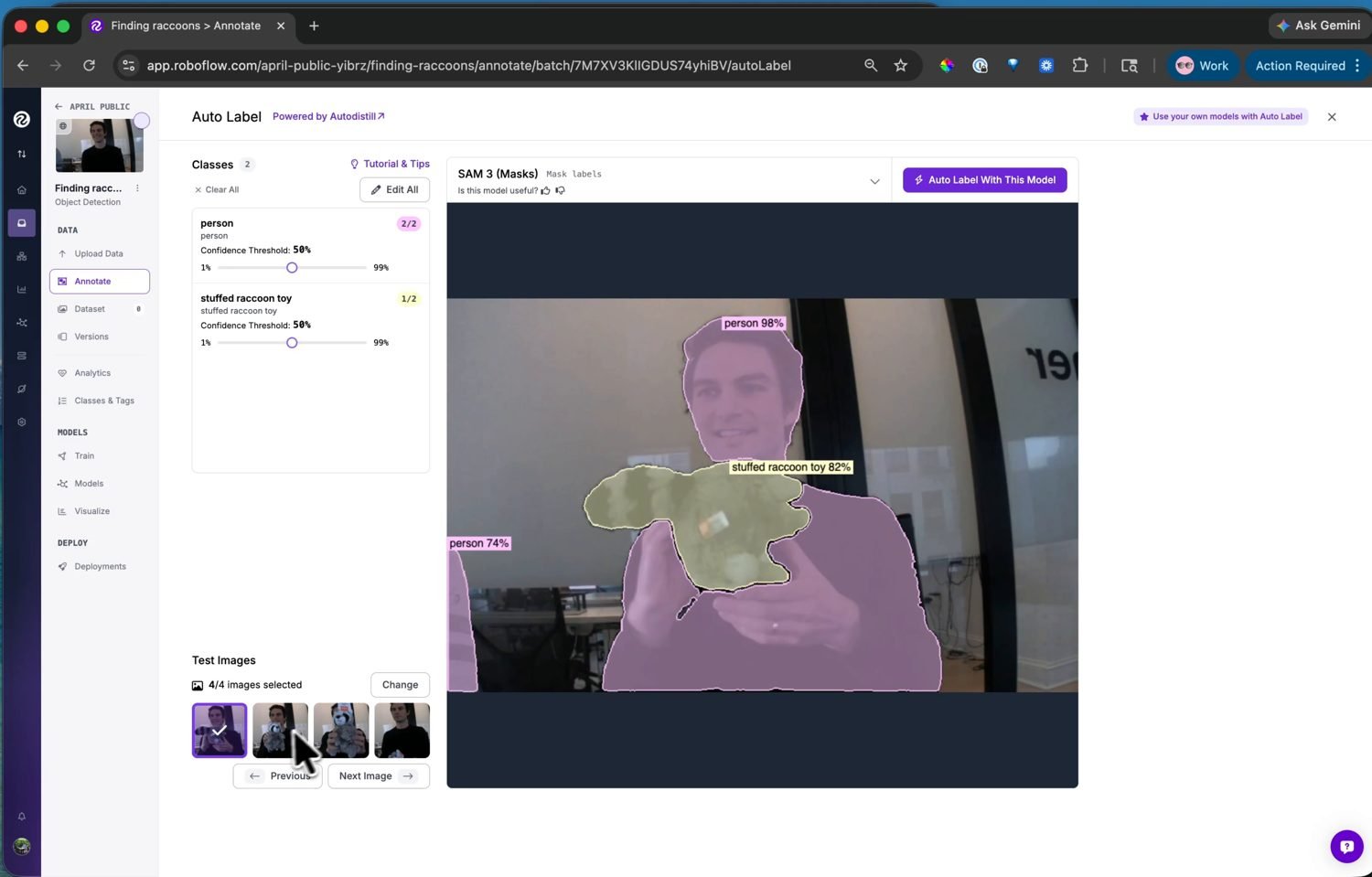
Auto Label finds the classes from text prompts and labels the batch – preview and tune the thresholds before running it on every image.#
Run it on the batch, then review: scan the labelled images, fix the few the model got wrong, and delete boxes it invented. Auto Label does the bulk work; the review pass catches its mistakes.
13.8.3.2. Adding to the dataset#
Labelled images move into the dataset with a train / valid / test split. The split is how the model’s accuracy is measured: it trains on the training images, tunes against the validation set, and is scored on the test images it never saw during training. The default split works – accept it and the dataset is ready to train.