
 OpenMV MicroPython
 10. Web Servers#
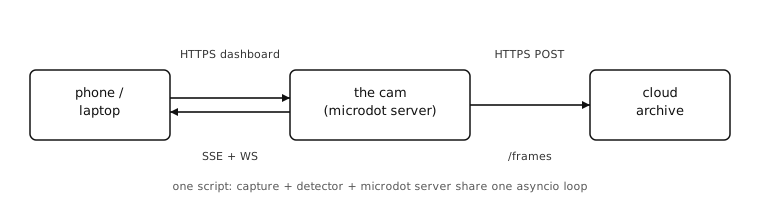
The networking chapters got the cam onto the network and gave it sockets to talk through (Networking). What now? Most camera applications boil down to two things – expose what the cam sees to the world and react to what other things on the network say. HTTP is how that conversation happens, and it works in both directions:
As a server, the cam answers requests from phones, browsers, and other devices on the network. The
microdotframework is the cam’s server.As a client, the cam reaches out to cloud services to upload, fetch, or coordinate. The
requestsmodule is the cam’s client.
Across the next 14 chapters we’ll build one running camera application that exercises both.
A backyard motion-trigger cam sits on a pole in the yard, sees what’s going on, and tells the owner about anything interesting. We’ll grow the cam from a one-route “I’m alive” server into a shippable thing: live preview to the owner’s phone, a dashboard with a threshold slider and an event log, push notifications when motion fires, login, HTTPS, and a cloud archive of every triggered frame.
Each chapter adds one feature. Code samples assume the earlier chapters are in place – we don’t re-paste the whole script every time.
- 10.1. Your first endpoint
- 10.2. Returning a snapshot
- 10.3. Live streaming – one viewer
- 10.4. Sharing one capture loop across viewers
- 10.5. A control API for the cam
- 10.6. Building the dashboard
- 10.7. Pushing events to the dashboard
- 10.8. Two-way control with WebSockets
- 10.9. Auth for programmatic clients
- 10.10. Login for the dashboard
- 10.11. HTTPS – transport encryption for the server
- 10.12. CORS and CSRF
- 10.13. Uploading triggered frames to the cloud
- 10.14. Wrap up