
 OpenMV MicroPython
 12. Host Protocol#
Every OpenMV cam ships with a protocol stack that exposes the camera as a set of named data channels to a host program. The host program might be a Python script on the developer’s laptop, a desktop GUI, another cam on the other end of a UART, or a service running on a workstation watching a fleet of cameras. The cam doesn’t care which – the same framing, the same reliability machinery, the same channel abstraction works for all of them.
This is the answer to two questions that come up constantly once a cam project leaves the IDE:
“How do I get a live view of what the cam sees into a custom GUI on my laptop?”
“How do I let an operator change a threshold or pick a region of interest at runtime, without reflashing?”
The protocol module on the cam side and the openmv-python package on the host side answer both questions, by letting a Python class on the cam expose a channel that a Python class on the host can read from, write to, and react to events on, all over a single USB or serial connection.
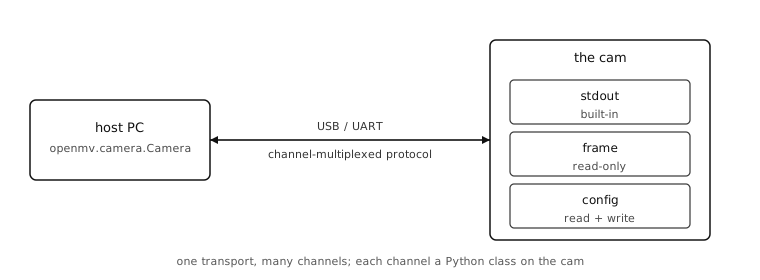
The chapter teaches both sides. The cam-side code shows how to register channels and feed them; the host-side code shows how to connect, list the channels, pull data, and push commands back. Real tools that ship in the openmv-projects/tools/ directory use exactly the patterns shown here.
Often, though, no host code is needed at all. OpenMV IDE is itself a host: register a protocol.CBORChannel of named readings and controls and the IDE’s Channels view shows them live as labels, switches, sliders, graphs, and depth maps, and sends the operator’s changes back to the script. Widgets and telemetry with CBORChannel is that fast path; the rest of the chapter is what it is built on, for when a project needs its own host.
Framing
Wrap up