
 OpenMV MicroPython
 12.8. Widgets and telemetry with CBORChannel#
The backends on the previous two pages move raw bytes, and a raw byte channel needs a host program that knows how to decode them. Most of the time what a cam wants to publish is simpler than that: a few named readings, a few named controls, a waveform, a depth map. For that case the protocol package ships protocol.CBORChannel, a ready-made backend that holds named fields, serialises them as CBOR records in the SenML layout, and decodes host writes back into field values. Its payoff is that OpenMV IDE already understands it: register a CBORChannel and the IDE’s Channels view renders every field as a live widget – labels, switches, sliders, graphs, maps – with no host code at all. The same records are plain CBOR, so a custom host decodes them with any CBOR library when you outgrow the IDE.
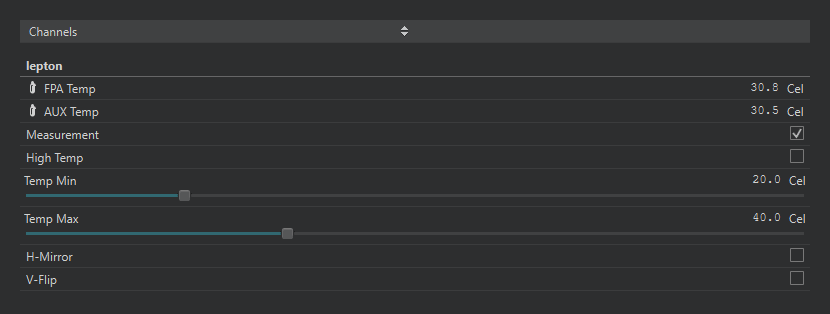
The controls_channel.py example’s channel as the IDE renders it: readouts, toggles, and sliders for a FLIR Lepton. Every control writes back to the script.#
12.8.1. Readouts and controls#
A CBORChannel is a dictionary of typed fields. add declares each one with a name, a widget type, and the arguments that type needs; assigning to ch["name"] updates a field; the on_write callback receives the host’s changes:
import time
import protocol
from protocol import CBORChannel

def on_write(ch, name, value):
    # Called for every control the host changes.
    print(name, "=", value)
    if name == "Reset":
        ch["Count"] = 0

ch = CBORChannel(on_write=on_write)
ch.add("Status", type="label", value="starting")
ch.add("Count", type="label", value=0)
ch.add("Enable", type="toggle", value=True)
ch.add("Threshold", type="slider", min=0, max=100, step=1,
       value=50, unit="%")
ch.add("Gap", type="spinbox", min=0.0, max=15.0, step=0.1,
       value=1.5, unit="mm")
ch.add("Mode", type="radio", options=["Idle", "Track", "Record"],
       value="Idle")
ch.add("Quality", type="select", options=["Low", "Medium", "High"],
       value="Medium")
ch.add("Name", type="lineedit", value="openmv-cam")
ch.add("Reset", type="pushbutton")
protocol.register(name="controls", backend=ch)

count = 0
while True:
    if ch["Enable"]:
        count += 1
        ch["Count"] = count
    ch["Status"] = "threshold %d%%" % ch["Threshold"]
    time.sleep_ms(100)
Run it in the IDE, switch the pane under the frame buffer to Channels, and the widgets appear: a label is a read-only value (with its unit beside it), text is a block of static rich text, a toggle is a switch, slider and spinbox set a number within min / max / step (the spin box for precise entry), radio and select pick one of options, lineedit is a free-text field, and pushbutton is a momentary action that calls on_write with True. The script reads its controls back with ch["Threshold"] whenever it likes – the channel holds the latest value – and on_write is the hook for the ones that need an immediate reaction. A (min, max, value) tuple assigned to a slider or spin box moves its range along with its value, which is how a control tracks a sensor whose limits depend on another setting.
The optional on_read(channel) callback runs just before the channel is serialised for the host – the place to sample a sensor into a label so a reading is only taken when someone is looking:
def on_read(ch):
    ch["FPA Temp"] = round(csi0.ioctl(csi.IOCTL_LEPTON_GET_FPA_TEMP), 1)
The controls_channel.py example under File → Examples → 12-Protocol uses exactly this shape to expose a FLIR Lepton’s measurement mode, temperature range, and mirror / flip settings while the camera streams.
12.8.2. Waveforms#
A waveform field carries a block of samples with a sample rate. The samples are the raw bytes of an array in the field’s typecode (unsigned 16-bit by default); for several signals at once – the three axes of an accelerometer – interleave them and say how many series there are and what to call them:
import math
import time
import protocol
from array import array
from protocol import CBORChannel

RATE = 1000           # samples per second
CHUNK = 100           # samples per update (100 ms)

ch = CBORChannel()
ch.add("Mic", type="waveform", sample_rate=RATE,
       min=0, max=65535)                           # uint16
ch.add("IMU", type="waveform", sample_rate=RATE, series=3,
       typecode="f", min=-2.0, max=2.0,
       options=["X", "Y", "Z"], unit="g")          # float32 x 3
protocol.register(name="signals", backend=ch)

t = 0
while True:
    mic = array("H", (int(32768 + 20000 * math.sin(2 * math.pi * 50 * (t + i) / RATE))
                      for i in range(CHUNK)))
    imu = array("f")
    for i in range(CHUNK):
        phase = 2 * math.pi * 2 * (t + i) / RATE
        imu.extend((math.sin(phase), math.cos(phase), 1.0))
    ch["Mic"] = bytes(mic)    # the raw sample bytes
    ch["IMU"] = bytes(imu)
    t += CHUNK
    time.sleep_ms(100)
The IDE plots each waveform as a scrolling graph with one trace per series, timestamps each chunk so gaps between updates show as gaps, and offers a spectrum view, triggers, markers, and recording to CSV, WAV, NumPy, or Edge Impulse files. Replace the synthetic sine with audio samples or an IMU driver’s readings and the script is a data-collection tool.
12.8.3. Depth maps#
A depth field is a width x height grid of 32-bit floats, one distance per cell – what a time-of-flight sensor produces. min / max declare the range the host should map to colour; the IDE can also range the colours automatically from the data:
import struct
import time
import tof
import protocol
from protocol import CBORChannel

tof.init()
ch = CBORChannel()
ch.add("depth", type="depth", width=tof.width(), height=tof.height(),
       min=0, max=1000)
reg = protocol.register(name="ToF", backend=ch)

while True:
    try:
        d, dmin, dmax = tof.read_depth(vflip=True, hmirror=True)
    except RuntimeError:
        continue
    ch["depth"] = struct.pack("<%df" % len(d), *d)
    reg.send_event(0xFFFF)
    time.sleep_ms(50)
The sensors_channel.py example pairs a depth channel like this with a readings channel and a face detector on the same camera. The send_event() call is optional – the IDE polls channels on its own – but it tells an event-driven host that a new frame is ready without it having to ask.
12.8.4. Decoding on a custom host#
The records are standard CBOR: each channel read returns an array of maps keyed by SenML’s integer keys (0 name, 1 unit, 2 numeric value, 3 string value, 8 data value, and negative keys for the widget type, options, range, and dimensions). A host that has outgrown the IDE reads the channel with channel_read() and decodes it with any CBOR library (pip install cbor2); writing a control back is a CBOR array of {0: name, 2: value} maps sent with channel_write(). The protocol.CBORChannel reference lists every key. For most projects, though, the IDE’s Channels view is the host, and the only code is the cam-side script above.