
 OpenMV MicroPython
2.6. 文本与字节
Python 有两种用于原始字符数据的序列类型:
str—— Unicode 码点的序列。用于所有人类可读的文本:文件路径、日志消息、JSON 负载。bytes—— 取值范围在 0 到 255 之间的整数序列。用于原始二进制数据:UART 帧、图像缓冲区、网络数据包、寄存器值。
二者不经过显式转换无法混用。将 str 传给硬件的 write 方法会引发 TypeError,反过来也同样会被拒绝。
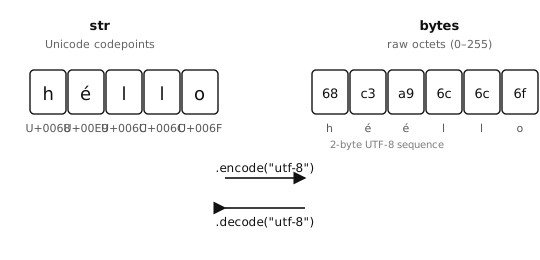
str 存储 Unicode 字符;bytes 存储原始字节。在二者之间转换分别是编码(str → bytes)和解码(bytes → str)。
2.6.1. bytes 字面量
bytes 字面量是一个带 b 前缀的类字符串字面量:
header  = b"OMV"
crlf    = b"\r\n"
payload = b"\x01\x02\x03"
bytes 字面量中只允许直接出现 ASCII 字符;非 ASCII 值必须写成 \xHH 十六进制转义。
2.6.2. 编码与解码
str.encode()使用某个命名编码(默认为"utf-8")将字符串转换为字节。bytes.decode()则执行相反的操作。
>>> "hello".encode()
b'hello'
>>> "héllo".encode()
b'h\xc3\xa9llo'              # é is two bytes in UTF-8
>>> b"hello".decode()
'hello'
UTF-8 是默认编码,对于任何可能包含非 ASCII 字符的内容都是正确选择。只有在确保数据是纯 ASCII 时才使用 "ascii";这样一来,意外出现的非 ASCII 字节会引发 UnicodeError,而不是悄无声息地通过。
2.6.3. 索引与切片
对 bytes 值进行索引时,它的行为像是一个整数序列,而不是单字节字符串的序列:
>>> data = b"abc"
>>> data[0]
97                           # the int 97, not 'a'
>>> data[0:1]
b'a'                         # slicing returns bytes
一个常见的错误是比较 data[0] == "a" 却惊讶地发现结果是 False——data[0] 是一个整数,而不是单字符字符串,因此这两个值永远不可能相等。
2.6.4. ord 与 chr —— 在字符和整数之间架桥
由于对 bytes 索引会返回一个整数,而程序的其余部分很可能是以字符来思考的,因此 Python 提供了两个内建函数用于在二者之间转换:
>>> ord("a")
97
>>> chr(97)
'a'
>>> ord("A"), chr(0x41)
(65, 'A')
对于 ASCII 字符,码点等于字节值,所以 ord("a") 和 b"a"[0] 都得到 97。这使得字节比较能够以你真正关心的字符形式来阅读:
>>> data = b"abc"
>>> data[0] == ord("a")          # instead of the magic number 97
True
而当你想看到某个字节的可打印形式时,chr() 在记录日志或调试时很方便:
>>> chr(data[0])
'a'
对于非 ASCII 字符,ord() 返回的是 Unicode 码点,它与编码形式中的任何单个字节都不相同;字节表示取决于所用的编码。
2.6.5. 用 bytearray 表示可变缓冲区
bytes 是不可变的——每一次“修改”都会返回一个新对象,而原对象保持不变。对于你打算修改、追加或逐段填充的数据,请使用 bytearray。它持有与 bytes 相同的内容,但支持就地修改:
>>> s = b"hello"
>>> s[0] = ord("H")
Traceback (most recent call last):
  File "<stdin>", line 1, in <module>
TypeError: 'bytes' object does not support item assignment

>>> s = bytearray(b"hello")
>>> s[0] = ord("H")
>>> s
bytearray(b'Hello')
2.6.5.1. 创建 bytearray
bytearray 构造函数接受多种输入:
bytearray(8)—— 一个包含 8 个零字节的缓冲区。bytearray(b"hello")—— 某个 bytes 值的可变副本。bytearray("hello", "utf-8")—— 使用给定编码从字符串创建的 bytearray。bytearray([72, 73, 74])—— 从 0 到 255 之间的整数序列创建的 bytearray(此处为b"HIJ")。
>>> bytearray(4)
bytearray(b'\x00\x00\x00\x00')
>>> bytearray(b"abc")
bytearray(b'abc')
>>> bytearray("café", "utf-8")
bytearray(b'caf\xc3\xa9')
2.6.5.2. 修改 bytearray
索引赋值和切片赋值的工作方式与 list 完全一样:
>>> buf = bytearray(8)        # 8 zero bytes
>>> buf[0] = 0xFF             # one byte at a time
>>> buf[1:4] = b"ABC"         # replace a slice
>>> buf
bytearray(b'\xffABC\x00\x00\x00\x00')
单个字节必须是 0 到 255 之间的整数;赋以任何其他类型都会引发 TypeError 或 ValueError。
切片赋值可以改变缓冲区的长度。用更长的值替换某个切片会使 bytearray 增长;用更短的值替换则会使其缩短。用 b"" 替换则会完全删除该切片:
>>> buf = bytearray(b"abcdef")
>>> buf[1:3] = b"XYZ"         # 2 bytes replaced with 3
>>> buf
bytearray(b'aXYZdef')
>>> buf[1:4] = b""            # delete the inserted run
>>> buf
bytearray(b'adef')
bytearray.append() 和 bytearray.extend() 方法在末尾添加字节,而无需每次都重新分配整个缓冲区:
>>> buf = bytearray()
>>> buf.append(0x01)
>>> buf.extend(b"abc")
>>> buf
bytearray(b'\x01abc')
2.6.5.3. 从 bytearray 读取
索引、切片、迭代以及 bytes 的检视方法(bytes.startswith()、bytes.find()、bytes.strip() 等)的行为都与在 bytes 值上完全相同。索引返回一个整数;切片返回另一个 bytearray:
>>> buf = bytearray(b"OpenMV")
>>> buf[0]
79
>>> buf[0:4]
bytearray(b'Open')
>>> buf.startswith(b"Open")
True
2.6.5.4. 在 bytes 和 bytearray 之间转换
bytes 和 bytearray 可以用各自的构造函数相互转换。当某个 API 明确要求其中一种形式时使用此方法:
>>> ba = bytearray(b"hello")
>>> snapshot = bytes(ba)      # immutable copy
>>> ba[0] = ord("H")
>>> ba, snapshot
(bytearray(b'Hello'), b'hello')
2.6.5.5. 用 memoryview 实现零拷贝切片
对 bytes 或 bytearray 切片通常会把字节拷贝到一个新缓冲区中。memoryview 则在不拷贝的情况下暴露同一份字节:
>>> buf = bytearray(b"OpenMV Cam")
>>> view = memoryview(buf)
>>> view[0:6]                 # shares storage with buf
<memoryview ...>
>>> bytes(view[0:6])          # materialise as bytes when needed
b'OpenMV'
对 bytearray 的视图也是可写的——修改视图就会修改底层缓冲区:
>>> view[0] = ord("o")
>>> buf
bytearray(b'openMV Cam')
当拷贝一个切片会造成浪费时——通常是同一个大缓冲区被到处传递或分段处理时——就该使用 memoryview。对于在小段字节上进行的日常字符串式操作,普通切片就足够了。