
 OpenMV MicroPython
2.6. 文字與位元組
Python 有兩種用於原始字元資料的序列型別:
str—— 一連串 Unicode 碼位。用於所有人類可讀的文字:檔案路徑、日誌訊息、JSON 酬載。bytes—— 一連串範圍在 0 到 255 之間的整數。用於原始二進位資料:UART 影格、影像緩衝區、網路封包、暫存器值。
若不進行明確轉換,兩者不能混用。將 str 傳給硬體的 write 方法會引發 TypeError,反向亦會被拒絕。
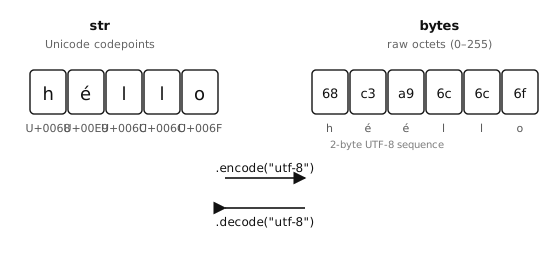
str 儲存 Unicode 字元;bytes 儲存原始八位元組。在兩者之間轉換即為 編碼(str → bytes)與 解碼(bytes → str)。
2.6.1. bytes 字面值
bytes 字面值是一個前綴 b 的類字串字面值:
header  = b"OMV"
crlf    = b"\r\n"
payload = b"\x01\x02\x03"
在 bytes 字面值內只允許直接使用 ASCII 字元;非 ASCII 的值必須以 \xHH 十六進位跳脫的形式寫出。
2.6.2. 編碼與解碼
str.encode()使用具名編碼(預設為"utf-8")將字串轉換為 bytes。bytes.decode()則執行相反的操作。
>>> "hello".encode()
b'hello'
>>> "héllo".encode()
b'h\xc3\xa9llo'              # é is two bytes in UTF-8
>>> b"hello".decode()
'hello'
UTF-8 是預設值,也是任何可能包含非 ASCII 字元之資料的正確選擇。只有在資料保證為純 ASCII 時才使用 "ascii";如此一來,一個失控的非 ASCII 位元組就會引發 UnicodeError,而不會默默通過。
2.6.3. 索引與切片
bytes 值在被索引時的行為像是一連串整數,而非一連串單位元組字串:
>>> data = b"abc"
>>> data[0]
97                           # the int 97, not 'a'
>>> data[0:1]
b'a'                         # slicing returns bytes
一個常見的錯誤是比較 data[0] == "a" 並驚訝於它是 False——data[0] 是整數,而非單一字元字串,因此兩值永遠不會相符。
2.6.4. ord 與 chr —— 銜接字元與整數
由於對 bytes 索引會回傳整數,但程式的其餘部分多半以字元思考,Python 提供了兩個內建函式來在兩者之間轉換:
>>> ord("a")
97
>>> chr(97)
'a'
>>> ord("A"), chr(0x41)
(65, 'A')
對 ASCII 字元而言,碼位等於位元組值,因此 ord("a") 與 b"a"[0] 都會得到 97。這使得位元組比較能以你真正關心的字元來閱讀:
>>> data = b"abc"
>>> data[0] == ord("a")          # instead of the magic number 97
True
而 chr() 在你想看到位元組可列印形式以進行日誌記錄或除錯時相當方便:
>>> chr(data[0])
'a'
對非 ASCII 字元而言,ord() 會回傳 Unicode 碼位,這與編碼形式中的任何單一位元組都不同;其位元組表示法取決於編碼。
2.6.5. 用於可變緩衝區的 bytearray
bytes 是不可變的——每次「修改」都會回傳一個新物件,而原物件保持不變。對於你打算修改、附加或逐片填入的資料,請使用 bytearray。它與 bytes 持有相同的內容,但支援就地變更:
>>> s = b"hello"
>>> s[0] = ord("H")
Traceback (most recent call last):
  File "<stdin>", line 1, in <module>
TypeError: 'bytes' object does not support item assignment

>>> s = bytearray(b"hello")
>>> s[0] = ord("H")
>>> s
bytearray(b'Hello')
2.6.5.1. 建立 bytearray
bytearray 建構式接受數種輸入:
bytearray(8)—— 一個由 8 個零位元組組成的緩衝區。bytearray(b"hello")—— 一個 bytes 值的可變副本。bytearray("hello", "utf-8")—— 使用指定編碼從字串建立的 bytearray。bytearray([72, 73, 74])—— 從一連串 0 到 255 的整數建立的 bytearray(此處為b"HIJ")。
>>> bytearray(4)
bytearray(b'\x00\x00\x00\x00')
>>> bytearray(b"abc")
bytearray(b'abc')
>>> bytearray("café", "utf-8")
bytearray(b'caf\xc3\xa9')
2.6.5.2. 修改 bytearray
索引與切片賦值的運作方式與 list 完全相同:
>>> buf = bytearray(8)        # 8 zero bytes
>>> buf[0] = 0xFF             # one byte at a time
>>> buf[1:4] = b"ABC"         # replace a slice
>>> buf
bytearray(b'\xffABC\x00\x00\x00\x00')
個別位元組必須是 0 到 255 的整數;指派任何其他型別都會引發 TypeError 或 ValueError。
切片賦值可以改變緩衝區的長度。以較長的值取代切片會使 bytearray 變大;以較短的值取代則會使其縮小。以 b"" 取代會完全刪除該切片:
>>> buf = bytearray(b"abcdef")
>>> buf[1:3] = b"XYZ"         # 2 bytes replaced with 3
>>> buf
bytearray(b'aXYZdef')
>>> buf[1:4] = b""            # delete the inserted run
>>> buf
bytearray(b'adef')
bytearray.append() 與 bytearray.extend() 方法可在尾端加入位元組,而不必每次都重新配置整個緩衝區:
>>> buf = bytearray()
>>> buf.append(0x01)
>>> buf.extend(b"abc")
>>> buf
bytearray(b'\x01abc')
2.6.5.3. 從 bytearray 讀取
索引、切片、迭代,以及 bytes 的檢視方法(bytes.startswith()、bytes.find()、bytes.strip() 等)的運作方式都與在 bytes 值上相同。索引會回傳整數;切片則回傳另一個 bytearray:
>>> buf = bytearray(b"OpenMV")
>>> buf[0]
79
>>> buf[0:4]
bytearray(b'Open')
>>> buf.startswith(b"Open")
True
2.6.5.4. 在 bytes 與 bytearray 之間轉換
bytes 與 bytearray 可透過各自的建構式互相轉換。當某個 API 明確要求其中一種形式時,請使用此方式:
>>> ba = bytearray(b"hello")
>>> snapshot = bytes(ba)      # immutable copy
>>> ba[0] = ord("H")
>>> ba, snapshot
(bytearray(b'Hello'), b'hello')
2.6.5.5. 用於零複製切片的 memoryview
對 bytes 或 bytearray 切片通常會將位元組複製到一個新緩衝區。memoryview 則能 不經複製 地公開相同的位元組:
>>> buf = bytearray(b"OpenMV Cam")
>>> view = memoryview(buf)
>>> view[0:6]                 # shares storage with buf
<memoryview ...>
>>> bytes(view[0:6])          # materialise as bytes when needed
b'OpenMV'
對 bytearray 的檢視(view)也是可寫入的——變更該檢視會變更其底層緩衝區:
>>> view[0] = ord("o")
>>> buf
bytearray(b'openMV Cam')
當複製切片會造成浪費時,就應採用 memoryview——通常是在同一個大型緩衝區被四處傳遞或分段處理時。對於小型 bytes 上的日常字串式作業,普通切片就已足夠。