
 OpenMV MicroPython
14.4. Advertising and scanning
Two BLE devices that have never met before have to find each other first. Networking solves that by handing every device an address out of a shared pool and letting either side reach the other through routers. BLE has no routers, no shared pool, and – between most pairs of devices – no prior relationship at all. The Generic Access Profile (GAP) solves discovery with a broadcast-and-listen pattern instead. One side advertises – it transmits a short packet on the three advertising channels at a regular interval, describing who it is. The other side scans – it sweeps the same three channels listening for those packets.
GAP defines four roles around that pattern, each one a specific combination of advertising and listening.
14.4.1. The four GAP roles
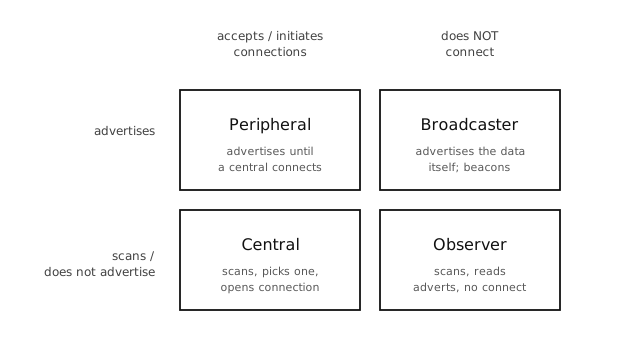
The four GAP roles. The vertical axis is whether the device advertises; the horizontal axis is whether it accepts (or initiates) connections.
A peripheral advertises packets that say “I’m here and you can connect to me”. When another device opens a connection, the peripheral stops advertising and starts serving GATT requests. Heart-rate straps, thermometers, and most cameras-as-sensors act as peripherals.
A central scans for peripherals, picks one, and initiates a connection. After connecting it speaks GATT as a client. Phones, laptops, and cameras acting as data collectors are centrals.
A broadcaster advertises but never accepts connections. Its advertising payload is the data – there is nothing to connect to. iBeacons and most store-presence beacons are broadcasters.
An observer scans for those advertisements and reads the payload, again without ever connecting. A camera that listens for nearby beacons and acts on what it hears is an observer.
A single device can play more than one role at the same time – a camera can be a peripheral that publishes its own state and a central that connects to a nearby sensor. The radio multiplexes the work.
14.4.2. What an advertising packet contains
An advertising packet is small: 31 bytes of payload, or 62 if the advertiser also publishes a scan response that scanners can request on the fly. The payload is a list of short typed fields:
Flags. Connectable or not, general / limited discoverable.
Local name. A short, human-friendly string – the name the operating system on a phone or laptop shows in its Bluetooth menu.
Service UUIDs. A list of GATT service identifiers the device hosts, so a scanner can recognise capable peripherals without connecting first. A heart-rate strap advertises
0x180D– the standard Heart-Rate service UUID – and a heart-rate app on the phone knows from that alone that the device is worth connecting to.Appearance. A 16-bit value from the Bluetooth assigned-numbers list (sensor, generic media, generic watch, …) – a hint to the central about what to display.
Manufacturer-specific data. Free-form bytes prefixed with a company ID. iBeacons use this field to carry their UUID, major, and minor; custom applications can put anything they like in here.
Advertising payloads are tight. The 31-byte limit makes
choosing what to include a real design decision – a
long human-readable name can quickly leave no room for
service UUIDs. The aioble.advertise() API takes
each of these as a keyword argument and assembles the
bytes for you, overflowing into the scan response
automatically if the main packet fills up.
14.4.3. Active and passive scanning
A scanner can run passive, where it listens for advertising packets and parses what arrives, or active, where it also sends a scan request to each advertiser and parses the scan response that comes back.
Passive scanning sees only the initial advertising packet (up to 31 bytes). Active scanning doubles that – the scan response is another 31 bytes the peripheral can use for fields that did not fit. Active scanning also costs power on both sides, since the scanner transmits and the advertiser transmits an extra packet, so it is a choice rather than a default.
In the aioble API, active=True on
aioble.scan() switches the mode, and each
ScanResult exposes the combined adv_data plus
resp_data as well as helpers like
result.name() and result.services() that hide
the byte-level parsing.
Note
The adv_data and
resp_data attributes are
the raw advertising and scan-response payloads
(bytes). The helpers –
name(),
services(),
manufacturer() – cover
the common standard fields and are the right
choice 99% of the time. Reach for the raw bytes
only when you need a vendor field the helpers do
not parse (Eddystone URLs, iBeacon UUID/major/
minor, custom advertising types). The byte layout
is the standard TLV one: each field is
length, type, value....
14.4.4. The advertising interval
How often the peripheral broadcasts is a power / discovery-latency trade-off. Adverts that go out every 20 ms get picked up almost immediately by a scanner but keep the radio busy and drain the battery; adverts every second use almost no power but make a scanner sweep slower to notice the device.
interval_us on aioble.advertise() sets the
interval in microseconds:
20,000 to 100,000 us (20 ms - 100 ms) – fast pairing, app expects a quick response, plugged-in device.
250,000 to 1,000,000 us (250 ms - 1 s) – a reasonable default for a battery-powered peripheral that wants to be discoverable without burning charge.
Above 1,000,000 us – slow background broadcast, beacons that send a position update every few seconds.
The scanner side has its own knobs –
aioble.scan() takes interval_us and
window_us (how often the scanner wakes up its radio
and how long it listens each time). The defaults are
fine; the only common change is to set both equal for a
continuous scan when battery is not a concern.
14.4.5. Connectionless patterns – broadcaster and observer
The pages on Acting as a peripheral and Acting as a central work through the connectable shape of the API – where a peripheral accepts a connection and the two sides exchange data through GATT. The other shape is connectionless: a broadcaster transmits payload-as- advertisement, and any observer in range can read it without ever connecting. Beacons, presence sensors, and one-way telemetry all live here.
A broadcaster is aioble.advertise() with
connectable=False. Manufacturer-specific data
carries the payload:
import aioble
import asyncio
import struct

_COMPANY_ID = const(0xFFFF)                # 0xFFFF is "no specific vendor"

async def beacon():
    seq = 0
    while True:
        seq = (seq + 1) & 0xFFFF
        payload = struct.pack("<H", seq)
        await aioble.advertise(
            interval_us=500000,
            connectable=False,
            name="openmv-beacon",
            manufacturer=(_COMPANY_ID, payload),
            timeout_ms=1000,                # one cycle, then loop
        )

asyncio.run(beacon())
The timeout_ms keyword ends the advertise call
after a second; the outer loop reissues it with the
next sequence number so listeners see fresh data. The
connectable=False flag is what makes the
advertisement broadcaster-style – the cam will not
respond to a connect request even if one arrives.
An observer is the matching read-only scanner. It runs
aioble.scan() forever, parses incoming
advertisements, and never calls
connect():
import aioble
import asyncio

_COMPANY_ID = const(0xFFFF)

async def watch():
    async with aioble.scan(duration_ms=0, active=False) as scanner:
        async for result in scanner:
            for company, data in result.manufacturer(filter=_COMPANY_ID):
                print(result.device.addr_hex(),
                      "rssi", result.rssi, "data", data)

asyncio.run(watch())
duration_ms=0 scans until the context manager
exits; active=False keeps the observer’s own radio
silent (no scan-response requests) for the lowest power
draw. The filter= argument on
manufacturer() discards every
advertisement that does not match the company ID, so
the loop only fires for the broadcaster’s traffic.
14.4.6. From discovery to a connection
Once a central picks a peripheral to talk to, it stops listening, sends a connect request on the advertising channel the peripheral last used, and both sides drop into the hopping data channels of the link layer. The peripheral typically stops advertising at this point. What happens next – connection parameters, GATT discovery, the lifetime of the link – is on Connections.