
 OpenMV MicroPython
14.7. GATT operations
A characteristic just sits in the GATT database as a named value. What makes it useful is the small, well-defined set of operations a client can run on it. Each characteristic declares which operations it supports as a property bitmask – a server that has nothing to expose can publish a read-only value, a control register might be write-only, a sensor that streams updates would set the notify bit. The client discovers the bitmask during discovery and respects it.
The five operations are read, write, write without response, notify, and indicate. They split into two groups – pull (the client asks) and push (the server sends).
14.7.1. Pull: read and write
These two are the simplest and look exactly like function calls.
Read. The client asks for the current value, the server sends it back. One round trip, the client gets whatever bytes the server has set for that characteristic, the server gets nothing about who read.
Write. The client sends new bytes, the server stores them (and optionally runs application logic on the new value). Two flavours exist:
Write with response – the server acknowledges, raising any application error on a non-zero status. Reliable, one round trip.
Write without response – the server stores the bytes silently; the client gets no acknowledgement at all. Faster (no round trip waiting on the ack) and useful for streaming, at the cost of finding out about errors only via side-channel readback.
In aioble, the client-side API hides the choice
behind a single aioble.ClientCharacteristic.write()
method with a response keyword (True /
False / None to auto-select based on what the
peer advertises).
14.7.2. Push: notify and indicate
The pull model is wrong for sensor data. A heart-rate strap that the phone has to poll every second would burn battery on a hundred unnecessary radio events; one that pushes a value only when it has a new reading is the point of BLE in the first place.
GATT solves this with server-initiated operations. The client subscribes to a characteristic; from that point on, every time the server updates the value, the new value is pushed across the link to the client. Two flavours:
Notify. Fire-and-forget. The server queues a notification, the link layer transmits it during the next connection event, the client receives it. There is no acknowledgement at the GATT level; the link layer’s normal retransmission handles loss on the radio side, but the application sees no confirmation that the value was processed.
Indicate. The server sends a notification and waits for the client’s GATT-level confirmation before sending the next one. One indication at a time. Used when the server needs to know the client actually saw the value – a critical-alarm characteristic, a configuration acknowledgement.
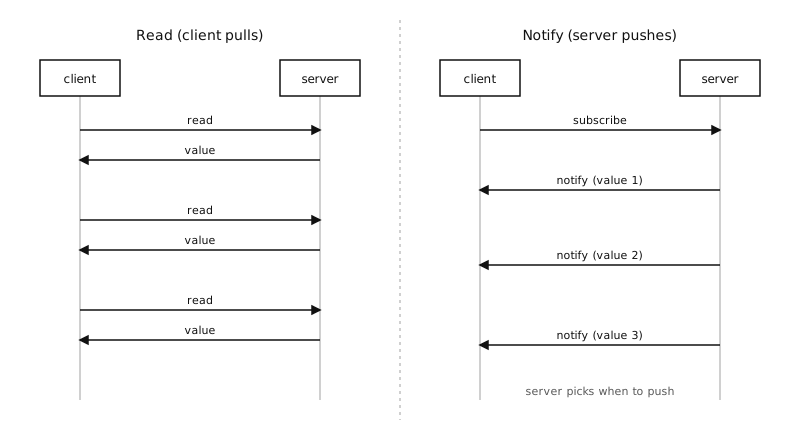
Pull (read) versus push (notify). With notifications, the client subscribes once and the server pushes new values whenever they change.
Subscribing happens by writing to a descriptor attached
to the characteristic – the Client Characteristic
Configuration Descriptor (CCCD, 0x2902). Writing
0x0001 enables notifications, 0x0002 enables
indications, 0x0000 disables both. The
aioble.ClientCharacteristic.subscribe() method
performs the write for you, with notify=True and
indicate=True keyword flags.
Once subscribed, the client waits for incoming pushes
with notified() and
indicated() – both
async coroutines that suspend until the next push
arrives.
14.7.3. The MTU governs payload size
Every operation is constrained by the negotiated
MTU the connection settled on at link-up time. The
default MTU is 23 bytes, which leaves 20 bytes for
characteristic value bytes after the GATT header.
Anything larger than that has to either fit into a
larger MTU (negotiated up via
aioble.DeviceConnection.exchange_mtu(), up to 512
bytes on the camera) or be split into multiple
characteristics or multiple notifications.
Client-initiated reads and writes of values larger than
the MTU are handled by GATT’s long procedures behind
the scenes (Read Long / Prepare-Write + Execute-Write);
aioble runs these transparently, so calling
read() /
write() with an
oversized value just costs more round trips. Server-
initiated notifications and indications are not
fragmented – one push is bounded by the MTU, and the
application splits anything larger into multiple
notifications or steps off GATT entirely.
For genuinely large transfers – a captured frame, a batch of measurements, a firmware blob – the right answer is usually to step off GATT entirely and use an L2CAP channel instead (see L2CAP channels).
14.7.4. The two sides at a glance
The five operations expose differently on each side of the connection:
On the server (the peripheral, in the common layout):
aioble.Characteristic.read()– read the current local value out of the GATT database (the server side of “what would the client see”).aioble.Characteristic.write()– update the local value, optionally pushing the update to every subscribed client.aioble.Characteristic.notify()/indicate()– send a push to one specific client.aioble.Characteristic.written()– await the next incoming write from any client.aioble.Characteristic.on_read()– callback invoked synchronously when a client reads, useful for computing a value on demand.
On the client (the central, in the common layout):
aioble.ClientCharacteristic.read()– ask the server for the current value.aioble.ClientCharacteristic.write()– send a new value, with or without response.aioble.ClientCharacteristic.subscribe()– enable / disable notifications and indications.aioble.ClientCharacteristic.notified()/indicated()– await the next push.