
 OpenMV MicroPython
15.6. Named channels
The channel ID in each packet’s header lets up to 32 independent streams share the same physical transport. The channel layer turns those numeric IDs into named, application-visible endpoints that the host code can refer to by string.
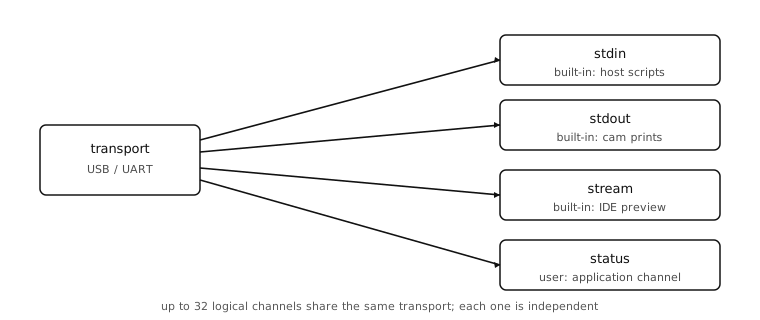
15.6.1. The four built-in channels
The cam registers four channels at boot, before any application code runs:
stdin– script bytes the host pushes to the cam to execute. The IDE uses this channel to send the script being edited;exec()on the host SDK is the equivalent call from a Python program.stdout– bytes from camprint()calls and uncaught exception tracebacks. The IDE’s serial console reads this channel.stream– the live preview channel. The IDE pulls JPEG frames from it; any host script can do the same withread_frame().profile– profiler events, present only when the cam was built with profiling enabled. Most release builds omit it.
Application code rarely needs to touch any of the built-ins; the interesting work happens on channels the application registers itself.
15.6.2. Registering a channel
A cam-side script registers a new channel by calling
protocol.register() with a name and a Python backend object:
import json
import protocol
import time

trigger_count = 0

class StatusChannel:
    def size(self):
        # Refresh the snapshot on every host query.
        self._buf = json.dumps({
            'uptime_s': time.ticks_ms() // 1000,
            'triggers': trigger_count,
        }).encode()
        return len(self._buf)

    def read(self, offset, size):
        return self._buf[offset:offset + size]

protocol.register(name='status', backend=StatusChannel())
The backend object’s methods decide what the channel can do. A
backend with only size and read is a read-only data
channel; add write and it becomes bidirectional; add poll
and the host can ask whether new data is ready before paying for a
read. Sampling the data inside size is the simplest pattern
when the payload is small enough to fit in one fragment – the
buffer is generated on demand, never cached, never raced. Larger
payloads – image frames, sensor traces – need a latching pattern
that holds the buffer until the host finishes its multi-fragment
read, covered with the frame channel.
A small amount of bookkeeping happens automatically:
The library assigns the next free channel ID (between 0 and 31).
The capability flags are derived from the methods present:
CHANNEL_FLAG_READifreadis defined,CHANNEL_FLAG_WRITEifwriteis defined,CHANNEL_FLAG_LOCKiflock/unlockare defined.A
CHANNEL_REGISTEREDevent packet is sent to any connected host so its channel list updates.
The return value is a protocol.ProtocolChannel handle the
application can hold on to. The handle’s
send_event() method is the cam-side
hook for telling the host “something happened on this channel
without changing the readable data” – a trigger fired, a button
was pressed, a sample-count milestone passed.
15.6.3. Reading channels from the host
The host SDK ships as the openmv package on PyPI
(pip install openmv), built on pyserial for the transport.
Its openmv.camera.Camera class exposes the cam’s named
channels through high-level methods:
from openmv.camera import Camera

with Camera('/dev/ttyACM0', baudrate=921600) as cam:
    cam.update_channels()
    if cam.has_channel('status'):
        size = cam.channel_size('status')
        data = cam.channel_read('status', size)
Warning
The openmv package requires CPython 3.12 or newer.
Earlier interpreters lack features the SDK depends on; install
a 3.12+ build before pip install openmv.
A few things to notice about the setup:
The serial-port string –
/dev/ttyACM0here – isCOM3-style on Windows,/dev/cu.usbmodemXXXXon macOS, and/dev/ttyACM*on Linux. The actual number depends on which port the cam enumerated as.The baud rate is the protocol’s magic value
921600, which the cam’s USB-CDC stack recognises as “this client speaks the protocol, not the REPL.” Any other rate falls back to a plain serial line.The
with Camera(...) as cam:context manager opens the transport, runsPROTO_SYNC, exchanges capabilities, and on exit closes the port cleanly. The explicitupdate_channels()call after entry refreshes the local channel list with any channels the application registered after boot.
channel_size() and
channel_read() are the workhorse
methods; channel_write() round-trips a
buffer to the cam if the backend has a write method;
has_channel() is the safe way to check
that a name is registered before using it. The channel name is
looked up once into the channel ID the cam assigned during
register and used in every packet from then on.
Each channel_size() /
channel_read() pair costs two
round-trips: one packet to ask for the size, one to ask for the
bytes. Over USB-CDC both finish in about a millisecond combined;
over UART the same exchange takes longer in proportion to the
serial line’s baud rate. Application code that reads in a tight
loop should call channel_size()
only when the size can actually change – for fixed-size data, the
size from the first call can be cached.
15.6.4. Independence between channels
Three things are worth knowing about how channels interact:
Independent flow control. Each channel has its own pending read state, its own data, and its own
size/read/writecallbacks. A long-running read on thestreamchannel doesn’t block reads on the application’sconfigchannel.Sequential per channel. Within a single channel, packets are delivered in order. The reliability layer guarantees this even when retransmits are involved.
Shared transport, shared retransmit budget. All channels share the one physical link, so a torrent of traffic on one channel slows the others down by hogging the wire. The
CHANNEL_LOCKmechanism lets one channel reserve the wire for an atomic multi-packet read; the backend opts in by implementing thelock/unlockcallbacks.
A channel is the minimum surface area on which a host program and a cam program agree to cooperate. The name, the directionality (read or write or both), the callback methods on the cam side, and the matching method calls on the host side are the entire contract.