
 OpenMV MicroPython
10.4. การแบ่งปัน capture loop หนึ่งข้ามผู้ชมหลายคน
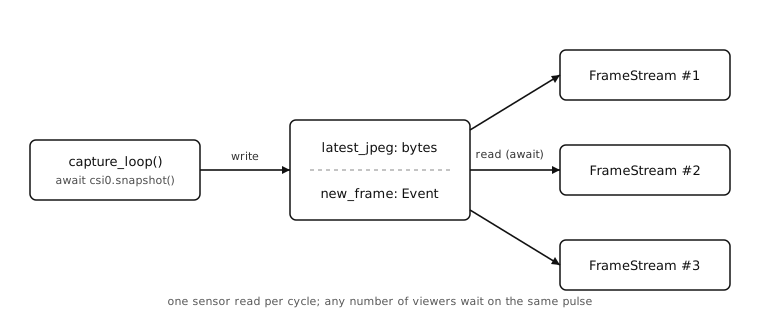
client แต่ละตัวที่เรียก csi0.snapshot() อิสระนั้นสิ้นเปลือง และเมื่อเปิดสองสตรีมพร้อมกันสิ่งต่าง ๆ แย่ลง: เซนเซอร์ส่งเฟรมด้วยอัตราของตัวเอง และทุกการจับภาพซ้ำซ้อนทำให้ทุกคนช้าลง แนวทางที่ถูกต้องคือ coroutine จับภาพหนึ่งตัวที่เผยแพร่ "เฟรมล่าสุด" ไปยัง slot ที่ใช้ร่วมกัน บวกกับ iterator ต่อ client ที่อ่านจาก slot
10.4.1. task การจับภาพ
coroutine พื้นหลังดึงเฟรมเร็วเท่าที่เซนเซอร์ส่ง บีบอัด JPEG แต่ละเฟรมเป็น bytes ที่ใช้ร่วมกัน และส่งสัญญาณ event เพื่อให้ client ที่รอปลุกขึ้น:
latest_jpeg = None
new_frame = asyncio.Event()

async def capture_loop():
    global latest_jpeg
    while True:
        img = await csi0.snapshot()
        latest_jpeg = bytes(img.compress(quality=85).bytearray())
        new_frame.set()
        new_frame.clear()
คู่ set() / clear() คือรูปแบบ pulse set() ปลดล็อก coroutine ทุกตัวที่รอ event อยู่ในขณะนั้นพร้อมกัน clear() รีเซ็ต event ทันทีเพื่อให้ wait() ถัดไปบล็อกอีกครั้ง ด้วยหลาย consumer (ผู้ชม ผู้ชมคนอื่น coroutine ใด ๆ ที่ต้องตอบสนองต่อเฟรมใหม่) ไม่มี consumer คนใดรับผิดชอบในการรีเซ็ต event และไม่มีใครขโมยการปลุกจากคนอื่น
Note
การ wrap bytes(...) รอบ JPEG มีความสำคัญที่นี่ bytearray() ส่งคืน view เข้าสู่บัฟเฟอร์ภาพของกล้อง การเรียก snapshot() ถัดไปจะเขียนทับบัฟเฟอร์นั้นด้วยเฟรมถัดไป latest_jpeg มีอายุยืนนานกว่า img ในท้องถิ่น ดังนั้นหากไม่มีการคัดลอก ผู้อ่านทุกคนจะเห็น slot เปลี่ยนแปลงภายใต้พวกเขาในทุกการจับภาพ
10.4.2. iterator ต่อ client อ่านจาก slot
ตัวจัดการสตรีม MJPEG หยุดเรียก csi0.snapshot() เอง แทนที่นั้น แต่ละอินสแตนซ์ FrameStream รอบน event ที่ใช้ร่วมกันและอ่านจาก bytes ที่ใช้ร่วมกัน:
class FrameStream:
    # One instance per connected client. Each one independently
    # waits on the shared new_frame pulse; the capture loop is
    # responsible for resetting the event between frames.

    def __aiter__(self):
        return self

    async def __anext__(self):
        await new_frame.wait()
        if latest_jpeg is None:
            return b''
        return (b'--' + BOUNDARY + b'\r\n'
                b'Content-Type: image/jpeg\r\n\r\n'
                + latest_jpeg + b'\r\n')
เส้นทาง snapshot เปลี่ยนด้วย: มันไม่กระตุ้นการจับภาพอีกต่อไป แต่ส่งคืนสิ่งที่ latest_jpeg มีอยู่ในขณะนั้น:
@app.get('/snapshot.jpg')
async def snapshot(request):
    if latest_jpeg is None:
        return 'no frame yet', 503
    return Response(
        body=latest_jpeg,
        headers={'Content-Type': 'image/jpeg'},
    )
tuple (body, status) คือชวเลขของ microdot สำหรับการตั้งรหัสสถานะ HTTP โดยไม่ต้องสร้าง microdot.Response 503 หมายความว่า ฉันอยู่ที่นี่แต่ยังไม่พร้อม -- รหัสที่ถูกต้องสำหรับ "ลองอีกครั้งในอีกสักครู่"
10.4.3. การรัน capture ควบคู่กับเซิร์ฟเวอร์
main ตอนนี้มี coroutine ระดับบนสุดสองตัว: capture loop และ HTTP server asyncio.gather() รันทั้งสองพร้อมกัน และหากตัวใดตัวหนึ่งล้มเหลว ตัวอื่นจะถูกยกเลิก:
async def main():
    await asyncio.gather(
        capture_loop(),
        app.start_server(host='0.0.0.0', port=80),
    )

asyncio.run(main())
ตอนนี้เซนเซอร์อ่านหนึ่งเฟรมต่อรอบไม่ว่าจะมีผู้ชมกี่คนเชื่อมต่อ เบราว์เซอร์แรกที่ /stream.jpg เห็นเฟรม ตัวที่สองก็เช่นกัน ตัวที่สาม ตัวที่สิบ -- ทุกคนแบ่งปันการจับภาพเดียวกัน และกล้องยังคงตอบสนองต่อเส้นทางอื่น ๆ ได้ดีเช่นเดิม