
 OpenMV MicroPython
12.17. Encrypted sockets and TLS
Everything covered up to here moves bytes around in the
clear. Any device on the path between the camera and
the server – the home router, the internet service
provider, a malicious access point in a coffee shop –
can in principle read or modify what passes through.
For most internet traffic that is not acceptable. The
standard fix is to wrap the connection in a layer of
encryption: TLS, the Transport Layer Security
protocol. The “HTTPS” lock icon in a browser is TLS
running over TCP, and the same wrapping is what makes
any other internet protocol “secure”. The camera’s
ssl module is what wraps a
socket in TLS.
12.17.1. What TLS adds, and what the cam ships with
TLS sits between TCP and the application – the application writes bytes to a TLS-wrapped socket, TLS encrypts them and hands the result to TCP, and the process is reversed on the other side. In its full form TLS gives three guarantees on top of plain TCP:
Confidentiality. Eavesdroppers on the path cannot read what the two endpoints are exchanging.
Integrity. Any modification of the traffic in transit is detected; the connection breaks rather than delivering tampered data.
Authentication. The server proves it is the named server, not an impostor (and, optionally, the client proves who it is too).
The first two come from the encryption itself. The
third needs certificates on at least one side, plus
something pre-trusted to verify those certificates
against. The OpenMV cam ships with no built-in
certificate store at all: a freshly flashed cam
trusts no certificate authority, has no server
certificate of its own, and the default verify mode
(ssl.CERT_NONE) does not check the peer’s
certificate against anything. So out of the box, TLS
on the cam gives you the first two guarantees –
encryption against eavesdropping and tampering by a
passive observer – but not the third.
12.17.2. Encrypting an outbound connection
The simplest use is wrapping an outbound TCP
connection. The flow is: open a normal TCP socket,
hand it to ssl.wrap_socket(), then read and
write through the wrapped socket exactly the way you
would the plain one:
import socket
import ssl

addr = socket.getaddrinfo("example.com", 443)[0][-1]
sock = socket.socket(socket.AF_INET, socket.SOCK_STREAM)
sock.connect(addr)

s = ssl.wrap_socket(sock)

s.send(b"GET / HTTP/1.0\r\nHost: example.com\r\n\r\n")
print(s.recv(4096))
s.close()
The wrap performs the TLS handshake; afterwards every
byte through s.send is encrypted on the way out
and every byte from s.recv was encrypted on the
wire. No certificates were configured, no trust
anchor was supplied – TLS just negotiates an
ephemeral session key with whichever server answers
and uses it.
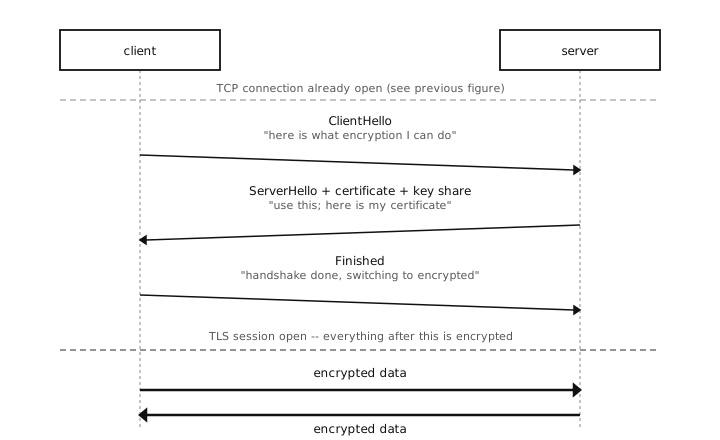
The TLS handshake ssl.wrap_socket() runs.
It sits on top of the already-open TCP connection
from the previous figure; once both sides have
sent Finished, the rest of the conversation is
encrypted in both directions.
Warning
This is encryption-only, not authenticated TLS. The cam talks securely to whatever answered on the other end of the TCP connection. If a man-in-the- middle redirects the connection to a server it controls and that server presents any certificate, the handshake still succeeds and the cam ends up securely talking to the attacker. Use this mode only when a man-in-the-middle is not part of the threat model – a closed local network, a development environment, the cam talking to a service running on the same hardware – not when reaching out to the public internet.
For real authentication – the cam verifying a public server, the cam acting as a TLS server, or mutual TLS – you need to bring certificates onto the device. The full story is in Working with TLS certificates.
The same wrap works for incoming TCP traffic, by
selecting the server protocol and passing
server_side=True to ssl.wrap_socket(). The
warning above still applies: without a certificate of
its own the cam cannot prove who it is to the client,
and a curious client would see a “no certificate”
handshake failure on most TLS stacks. The
production-side cert workflow is what unblocks running
the cam as a TLS server in a useful way.
12.17.3. With asyncio
The asyncio chapter
showed asyncio.open_connection() for plain TCP
clients. The same call accepts an ssl=True keyword
that wraps the connection in TLS, again without any
certificate setup:
import asyncio

async def main():
    reader, writer = await asyncio.open_connection(
        "example.com", 443, ssl=True,
    )
    writer.write(b"GET / HTTP/1.0\r\nHost: example.com\r\n\r\n")
    await writer.drain()
    print(await reader.read(4096))
    writer.close()
    await writer.wait_closed()

asyncio.run(main())
The reader/writer pair behind a TLS connection is the
same shape as for a plain TCP connection – only the
setup differs. The same caveat about authentication
applies: ssl=True alone gives encryption only, not
verification.
12.17.4. DTLS – TLS over UDP
TLS as discussed so far rides on top of TCP. The
parallel protocol for UDP is DTLS (Datagram TLS),
and the camera’s ssl module supports it the
same way. Where TLS turns one TCP connection into one
encrypted byte stream, DTLS turns one UDP socket into
a stream of encrypted, individually-delivered
datagrams – so the loss / out-of-order / no-flow-
control properties of UDP from UDP – send a packet, hope for the best
all carry over, with the bytes inside each datagram
now encrypted.
The wrap looks the same as the TLS case, just with a
SOCK_DGRAM socket and the DTLS
protocol constants:
import socket
import ssl

sock = socket.socket(socket.AF_INET, socket.SOCK_DGRAM)
sock.connect(socket.getaddrinfo("example.com", 4433)[0][-1])

ctx = ssl.SSLContext(ssl.PROTOCOL_DTLS_CLIENT)
s = ctx.wrap_socket(sock)

s.send(b"ping")
print(s.recv(64))
s.close()
(Calling connect() on a UDP socket
does not open a connection – it just remembers a
default destination so subsequent
send() / recv()
calls do not have to repeat it. DTLS needs that fixed
destination to run its handshake against.)
The handshake is the same shape as the TLS diagram above; the difference is that each handshake message is itself a UDP datagram, and either side will retry on loss.
Note
Does losing packets break the encryption? No. Each DTLS packet carries a sequence number, and the encryption uses that number to produce different output for each packet – so the same input never encrypts to the same bytes twice, and any packet can be decrypted on its own without the previous one having arrived. Lost or out-of-order packets do not desync the two sides. (The handshake itself is the one part that has to land reliably, and DTLS handles that with its own retransmission.)
The same encryption-only-without-certs warning from
above applies: a DTLS handshake against a
CERT_NONE peer encrypts the traffic but does not
verify who the other side is. The full DTLS workflow
– certificates, the server-side anti-spoofing cookie,
how this is the same surface as TLS apart from the
protocol constants – is covered alongside the TLS
material in
Working with TLS certificates.
The asyncio version uses the same non-blocking-UDP pattern from Sockets with asyncio. Do the handshake synchronously up front, switch the socket to non-blocking, then poll inside a coroutine:
import asyncio
import socket
import ssl

async def dtls_ping(target_addr, period_ms):
    sock = socket.socket(socket.AF_INET, socket.SOCK_DGRAM)
    sock.connect(target_addr)

    # Handshake while still blocking, then switch to async polling.
    ctx = ssl.SSLContext(ssl.PROTOCOL_DTLS_CLIENT)
    s = ctx.wrap_socket(sock)
    s.setblocking(False)

    while True:
        try:
            s.send(b"ping")
        except OSError:
            pass
        await asyncio.sleep_ms(period_ms)
The handshake is the one place this coroutine blocks
the event loop; after that, every s.send /
s.recv returns immediately (or raises
OSError), and the await asyncio.sleep_ms
keeps the rest of the program running.
12.17.5. Going further
Everything more than encryption-only TLS – verifying a public HTTPS server’s certificate, running the cam as an authenticated TLS server, mutual TLS between the cam and a back-end, choosing keys and key types, dealing with certificate expiry – is in Working with TLS certificates. That section covers how to generate self-signed certificates for local testing, how to obtain CA-signed certificates for production, how to get them onto the cam in the right format (DER), how to verify a public server when the cam is the client, how to think about key protection on a device an attacker may take apart, and how to plan for the day the certificate expires.
For the full ssl API reference – supported TLS
versions, cipher suites, and context options – see
ssl — SSL/TLS module.