
 OpenMV MicroPython
12.8. Ports
An IP address says which host a packet is for. A modern host runs many programs at once – a web browser, a chat client, a video call, a backup task – and each of those is sending and receiving packets in parallel. The IP layer has no way to tell them apart; it just hands every arriving packet to “the host”. Something has to decide which packet belongs to which program.
The port number is the answer. Every packet at the transport layer carries two extra fields beyond the IP header: a source port and a destination port. Each is a 16-bit integer, so there are 65535 possible port numbers per host. Combined with the IP address, the port identifies one specific endpoint inside a host – one specific program’s specific conversation.
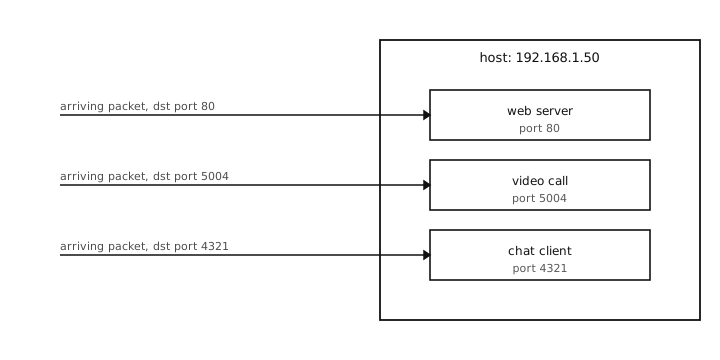
Many programs share one IP address; the destination port routes each arriving packet to the right one.
12.8.1. Well-known ports
The first 1024 port numbers are reserved by convention for standard services. A few the reader will meet:
22 – SSH (the Secure Shell protocol, used for encrypted remote login).
53 – DNS, the Domain Name System (covered on Names and DNS).
80 – HTTP, the Hypertext Transfer Protocol – the unencrypted protocol of the web.
123 – NTP, the Network Time Protocol (how devices set their clocks from a time server).
443 – HTTPS, HTTP carried over TLS (Transport Layer Security, the standard encryption wrapper for internet protocols) – the protocol behind every web page that shows a lock icon in the browser.
The convention is what makes it possible for a browser
to connect to http://example.com without specifying
a port – it assumes 80 because that is the well-known
port for HTTP. A camera connecting to a web server does
the same.
Above 1024, port numbers are unrestricted and any program can claim one. Database servers (5432 for PostgreSQL, 3306 for MySQL), application servers, and custom protocols all live somewhere in the higher range.
12.8.2. Ephemeral ports
Servers listen on a known port. Clients use a different port on their own end, picked fresh for each outgoing connection.
When the camera connects to a web server on port 443, the conversation is between
camera IP : <some-port> <--> server IP : 443
The <some-port> is an ephemeral port – MicroPython
picks an unused number from a high range, uses it for
the duration of the connection, and releases it
afterwards. The script does not have to care which
number was chosen; the socket layer handles it.
12.8.3. Listening vs talking
The job a port plays depends on which side of the conversation it is on. Two distinct cases:
A listening port belongs to a program that wants to receive unsolicited connections. The program tells MicroPython “any incoming packets addressed to me at port 80 are mine”, and waits. Servers do this.
A connected port belongs to a program that wants to initiate a conversation. The program picks (or asks MicroPython to pick) an ephemeral port, sends a packet with that as the source port and the server’s well-known port as the destination, and uses the same port pair for the rest of the conversation.
A single program can do both at once, holding different
ports for each role. A camera might listen on port 8000
for inbound HTTP connections from a configuration user
interface and hold an outbound HTTPS connection to a
remote server on port 443. The two roles do not interfere –
each conversation is identified by the full
(src IP, src port, dst IP, dst port) quadruple, and
no two conversations share the same quadruple.
12.8.4. What ports unlock
With ports in place, the transport layer can finally solve the program-to-program delivery problem. A packet now carries enough information to be routed not just to the right host (the IP address) but to the right socket inside that host (the port number).
The next two pages cover the two flavours the transport layer offers on top of that addressing: UDP (the User Datagram Protocol – each packet independent, no guarantees) and TCP (the Transmission Control Protocol – a connected, reliable, ordered stream).