
 OpenMV MicroPython
12.7. Private networks and NAT
IPv4 was designed with four billion addresses, which sounded like enough at the time. It is not. Every internet-connected home, office, and factory needs its own block of addresses for its internal devices, and adding the world’s worth of cameras, phones, and appliances does not leave four billion to go around.
The workaround the internet settled on is private networks: most devices on a local network use addresses that are not unique globally but only inside that network, and a single device at the edge translates between the two worlds. The camera, almost always, sits on one of these private networks.
12.7.1. The private address ranges
Three IPv4 ranges are reserved as not routable on the public internet. Any local network is free to use addresses from inside these ranges without coordinating with anyone, because no router outside the local network will ever try to deliver to them:
10.0.0.0–10.255.255.255(16 million addresses; common in larger corporate networks).172.16.0.0–172.31.255.255(about a million addresses; less common in the wild).192.168.0.0–192.168.255.255(65 thousand addresses; the default for almost every home router).
On a typical home network the camera and the laptop
talking to it both sit on 192.168.x.x addresses,
because that is the range the home router picks for the
network it hosts.
12.7.1.1. How the netmask is used
The IP addresses page introduced the /24
notation. The reason it matters here is that the
netmask is what each device uses to decide where a
packet has to go next. Every time the camera sends a
packet, it applies its own netmask to the destination
address and looks at the result:
If the destination shares the network bits with the camera’s own address, the destination is on the same local network. The camera sends the packet to it directly.
If the destination does not share the network bits, it must be on some other network. The camera sends the packet to its default gateway (the router configured automatically at link-up) and lets the gateway handle the rest.
That single test – “do we share network bits?” – is
what the netmask is for. It is also why home networks
default to /24: a 254-device cap fits a household
comfortably and keeps the network simple.
12.7.2. Network Address Translation
A camera on 192.168.1.50 cannot just send a packet
to a server on the public internet – the public
internet does not route to 192.168.x.x. The home
router solves this with Network Address Translation,
or NAT, and it does so transparently.
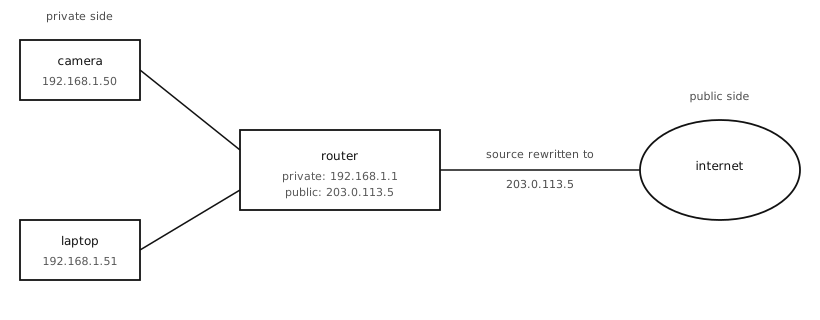
NAT rewrites the source address of outbound packets to the router’s public address, and reverses the rewrite on incoming replies, so private devices appear to share one public address.
The router has two addresses: a private one on the
local network (commonly 192.168.1.1) and a public
one assigned by the internet provider. When the camera
sends a packet to a public address, the router
records the camera’s private address + port and pairs it with a temporary outbound port of its own;
rewrites the source address on the packet to its own public address (and the source port to the chosen outbound port);
sends the rewritten packet out the public side.
When the reply comes back addressed to the router’s public address + port, the router looks up the pairing, rewrites the destination back to the camera’s private address + port, and delivers it on the local side. The camera never knows the rewrite happened; the server never knows the original source.
NAT is what makes home networks practical. It also has two consequences worth knowing about.
12.7.3. What NAT changes
Outbound is easy. A camera on a private network can talk out freely. Any time it opens a TCP connection or sends a UDP packet to a remote server, NAT sets up the pairing automatically. Most camera applications work in this direction: capture an image, push it to a server somewhere, receive the reply.
Inbound is hard. A device on the public internet cannot directly connect to a camera on a private network. There is no pairing for the router to look up when an unsolicited packet arrives at its public address, so the packet has nowhere to go. The router either drops it or hands it to a service running on the router itself.
Three workarounds for the inbound case are common, in roughly increasing order of practicality:
Port forwarding. Configure the router to direct all inbound packets on a chosen public port to a specific private device. Requires admin access to the router; brittle when the router’s public address changes.
VPN. Run a virtual private network that puts the camera on the same logical network as whoever needs to reach it. Heavyweight; out of scope for most cam deployments.
Outbound-initiated connection. The camera connects out to a known server somewhere on the public internet and keeps that connection open; the server uses the existing connection to push messages back. This is how push notifications and most cloud-connected device protocols work, and it is the pattern most camera applications end up using.
NAT is invisible to the Python code on the camera. The script just talks to whatever destination it needs to; the router handles the translation behind the scenes. But the direction of the connection does matter, and NAT is why “the camera reaches out to a cloud server” is a much easier shape than “a cloud server reaches in to the camera”.