
 OpenMV MicroPython
10.1. Your first endpoint
Before the cam can do anything interesting, the rest of the network has to be able to reach it. The cheapest thing that proves the server is alive is a one-route HTTP endpoint that returns some JSON:
from microdot import Microdot

app = Microdot()

frame_count = 0
trigger_count = 0

@app.get('/status')
async def status(request):
    return {'frames': frame_count, 'triggers': trigger_count}

app.run(host='0.0.0.0', port=80)
Run it in the IDE. From any other machine on the LAN open
http://<cam-ip>/status. The browser shows:
{"frames": 0, "triggers": 0}
The counters are placeholders – nothing is touching them yet – but the request crossed the network, the cam routed it, ran a handler, and sent JSON back.
10.1.1. What each line does
One microdot.Microdot instance per script. The instance owns
the routing table, the error handlers, and the lifecycle (start,
serve, stop). Big apps split into several Python modules but still
share one app object.
@app.get('/status') is the route decorator. We’re only using
microdot.Microdot.get() here; post(),
put(), and delete()
show up on later pages when the cam starts accepting writes.
Every route handler is an asyncio coroutine and receives the request as its first argument. The handler doesn’t have to use request – this one ignores it – but the parameter is always there so the signature is consistent.
Returning a dict is the shortest way to send JSON. Microdot serializes
the dict to JSON automatically and sets
Content-Type: application/json on the response. Returning a string
sends text/plain. Returning a microdot.Response
explicitly is the long form – needed when the body is binary or when
the response wants custom headers.
app.run(host='0.0.0.0', port=80) starts the server. 0.0.0.0
means listen on every interface the cam has – both the wired
ethernet and the wifi STA, if both are up. Port 80 is the HTTP
default, so browsers don’t need to type a port number.
10.1.2. One request, end to end
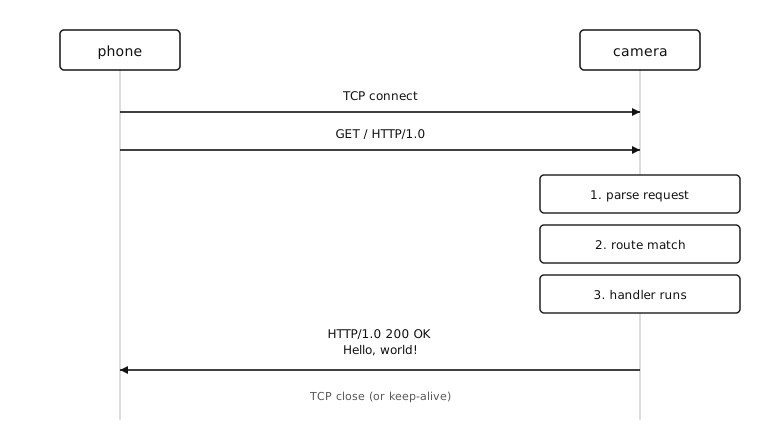
The phone opens a TCP connection, writes the request line and
headers, and waits. The cam reads the bytes off the socket, parses
them into a microdot.Request object, matches the path and
method against the routing table, awaits the handler coroutine,
serializes whatever it returned, writes a status line, headers, and
body back down the socket, then closes the connection (HTTP/1.0
default) or recycles it (HTTP/1.1 with Connection: keep-alive).
The whole exchange takes about as long as the network round-trip
plus whatever the handler did.
10.1.3. A note on blocking
run() is blocking – it never returns
until the server stops. That’s fine for a single-purpose server. An
app that also captures frames or runs other coroutines uses
start_server() inside an asyncio.run()
instead, so the HTTP server can share the loop with everything else.
The app answers one URL.