
 OpenMV MicroPython
10.3. Live streaming – one viewer
Browsers can render multi-part Motion JPEG (MJPEG) streams
directly inside an <img> tag. Hand the browser one HTTP response
that never finishes, write JPEGs separated by a multipart boundary,
and the browser displays each frame as it arrives.
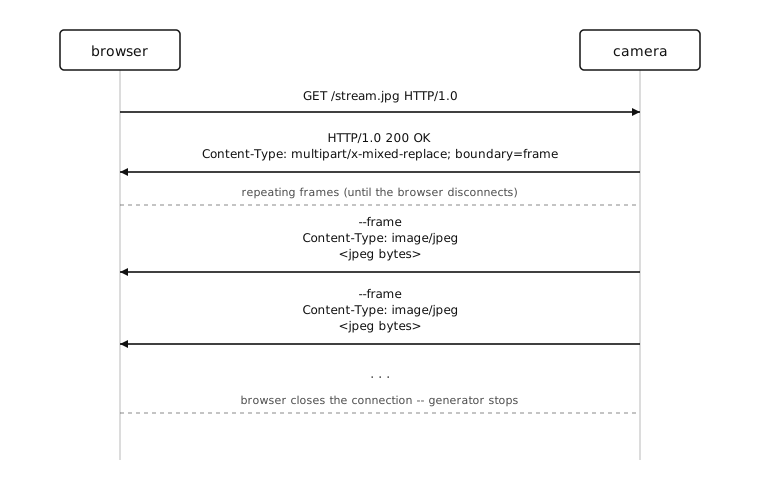
The wire is straightforward: one response header,
Content-Type: multipart/x-mixed-replace; boundary=frame, then a
--frame line, Content-Type: image/jpeg, a blank line, the
JPEG bytes, \r\n, and repeat. The browser closes the connection
when the <img> is removed or the tab is closed.
10.3.1. Capturing without blocking
The blocking csi0.snapshot() used so far stalls the whole event
loop until the sensor delivers a frame. That was fine when one
request fired one snapshot and nothing else was running. Once a
stream is open the server has to keep handling other requests while
the next frame is being captured – the capture call needs to
yield to the event loop while it’s waiting on the sensor.
The pattern is a thin AsyncCSI wrapper that polls
csi.CSI.snapshot() in non-blocking mode and sleeps the
coroutine between polls. The asyncio chapter walked through this
pattern in AsyncCSI;
inline it into the script for now:
import asyncio

class AsyncCSI:
    def __init__(self, *args, **kwargs):
        self._csi = csi.CSI(*args, **kwargs)

    def __getattr__(self, name):
        return getattr(self._csi, name)

    async def snapshot(self):
        while True:
            img = self._csi.snapshot(blocking=False)
            if img is not None:
                return img
            await asyncio.sleep_ms(0)
Every other CSI method (reset(),
pixformat(), framesize(),
gain_db(), …) is forwarded through __getattr__;
only snapshot() is replaced with an awaitable version
that lets the event loop schedule other coroutines between polls.
Swap the bare csi.CSI() from the snapshot route for an
AsyncCSI():
csi0 = AsyncCSI()
csi0.reset()
csi0.pixformat(csi.RGB565)
csi0.framesize(csi.QVGA)
10.3.2. Streaming bodies are class-based iterators
A streaming response body is just an object microdot iterates with
async for, sending each yielded chunk down the socket. On CPython
this is normally an async generator function – async def with
yield. MicroPython doesn’t support that:
Note
MicroPython’s asyncio does not support async-generator
functions (async def name(): ... yield ...). Streaming
response bodies must be class-based async iterators with
__aiter__ returning self and __anext__ defined as
async def.
For an MJPEG stream that means a class whose __anext__ awaits one
frame and returns it framed in the multipart wrapper:
BOUNDARY = b'frame'

class FrameStream:
    def __aiter__(self):
        return self

    async def __anext__(self):
        img = await csi0.snapshot()
        jpeg = bytes(img.compress(quality=85).bytearray())
        return (b'--' + BOUNDARY + b'\r\n'
                b'Content-Type: image/jpeg\r\n\r\n'
                + jpeg + b'\r\n')

@app.get('/stream.jpg')
async def stream(request):
    return Response(
        body=FrameStream(),
        headers={
            'Content-Type':
                b'multipart/x-mixed-replace; boundary=' + BOUNDARY,
        },
    )
The instance is fresh per request, so each connected client gets its
own iterator. When the browser disconnects, microdot stops awaiting
__anext__ and the iterator is garbage-collected.
Note
The bytes(...) wrap around the JPEG is defensive.
bytearray() returns a view into the camera’s
image buffer, and the next snapshot() call
rewrites that buffer in place. Wrapping in bytes copies
the JPEG out so the chunk microdot is mid-write stays stable even
if the writer’s flush has not finished by the time __anext__
runs again.
10.3.3. Running the server inside asyncio
The earlier app.run(host=..., port=...) call is blocking. The
MJPEG handler needs to share the loop with the AsyncCSI snapshot
polls, so swap app.run for start_server()
inside an asyncio.run():
async def main():
    await app.start_server(host='0.0.0.0', port=80)

asyncio.run(main())
The asyncio.run() wrapper lets the server be one task among
several – the main coroutine is then the natural place to spawn
capture, motion detection, and anything else that has to share the
loop with the HTTP server.
10.3.4. One viewer at a time
Every connected client runs its own FrameStream iterator, which
means every client triggers its own csi0.snapshot() call. Two
browsers means two sensor reads per frame interval, three means
three, and so on. The sensor can’t actually deliver frames faster
than its own frame rate, so the requests queue up behind each other
and everyone’s stream slows down.
The fix is a single shared capture loop publishing one frame to many readers.