
 OpenMV MicroPython
9.18. MQTT, byte by byte
By this point the cam has every piece it needs to talk to a real service on the open internet: a TCP socket, TLS to wrap it, DNS to name the peer, and asyncio to let the same script do other work while the connection is open. MQTT is the first wire protocol that pulls all of those together into something a deployed product actually uses.
This page covers the protocol itself – the on-the-wire format, the
roles each participant plays, and the trade-offs in its design –
honestly enough that the bundled mqtt client looks like an
obvious wrapping of what’s already known instead of a leap of faith.
9.18.1. Pub/sub vs request/response
HTTP – the protocol most cam projects reach for first – is request/response. A client asks a specific server for a specific resource; the server answers. Every exchange is one-to-one, and both ends know each other’s address in advance.
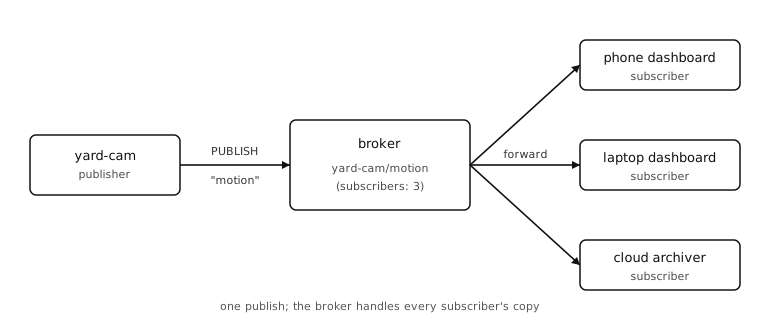
MQTT is publish/subscribe. Clients connect to a third party in the
middle called the broker. A publisher sends a message to a
named topic without knowing or caring who is listening. A
subscriber tells the broker which topics it wants and receives
every message published to those topics afterwards. The broker is
the fan-out: one publish on yard-cam/motion reaches every device
subscribed to yard-cam/motion, even if there are zero, one, or
fifty of them.
Three things follow from that change of model:
Decoupling. Publishers don’t have to know subscribers exist. Subscribers can come and go without the publisher noticing. Adding a second dashboard is one line of code on the new dashboard; the cam doesn’t change.
Fan-out. The broker handles every duplicate, so the cam sends one packet regardless of how many devices read it. That’s the use case MQTT was built for.
Asymmetry. The broker is now a required piece of infrastructure – without one, the protocol doesn’t work. For home projects this is usually a free public broker (
test.mosquitto.org,broker.hivemq.com) or a small one you run yourself.
9.18.2. Topics
Topics are slash-separated strings. The convention is most-general on the left, most-specific on the right:
yard-cam/motion
yard-cam/temperature
workshop-cam/motion
workshop-cam/temperature/sensor-3
Two wildcards work in subscriptions (not in publishes):
+matches a single level.+/motionsubscribes to every cam’s motion topic;yard-cam/+subscribes to every yard-cam sub-topic.#matches one or more trailing levels.yard-cam/#subscribes toyard-cam/motion,yard-cam/temperature,yard-cam/temperature/sensor-3, and anything else underyard-cam/. It must appear at the end of the subscription.
Topic strings are case-sensitive. Per the spec a leading $
marks broker-internal topics ($SYS/...) that publishers should
not write to.
9.18.3. The packet format
MQTT runs over TCP. Every control packet starts with a one-byte fixed header followed by a variable-length Remaining Length field, then a packet-type-specific variable header, then the payload. The same outer format covers every command – CONNECT, PUBLISH, SUBSCRIBE, PUBACK, DISCONNECT, and the rest – which is why an MQTT client can be written in a few hundred lines.
The fixed header is one byte:
Bits 7..4 are the control packet type.
0x3is PUBLISH (so the first byte usually starts0x3?).0x1is CONNECT,0x2CONNACK,0x8SUBSCRIBE,0xCPINGREQ,0xEDISCONNECT, etc.Bits 3..0 are packet-type-specific flags. For PUBLISH the flags encode the DUP retransmit flag, the QoS level (2 bits), and the RETAIN flag.
The Remaining Length is a 1-to-4-byte variable-length integer that counts every byte after itself. Each byte’s top bit is a continuation marker – 1 means “another length byte follows”, 0 means “this is the last”. A length under 128 fits in one byte; larger payloads use more. The maximum encoded length is 256 MiB.
For a PUBLISH the variable header is the topic name – a 2-byte length, then UTF-8 bytes – followed by a 2-byte packet identifier that only exists when QoS is 1 or 2. The remaining bytes are the payload, treated as opaque bytes by the protocol.
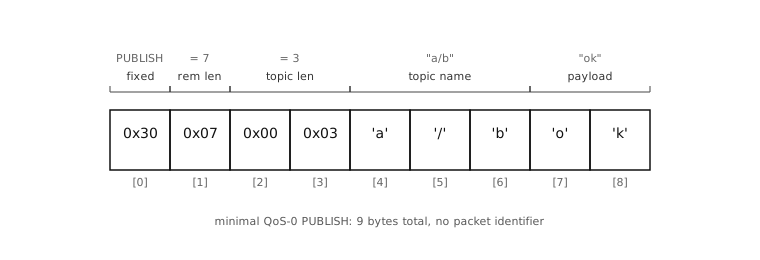
A minimal QoS-0 PUBLISH of ok to a/b is:
30 07 00 03 'a' '/' 'b' 'o' 'k'
30– PUBLISH, all flags zero.07– 7 bytes follow.00 03– topic length 3.'a' '/' 'b'– topic.'o' 'k'– payload.
Nine bytes on the wire and the message lands at every subscriber to
a/b on the broker.
9.18.4. QoS levels
Quality-of-Service controls how hard the broker (and client) work to ensure delivery. The three levels:
QoS 0 – at most once. Fire and forget. The PUBLISH packet is sent and never confirmed. If TCP delivers, the broker forwards. If the connection drops mid-send, the message is gone. Most sensor telemetry is fine at QoS 0 – a single missed temperature reading in a stream that emits every 30 seconds doesn’t matter.
QoS 1 – at least once. The publisher includes a packet identifier and waits for a PUBACK. If no PUBACK arrives before a timeout, the publisher retransmits with the DUP flag set. The broker may end up delivering the same message twice to a subscriber on the same level; the subscriber has to be willing to handle duplicates.
QoS 2 – exactly once. A four-step handshake (PUBREC / PUBREL / PUBCOMP) makes sure the message lands exactly once, even across reconnects. Expensive in round-trips and broker state. Few cam apps need it.
The bundled mqtt client implements QoS 0 and QoS 1; QoS 2
raises if you ask for it. For a cam reporting sensor readings,
QoS 0 is almost always the right answer.
9.18.5. Retained messages and last will
Two features are worth knowing about because they change what the broker remembers about your topic.
RETAIN. If a PUBLISH has the RETAIN flag set, the broker stores the message and forwards it to every future subscriber the moment they subscribe. That’s how MQTT handles “what’s the current value?” – a sensor publishes its latest reading retained, and a dashboard that subscribes ten minutes later still receives the most recent value instead of waiting for the next publish. Re-publishing with the same topic overwrites the retained value; publishing an empty payload clears it.
Last will. When a client connects it can give the broker a “last will and testament”: a topic, a payload, a QoS, and a retain flag. If that client disconnects uncleanly – TCP RESET, power loss, network drop with no DISCONNECT packet – the broker publishes the will on the client’s behalf. Subscribers see it as the cam’s notification that it has gone offline. The cam itself never sends the will; the broker does, because by then the cam is gone.
9.18.6. Keepalive and reconnect
CONNECT carries a keepalive interval in seconds. If the client has
been silent for that long the broker considers it dead. To prevent
that, the client periodically sends a PINGREQ (one byte: 0xC0)
and gets back a PINGRESP (0xD0) – the smallest, cheapest
heartbeat the protocol can carry. Most cam apps set keepalive to 30
or 60 seconds.
If the TCP connection drops, both sides notice and reconnect from scratch. Subscriptions made before the drop are lost unless the client used a persistent session on connect; for simple cam apps the resubscribe-on-reconnect pattern is shorter and just as good.
This is enough to read the MQTT spec or hand-roll a client over a
socket.socket. The bundled client in
mqtt does exactly that, plus a sensible API for application
code.