
 OpenMV MicroPython
Arduino Nicla Vision¶
The Arduino Nicla Vision is a 22.86 × 22.86 mm machine‑vision board built around the STMicroelectronics STM32H747AII6 — a dual‑core SoC combining a Cortex‑M7 at 400 MHz with a Cortex‑M4 at 200 MHz. The OpenMV firmware runs entirely on the M7 core. The board pairs the MCU with the GC2145 2 MP colour CMOS sensor, an LSM6DSOX 6‑axis IMU, an MP34DT06 MEMS microphone, a VL53L1CB time‑of‑flight ranger, Wi‑Fi + Bluetooth LE 5.1, and a battery charger / fuel gauge.
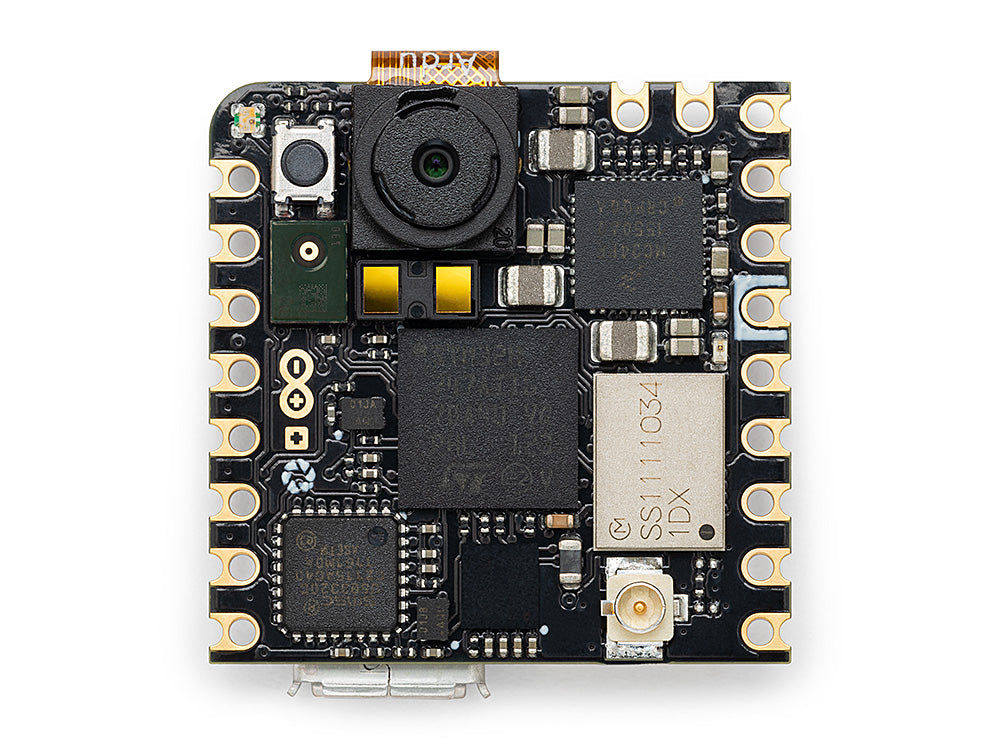
For full datasheet, photos, and dimensions see the Arduino Nicla Vision product page.
Highlights¶
STMicroelectronics STM32H747AII6 dual Cortex‑M7 (400 MHz) + Cortex‑M4 (200 MHz). OpenMV firmware runs on the M7 core only.
2 MB internal flash plus 16 MB external QSPI flash (used for the application + ROMFS).
1 MB internal SRAM.
Hardware JPEG encoder/decoder.
GC2145 2 MP colour CMOS sensor.
Onboard IMU (LSM6DSOX accelerometer + gyroscope), MEMS microphone (MP34DT06JTR), and VL53L1CB time‑of‑flight ranger (up to ~4 m).
Wi‑Fi b/g/n (2.4 GHz) + Bluetooth LE 5.1 via the Murata 1DX (CYW4343W) module — connects to the supplied antenna via an on‑board U.FL connector.
High‑speed USB (480 Mb/s) over Micro USB through an external ULPI PHY (USB3320C).
13 user I/O pins on the Arduino edge headers — four digital LPIOs (
D0–D3), three 1.8 V analog inputs (A0–A2), theSCL/SDAI²C pair, and theSCLK/CIPO/COPI/CSSPI quartet.Battery support — Li‑Po connector on the back, BQ‑style charger, and MAX17262 fuel gauge over the internal PMIC bus.
5‑pin ESLOV connector on the back for solder‑free I²C expansion.
Warning
The user digital pins are 3.3 V by default but routed through
software‑programmable level shifters (VDDIO_EXT) that can be
reconfigured to 1.8 V. The analog pins (A0–A2) are 1.8 V
only — they bypass the level shifters and connect directly to
the MCU. Driving 3.3 V into A0–A2 will damage the SoC.
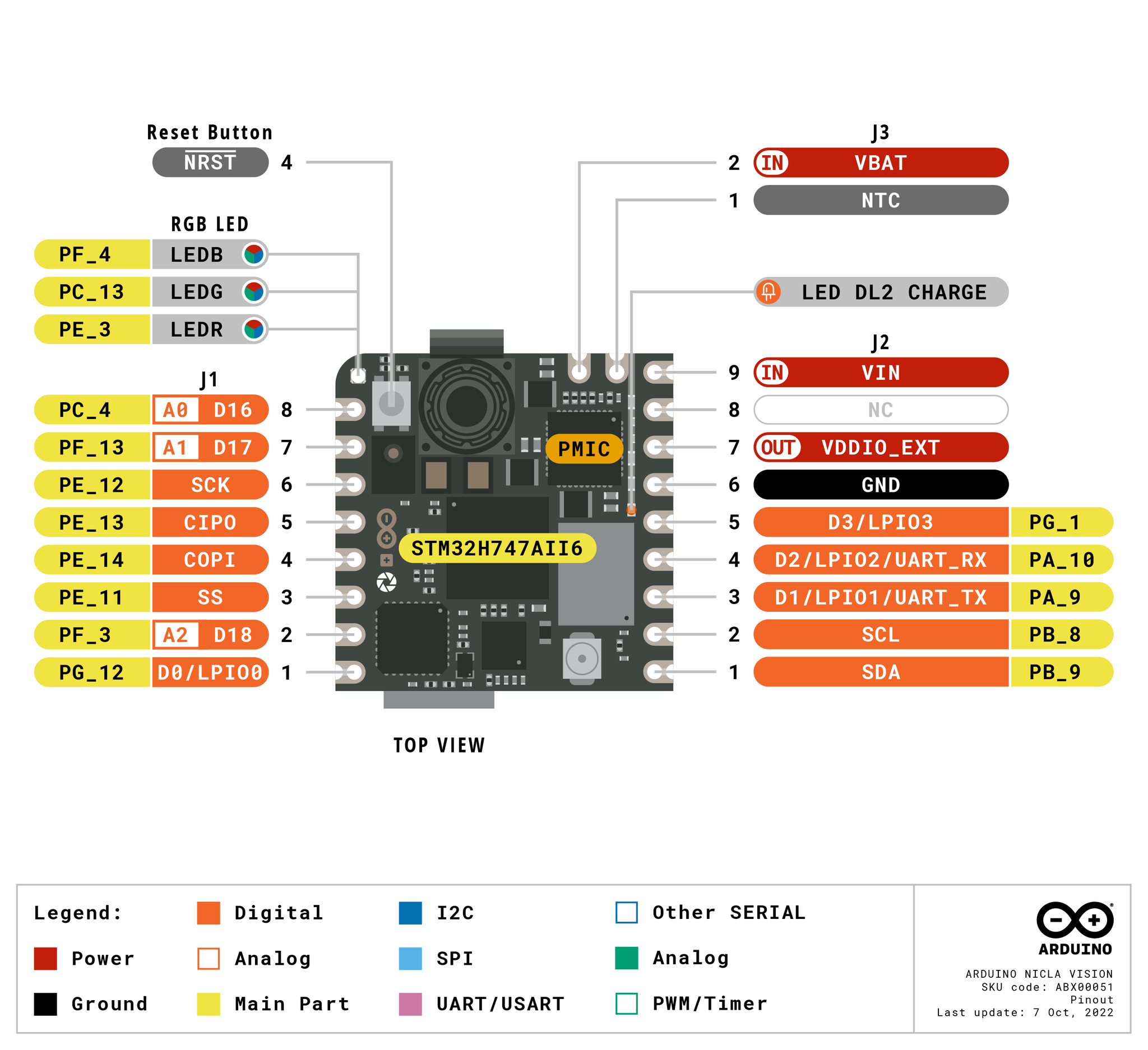
Pinout¶
Pin reference¶
Thirteen user pins are exposed on the Arduino edge headers (J1
and J2). Additional debug, recovery, and PMIC signals are
routed to test pads on the back of the board.
Pin name |
Reference |
Function |
|---|---|---|
D0 |
3.3 V |
GPIO / LPIO0 (J1‑1) |
D1 |
3.3 V |
LPUART1 TX / TIM1 CH2 / LPIO1 (J2‑3) |
D2 |
3.3 V |
LPUART1 RX / TIM1 CH3 / LPIO2 (J2‑4) |
D3 |
3.3 V |
GPIO / LPIO3 (J2‑5) |
A0 |
1.8 V |
ADC1 channel 4 (J1‑8) |
A1 |
1.8 V |
ADC2 channel 2 (J1‑7) |
A2 |
1.8 V |
ADC3 channel 5 (J1‑2) |
SCL |
3.3 V |
I2C1 SCL / UART4 RX / TIM4 CH3 (J2‑2) |
SDA |
3.3 V |
I2C1 SDA / UART4 TX / TIM4 CH4 (J2‑1) |
SCLK |
3.3 V |
SPI4 SCK / TIM1 CH3N (J1‑6) |
CIPO |
3.3 V |
SPI4 MISO / TIM1 CH3 (J1‑5) |
COPI |
3.3 V |
SPI4 MOSI / TIM1 CH4 (J1‑4) |
CS |
3.3 V |
SPI4 NSS / TIM1 CH2 (J1‑3) |
RESET |
3.3 V |
pull to GND (or press the on‑board switch) to reset the board |
LED_RED |
3.3 V |
RGB LED red channel (active low) |
LED_GREEN |
3.3 V |
RGB LED green channel (active low) |
LED_BLUE |
3.3 V |
RGB LED blue channel (active low) |
Note
D0–D3 and SCLK/CIPO/COPI/CS sit behind the
TXB0108 bidirectional level shifter — that part only supports
push‑pull GPIO drive, so open‑drain bus traffic (e.g. a
bit‑banged 1‑Wire or I²C on those pins) won’t work.
SCL/SDA sit behind a separate NTS0304 shifter that
supports both push‑pull and open‑drain drive, which is why
I²C 1 works there.
Both shifters are referenced to VDDIO_EXT (3.3 V by default
from the on‑board PMIC), and their drive strength is limited
compared with a direct GPIO — they are designed for signal‑level
rather than power loads.
Power pins¶
Edge‑header pins:
VIN (J2‑9) — main 3.6 – 5 V system rail. The PMIC takes its input here.
VDDIO_EXT (J2‑7) — output of the level‑shifter rail, 1.8 V or 3.3 V (3.3 V by default). Use this to power external 1.8 V or 3.3 V peripherals attached to the LPIO/SPI/I²C pins so they speak the same logic level as the headers.
VBAT (J3‑2) — Li‑Po battery input. The on‑board PMIC charges the cell from VIN and reports state of charge through the fuel gauge.
NTC (J3‑1) — optional Li‑Po thermistor input.
GND (J2‑6) — common ground.
NC (J2‑8) — no connect.
Test pads on the back of the board:
+3V3 — main 3.3 V rail.
D_P / D_N — USB high‑speed data pair (post‑PHY).
USB and the ESLOV connector both feed VIN through a pair of
LM66100 ideal diodes (one per source), so either supply can
power the board on its own and the two never back‑drive each
other. If you drive VIN externally on J2‑9, that takes
precedence — the diodes simply stop conducting from USB / ESLOV
once the external rail rises higher.
The board can therefore be powered through any of these paths:
Micro USB — 5 V into VIN through the USB‑side ideal diode.
ESLOV connector — up to 5 V on the
VESLOVpin of J5, routed into VIN through the ESLOV‑side ideal diode (see ESLOV connector).VIN pin (J2‑9) — drive a regulated 3.6 – 5 V supply directly.
Li‑Po battery — connect to the J4 battery connector on the back or to the VBAT/GND/NTC pads on J3 / J2‑6. Do not connect two batteries simultaneously.
ESLOV connector¶
J5 on the back of the board is a 5‑pin Molex solder‑free
ESLOV connector:
Pin |
Name |
Function |
|---|---|---|
J5‑1 |
VESLOV |
power input (≤ 5 V) — OR’d into |
J5‑2 |
INT |
external interrupt input on |
J5‑3 |
SCL_EXT |
shared with the J2 |
J5‑4 |
SDA_EXT |
shared with the J2 |
J5‑5 |
GND |
common ground |
ESLOV’s SCL_EXT/SDA_EXT and J2’s SCL/SDA are the
same pins — one I²C 1 bus exposed on two connectors.
Tip
Use the battery life estimator to model how long the Nicla Vision will run on a battery for a given active / deep-sleep duty cycle.
Recovery and debug pins¶
RESET — both a momentary switch on top of the board and a pad (J3‑4 / test pad P5) tied to the SoC’s NRST line. Pull to GND to reset.
The Nicla Vision uses Arduino’s standard double‑tap reset to enter Arduino’s bootloader — quickly press the reset button twice and the board enumerates as a DFU device. OpenMV IDE uses this mode to reflash the firmware.
The STM32 SWD signals are exposed on the back of the board through a row of test pads between the two J2 headers. Solder a 2.54 mm (100‑mil) header into them to attach an ST‑LINK or J‑Link adapter:
P1 / P2 — internal PMIC I²C bus on PF0 (SDA) and PF1 (SCL). This is
machine.I2C(2)on the Nicla Vision and carries the PMIC, fuel gauge, and ToF traffic.P3 — TMS / SWDIO (PA13)
P4 — TCK / SWCLK (PA14)
P5 — NRST
P6 — TDO / SWO (PB3)
P7 — +1V8 rail (the SoC’s I/O supply — also the right reference for the debug adapter).
P8 —
VOTP_PMIC— factory programming only. Must be left unconnected.
All debug signals are 1.8 V referenced — the STM32H747’s I/O ring on this board runs from the +1V8 rail. Set your debug adapter for 1.8 V logic before connecting.
Onboard peripherals¶
LEDs¶
The Nicla Vision has a single user RGB LED, software‑controllable through machine.LED:
from machine import LED

LED("LED_RED").on()
LED("LED_GREEN").on()
LED("LED_BLUE").on()
A separate DL2 CHARGE LED on the side of the board is wired directly to the PMIC’s CHGB output — it lights while a Li‑Po battery is being charged from USB / ESLOV / VIN and is not user‑controllable.
Camera sensor¶
The GC2145 is driven through the csi — camera sensors module:
import csi

cam = csi.CSI()
cam.reset()
cam.pixformat(csi.RGB565)
cam.framesize(csi.QVGA)
cam.snapshot(time=2000)       # let auto‑exposure settle

while True:
    img = cam.snapshot()
When you ask for a small framesize the GC2145 driver crops a
proportionally small readout window from the sensor — by default
the readout-to-output downscale ratio is capped at 3x to keep the
frame rate up. csi.IOCTL_SET_FOV_WIDE raises that cap to 5x,
which means the driver pulls from a wider area of the sensor when
streaming small resolutions. The result is a noticeably wider field
of view at small framesizes, at the cost of some throughput:
cam.ioctl(csi.IOCTL_SET_FOV_WIDE, True)
cam.ioctl(csi.IOCTL_GET_FOV_WIDE)  # returns the current setting
M4 core¶
The Cortex‑M4 core is exposed through openamp
for inter‑processor communication. The OpenMV firmware runs on the
M7 only; the M4 has no MicroPython runtime of its own, so using it
means building a separate C firmware image and loading it from the
filesystem via openamp.RemoteProc.
Pre‑built example firmware that implements a virtual UART endpoint
is available in the
openamp_vuart
repository — follow its README to build vuart.elf:
import openamp
import time

def ept_recv_callback(src_addr, data):
    print("Received:", data.decode())

ept = openamp.Endpoint("vuart-channel", callback=ept_recv_callback)

rproc = openamp.RemoteProc("vuart.elf")
rproc.start()

count = 0
while True:
    if ept.is_ready():
        ept.send("Hello World %d!" % count, timeout=1000)
        count += 1
    time.sleep_ms(1000)
In practice this support is best treated as a demonstration of the openamp interface rather than a working dual‑core platform — the M4 cannot be reset independently of the M7, so stopping the M4 forces a full system reboot.
Microphone¶
The on‑board MP34DT06JTR PDM microphone is captured through
audio — Audio Module over the STM32’s DFSDM peripheral. Each
buffer arrives as a signed‑16‑bit PCM bytearray, ready to feed
into ulab/numpy for DSP — for
example, a simple loudness detector:
import audio
from ulab import numpy as np

def loudness(pcmbuf):
    samples = np.array(np.frombuffer(pcmbuf, dtype=np.int16), dtype=np.float)
    rms = np.sqrt(np.mean(samples ** 2))
    if rms > 10000:
        print("Loud!", int(rms))

audio.init(channels=1, frequency=16000, gain_db=24)
audio.start_streaming(loudness)

while True:
    pass
IMU¶
The on‑board LSM6DSOX accelerometer + gyroscope is exposed through imu — imu sensor:
import imu
import time

while True:
    print(imu.acceleration_mg())   # (x, y, z) in milli‑g
    print(imu.angular_rate_mdps()) # (x, y, z) in milli‑deg/s
    time.sleep_ms(100)
The IMU is wired to a dedicated internal SPI bus (SPI5) so it does not contend with the user SPI4 broken out on the headers.
Time‑of‑flight ranger¶
The on‑board ST VL53L1CB time‑of‑flight ranger sits on the internal PMIC I²C bus (I²C 2). Use the frozen vl53l1x — VL53L1X ToF distance sensor driver driver to get distance readings up to ~4 m:
import time
from machine import I2C
import vl53l1x

bus = I2C(2)               # internal bus (PMIC / fuel gauge / ToF)
tof = vl53l1x.VL53L1X(bus)

while True:
    print("Distance:", tof.read(), "mm")
    time.sleep_ms(100)
Battery fuel gauge¶
The Maxim MAX17262 ModelGauge m5 fuel gauge tracks the Li‑Po
battery’s voltage, current, temperature, and state of charge. It
sits on I²C 2 at address 0x36.
The MAX17262 has internal current sensing, so the current register reads out directly in microamps with no external Rsense factor to apply. Reading the fuel gauge is harmless — there is no driver shipped, but the registers documented in the MAX17262 datasheet can be read directly:
import time
import struct
from machine import I2C

FUEL_GAUGE = 0x36   # MAX17262

def read_reg(bus, addr, reg):
    return struct.unpack("<H", bus.readfrom_mem(addr, reg, 2))[0]

def read_signed(bus, addr, reg):
    v = read_reg(bus, addr, reg)
    return v - 0x10000 if v & 0x8000 else v

bus = I2C(2)

while True:
    # 0x05 RepCap — remaining capacity, raw × 0.5 mAh
    rep_cap   = read_reg(bus, FUEL_GAUGE, 0x05) * 0.5
    # 0x06 RepSOC — state of charge, raw / 256 %
    soc       = read_reg(bus, FUEL_GAUGE, 0x06) / 256
    # 0x08 Temp — die temperature, signed, raw / 256 °C
    temp      = read_signed(bus, FUEL_GAUGE, 0x08) / 256
    # 0x09 VCell — battery voltage, raw × 78.125 µV
    vcell     = read_reg(bus, FUEL_GAUGE, 0x09) * 78.125 / 1_000_000
    # 0x0A Current — signed, raw × 156.25 µA
    current   = read_signed(bus, FUEL_GAUGE, 0x0A) * 156.25 / 1000
    # 0x0B AvgCurrent — averaged current
    avg_curr  = read_signed(bus, FUEL_GAUGE, 0x0B) * 156.25 / 1000
    # 0x10 FullCapRep — learned full capacity, raw × 0.5 mAh
    full_cap  = read_reg(bus, FUEL_GAUGE, 0x10) * 0.5
    # 0x11 TTE — time-to-empty (valid while discharging), raw × 5.625 s
    tte_s     = read_reg(bus, FUEL_GAUGE, 0x11) * 5.625
    # 0x20 TTF — time-to-full   (valid while charging),  raw × 5.625 s
    ttf_s     = read_reg(bus, FUEL_GAUGE, 0x20) * 5.625
    # 0x17 Cycles — charge-cycle counter, 1% per LSB
    cycles    = read_reg(bus, FUEL_GAUGE, 0x17) / 100

    print("V:        %.3f V" % vcell)
    print("Capacity: %.1f / %.1f mAh (%.1f %%)" % (rep_cap, full_cap, soc))
    print("Temp:     %.1f C" % temp)
    print("Current:  %.1f mA  (avg %.1f mA)" % (current, avg_curr))
    print("TTE:      %.0f s   TTF: %.0f s" % (tte_s, ttf_s))
    print("Cycles:   %.2f" % cycles)
    print()
    time.sleep_ms(1000)
Current is signed two’s-complement: positive while charging,
negative while discharging. TTE is only meaningful when current
is negative; TTF only when current is positive.
Power management IC¶
The NXP MC34PF1550A0EP PMIC handles every regulator on the
Nicla Vision — the +3V3 main rail, the +1V8 SoC core / I/O rail,
VDDIO_EXT to the level shifters, and the Li‑Po charger. It
sits on I²C 2 at address 0x08.
Warning
Reading PMIC registers is fine; writing to them is dangerous. Misconfiguring a buck regulator or charger setting can permanently damage the board, the battery, or both. Treat the PMIC as read‑only unless you know exactly what you’re doing.
The most useful thing the PMIC tells you that the fuel gauge can’t
is the charger state machine — whether the board is currently
running on USB / ESLOV / VIN, what stage of the charge cycle the
Li‑Po is in, and whether the charger is in a thermal or watchdog
fault. The charger registers live at an offset of 0x80 in the
PF1550’s main I²C address space (see §22.2 of the
PF1550 datasheet),
so for example CHG_INT_OK at charger address 0x04 is read
from PMIC register 0x84:
import time
from machine import I2C

PMIC = 0x08

# Charger state machine (low nibble of CHG_SNS, register 0x87)
CHG_STATES = {
    0x0: "precharge",
    0x1: "fast charge (constant current)",
    0x2: "fast charge (constant voltage)",
    0x3: "end of charge",
    0x4: "done",
    0x6: "timer fault",
    0x7: "thermistor suspend",
    0x8: "off — input invalid or charger disabled",
    0x9: "battery overvoltage",
    0xA: "thermal shutdown",
    0xC: "linear mode (not charging)",
}

bus = I2C(2)

while True:
    # 0x84 CHG_INT_OK — single-bit indicators
    ok = bus.readfrom_mem(PMIC, 0x84, 1)[0]
    vbus_ok = bool(ok & (1 << 5))   # bit 5 — VBUS valid (USB/ESLOV/VIN)
    bat_ok  = bool(ok & (1 << 2))   # bit 2 — battery OK
    chg_ok  = bool(ok & (1 << 3))   # bit 3 — charger actively charging
    thm_ok  = bool(ok & (1 << 7))   # bit 7 — thermistor in normal range

    # 0x87 CHG_SNS — charger state + thermal regulation flag
    chg_sns = bus.readfrom_mem(PMIC, 0x87, 1)[0]
    state   = CHG_STATES.get(chg_sns & 0x0F, "reserved")
    treg    = bool(chg_sns & (1 << 7))   # thermal regulation active

    print("VBUS valid:         ", vbus_ok)
    print("battery OK:         ", bat_ok)
    print("charger active:     ", chg_ok)
    print("thermistor normal:  ", thm_ok)
    print("thermal reg active: ", treg)
    print("state:              ", state)
    print()
    time.sleep_ms(1000)
Other read‑only registers worth a look in the datasheet (all at
charger‑offset 0x80): 0x80 CHG_INT (latched charger
interrupts — fault flags), 0x86 VBUS_SNS (the multi‑bit
VBUS state including OVLO / UVLO / DPM), and 0x88 BATT_SNS
(battery presence and overcurrent state).
Wi‑Fi¶
The on‑board Murata 1DX (CYW4343W) is exposed via network — network configuration as a station interface. Connect the supplied antenna to the on‑board U.FL connector before bringing up the radio:
import network, time

wlan = network.WLAN(network.STA_IF)
wlan.active(True)
wlan.connect("ssid", "password")
while not wlan.isconnected():
    time.sleep(1)
print("Wi‑Fi IP:", wlan.ipconfig("addr4")[0])
Bluetooth¶
The same Murata 1DX also exposes Bluetooth LE 5.1. Use aioble — Async BLE for asyncio‑friendly BLE — for example, advertise as a peripheral and wait for a central to connect:
import asyncio
import aioble

async def run():
    while True:
        conn = await aioble.advertise(250_000, name="Nicla-Vision")
        print("Connected:", conn.device)
        await conn.disconnected()

asyncio.run(run())
Bus reference¶
GPIO¶
Use machine.Pin to read or drive any of the
silkscreened pins. Outputs are 3.3 V CMOS (default VDDIO_EXT)
and the level shifters limit the per‑pin drive strength to a few
milliamps — they are designed for signal‑level rather than power
loads.
from machine import Pin

out = Pin("D0", Pin.OUT)
out.on()
out.off()
out.value(1)

inp = Pin("D1", Pin.IN, Pin.PULL_UP)
print(inp.value())
Any input pin can also fire an interrupt on edge transitions:
def handler(pin):
    print("triggered:", pin)

Pin("D1", Pin.IN, Pin.PULL_UP).irq(
    handler, Pin.IRQ_FALLING | Pin.IRQ_RISING,
)
UART¶
Bus |
TX |
RX |
|---|---|---|
UART4 |
SDA |
SCL |
from machine import UART

uart = UART(4, baudrate=115200)
uart.write("hello")
uart.read(5)
Note
UART4 shares its pins with I²C 1 — the same SDA/SCL
pads carry both buses. Pick UART or I²C, not both, on those pins.
The D1/D2 silkscreen also reads UART_TX/UART_RX,
but on this firmware those pins are routed to LPUART1, not to
machine.UART. machine.UART(1) itself is reserved for the
on‑chip Bluetooth controller and is not accessible on the
headers.
I²C¶
Bus |
SCL |
SDA |
|---|---|---|
I2C1 |
SCL |
SDA |
from machine import I2C

i2c = I2C(1, freq=400_000)
i2c.scan()
i2c.writeto(0x76, b"hi")
The SCL/SDA pads on J2 and the ESLOV connector’s
SCL_EXT/SDA_EXT pins land on the same I²C 1 bus — see
ESLOV connector above for the ESLOV pinout.
The same hardware can also be used in target (slave) mode through machine.I2CTarget to expose a memory region to another I²C controller:
from machine import I2CTarget

buf = bytearray(32)
target = I2CTarget(1, addr=0x42, mem=buf)
SPI¶
Bus |
MOSI |
MISO |
SCK |
CS |
|---|---|---|---|---|
SPI4 |
COPI |
CIPO |
SCLK |
CS |
from machine import SPI
from machine import Pin

spi = SPI(4, baudrate=10_000_000)
cs = Pin("CS", Pin.OUT, value=1)   # CS is not driven by the SPI peripheral

cs.value(0)
spi.write(b"hello")
cs.value(1)
ADC¶
The Nicla Vision exposes three 12‑bit ADC channels on A0,
A1, and A2. All three are 1.8 V referenced —
read_u16 returns 0–65535 across 0–1.8 V at the pin:
from machine import ADC
import time

adc = ADC("A0")
while True:
    voltage = adc.read_u16() * 1.8 / 65535
    print(voltage)
    time.sleep_ms(100)
Warning
The Nicla Vision’s ADC inputs are 1.8 V referenced (and have no level shifter in front of the SoC). Driving a 3.3 V signal in will saturate the converter and may damage the pin — divide higher voltages down externally.
PWM¶
Pin |
Timer / channel |
|---|---|
D1 |
TIM1 CH2 |
D2 |
TIM1 CH3 |
SCL |
TIM4 CH3, TIM16 CH1 |
SDA |
TIM4 CH4, TIM17 CH1 |
SCLK |
TIM1 CH3N |
CIPO |
TIM1 CH3 |
COPI |
TIM1 CH4 |
CS |
TIM1 CH2 |
Drive any of them via machine.PWM:
from machine import Pin, PWM

pwm = PWM(Pin("D1"), freq=1_000, duty_u16=32768)
Note
Several pins share TIM1 channels:
TIM1 CH2 is on
D1andCS.TIM1 CH3 is on
D2andCIPO;SCLKoutputs the inverted complement (TIM1 CH3N) of the same channel.TIM1 CH4 is on
COPIalone.
Pick one consumer per timer channel. The SPI quartet pins
(SCLK/CIPO/COPI/CS) also cannot be PWM‑driven
while machine.SPI(4) is using them.
Software bit‑banged buses¶
machine.SoftI2C and machine.SoftSPI work on any GPIO if you need an extra bus.
Thermal sensor (off‑board)¶
The firmware includes the fir — thermal sensor driver (fir == far infrared) driver for externally wired thermal imagers:
MLX90621 — 16 × 4 IR array
MLX90640 — 32 × 24 IR array
MLX90641 — 16 × 12 IR array
AMG8833 — 8 × 8 IR array
Wire the module to the board’s I²C bus and read frames with
fir.init() + fir.snapshot():
import time
import image
import fir

fir.init()                          # auto‑detects the sensor
clock = time.clock()

while True:
    clock.tick()
    try:
        img = fir.snapshot(x_scale=5, y_scale=5,
                           color_palette=image.PALETTE_IRONBOW,
                           hint=image.BICUBIC,
                           copy_to_fb=True)
    except OSError:
        continue
    print(clock.fps())
The fir driver only talks to the sensor over I²C 1 — wire
the module to the silkscreened SCL / SDA pads.
Timing¶
time¶
The time module covers blocking delays, monotonic ticks, and
elapsed‑time measurement:
import time

time.sleep(1)              # seconds
time.sleep_ms(500)
time.sleep_us(10)

start = time.ticks_ms()
# ...do work...
elapsed = time.ticks_diff(time.ticks_ms(), start)
Virtual timers¶
machine.Timer schedules periodic or one‑shot
callbacks without consuming a hardware timer slot. Pass -1 as
the id to use a virtual (software) timer:
from machine import Timer

one_shot = Timer(-1)
one_shot.init(period=5_000, mode=Timer.ONE_SHOT,
              callback=lambda t: print("once"))

periodic = Timer(-1)
periodic.init(period=2_000, mode=Timer.PERIODIC,
              callback=lambda t: print("tick"))
Period values are in milliseconds. Call deinit()
to stop and release the slot.
Real‑time clock¶
machine.RTC keeps wall‑clock time across resets:
from machine import RTC

rtc = RTC()
rtc.datetime((2026, 4, 30, 4, 12, 0, 0, 0))   # Y, M, D, weekday, h, m, s, subsec
print(rtc.datetime())
Watchdog¶
machine.WDT resets the board if the application hangs. Once started it can’t be stopped or reconfigured — feed it periodically inside your main loop:
from machine import WDT

wdt = WDT(timeout=5_000)   # 5 second window
while True:
    # ...do work...
    wdt.feed()
Boot and runtime info¶
Firmware update (DFU)¶
The Nicla Vision uses Arduino’s standard double‑tap reset to enter Arduino’s bootloader. Quickly press the reset button twice — the board re‑enumerates over USB as a DFU device and OpenMV IDE can flash a new firmware image.
A running script can re‑enter the bootloader on demand by calling
machine.bootloader():
import machine

machine.bootloader()
Filesystem and boot order¶
The Nicla Vision firmware mounts up to two filesystems on boot:
Internal flash — always mounted at
/flash. Holdsmain.pyandREADME.txtby default; created on the very first boot.ROMFS — read‑only, memory‑mapped filesystem at
/rommounted automatically by MicroPython at startup.
After mounting, the working directory is set to /flash. The
interpreter then runs scripts from that directory:
boot.pyis executed on every soft reset (cold boot,Ctrl‑Dfrom the REPL, or whenever the running script returns).main.pyis executed only on cold boot, immediately afterboot.py. Subsequent soft resets re‑runboot.pybut drop straight to the REPL — to re‑runmain.pyyou have to fully reset the board.
The default main.py shipped on a freshly flashed board just
blinks the user RGB LED’s blue channel as a heartbeat (two short
pulses, short gap), so you can tell the firmware booted cleanly
without any host attached.
sys.path is extended to include both filesystems and their
lib/ subdirectories, so importable modules can live in
/flash/lib or /rom/lib.
When connected over USB, /flash also enumerates as a USB
mass‑storage drive on the host, letting you edit boot.py,
main.py, and any other files directly. Eject the drive before
resetting the camera so the host flushes its cached writes.
Note
Because the OS treats the drive as a passive block device, files created or modified by code running on the camera will not show up until the host re‑mounts the drive. If both the OS and the camera write the same filesystem at the same time, the OS will win and overwrite changes made by the camera. Use the SD card for any data the script writes back, and remount before reading those files from the host.
Note
The user RGB LED’s red channel may briefly light up while the host is reading from or writing to the USB mass‑storage drive — this is a firmware‑driven activity indicator, not a fault.
Storage sizes¶
The Nicla Vision ships with:
/flash— 11 MB FAT filesystem, read/write./rom— 4 MB read-only memory-mapped ROMFS, used to ship scripts and ML models that benefit from zero-copy mmap access.
Hard‑fault indicator¶
If the user RGB LED is rapidly cycling through all colours — fast enough that it tends to look like a twinkling white LED rather than distinct hues — the firmware has hit an unrecoverable hard fault. Reflash the firmware to recover; if reflashing doesn’t help, the board may be physically damaged.
Software libraries¶
See the library index for the full list of modules — including which ones are unique to the Nicla Vision build.