
 OpenMV MicroPython
OpenMV Cam M4
The OpenMV Cam M4 is a compact Cortex‑M4 machine‑vision board built around the STMicroelectronics STM32F427 at 180 MHz with 256 KB of internal SRAM and 1 MB of internal flash. The bundled OV7725 sensor captures 320×240 grayscale or RGB565 frames, and the 9‑pin user header exposes UART, I²C, SPI, CAN, ADC/DAC, and PWM peripherals.
Note
The OV7725 was the standard sensor on production M4 boards. Very early variants of the M4 shipped with the OmniVision OV2640 instead — same QVGA preview pipeline, but the OV2640 can also capture up to UXGA (1600×1200) JPEG frames. Both sensors are driven through the same csi — camera sensors API.
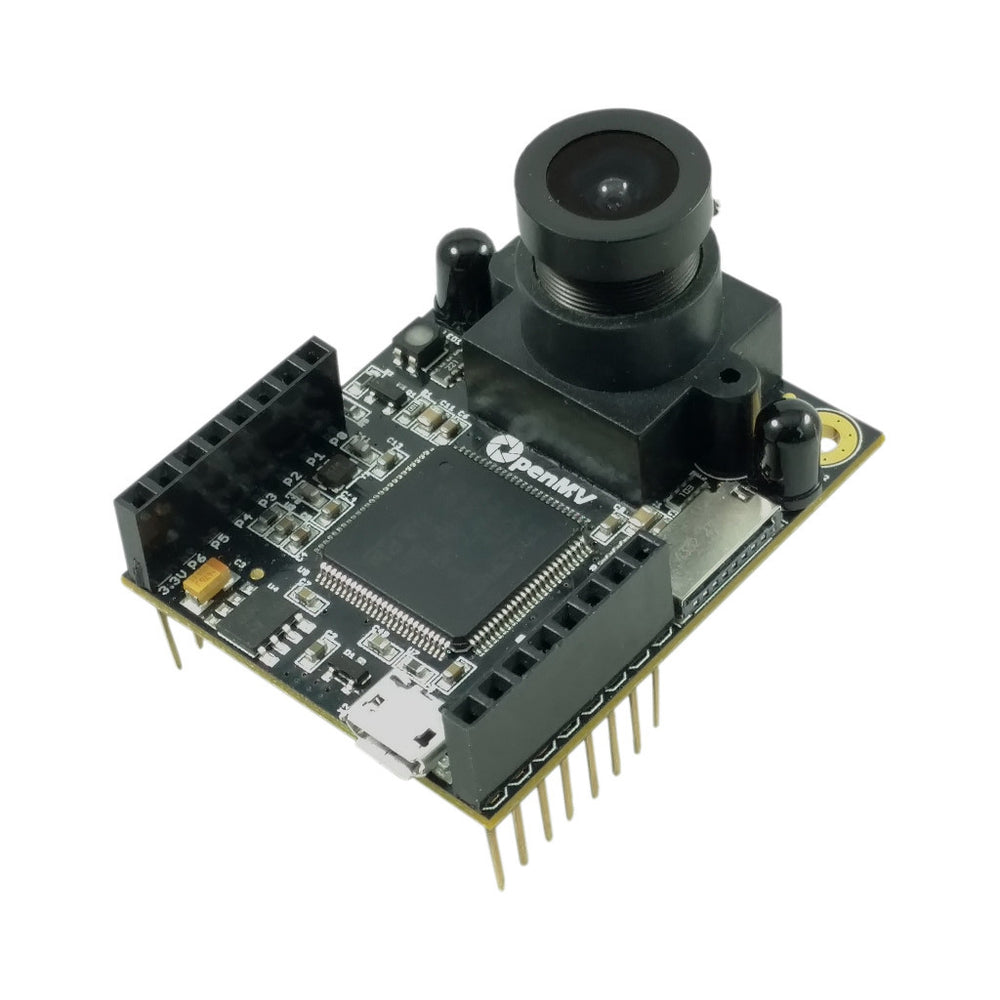
For full datasheet, photos, and dimensions see the OpenMV Cam M4 product page.
Highlights
STMicroelectronics STM32F427 Cortex‑M4 at 180 MHz.
256 KB internal SRAM — no external SDRAM.
1 MB internal flash (no external QSPI flash).
OV7725 sensor (or OV2640 on very early M4 variants) — 320×240 8‑bit grayscale or RGB565; the OV2640 can additionally capture up to UXGA (1600×1200) JPEG.
Full‑speed USB (12 Mb/s) — appears as VCP + USB mass storage to the host.
microSD socket — SD up to 2 GB, SDHC up to 32 GB, SDXC up to 2 TB.
9 I/O pins, 5 V tolerant with 3.3 V output, 25 mA per pin (120 mA total across the header), interrupt‑capable. P6 is not 5 V tolerant when used in ADC or DAC mode.
User RGB LED and two high‑power 850 nm IR LEDs for active lighting in low‑light vision.
Note
The M4 has no on‑board power management chip: there’s no battery connector, no battery charger, no battery‑voltage ADC, no charging / power‑status LEDs, and no hardware power button. Power the board from USB or VIN.
Pinout
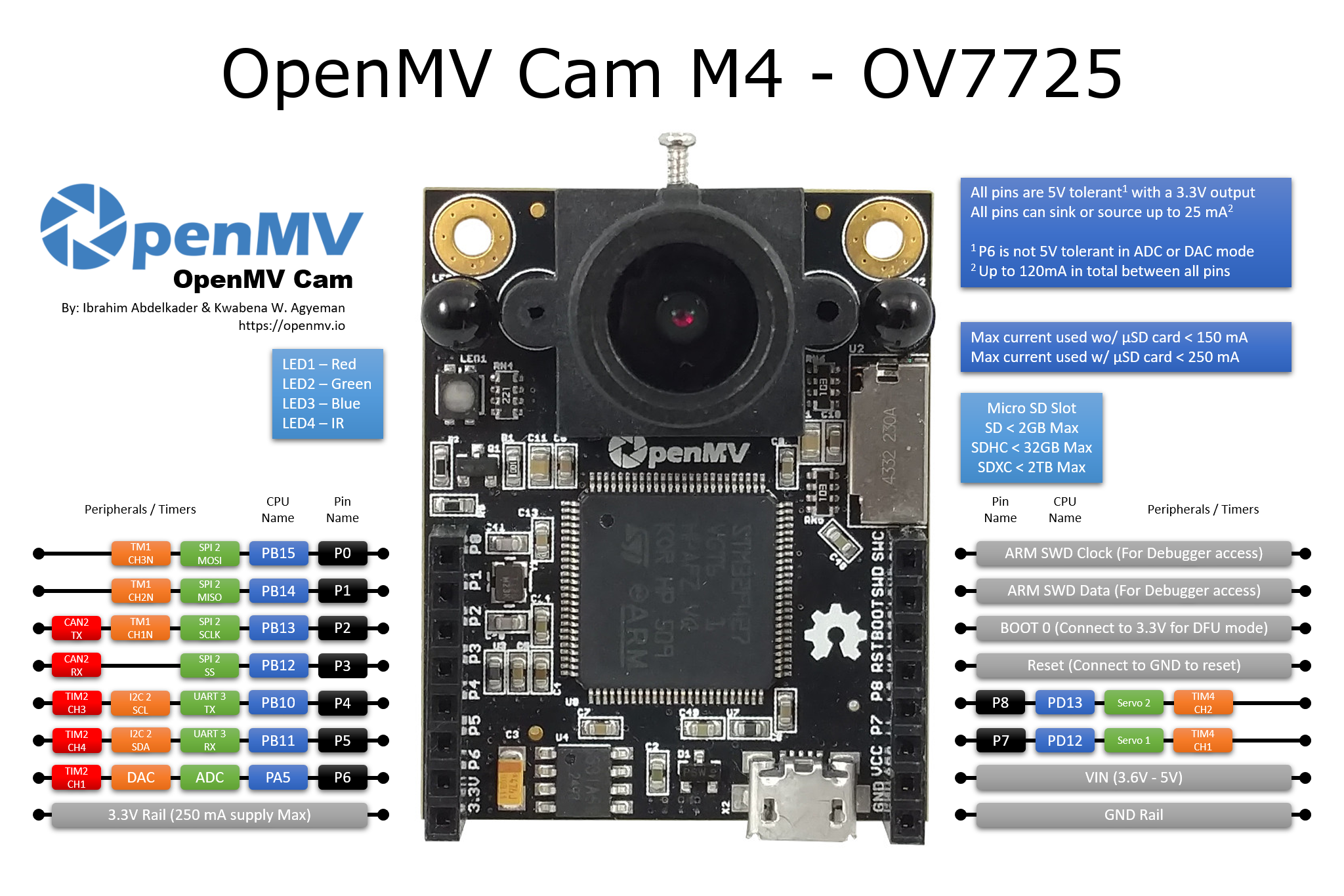
Pin reference
Pin name |
Function |
|---|---|
P0 |
SPI2 MOSI |
P1 |
SPI2 MISO |
P2 |
SPI2 SCK / CAN2 TX |
P3 |
SPI2 NSS (CS) / CAN2 RX |
P4 |
I2C2 SCL / UART3 TX / TIM2 CH3 |
P5 |
I2C2 SDA / UART3 RX / TIM2 CH4 |
P6 |
ADC / DAC / TIM2 CH1 |
P7 |
TIM4 CH1 |
P8 |
TIM4 CH2 |
RESET |
pull to GND to reset the board |
BOOT0 |
pull to 3.3 V at power‑on for DFU / ROM bootloader |
SWCLK |
ARM SWD clock (debugger access) |
SWDIO |
ARM SWD data (debugger access) |
LED_RED |
RGB LED red channel (active low) |
LED_GREEN |
RGB LED green channel (active low) |
LED_BLUE |
RGB LED blue channel (active low) |
LED_IR |
high‑power IR LEDs (both channels driven together) |
Power pins
3.3V — regulated 3.3 V rail. Up to 250 mA available for shields (less if the microSD card is in use). Unlike the newer cameras this pin is bidirectional — see the warning below.
VIN — 3.6 – 5 V input. Powers the board through the on‑board regulator.
GND — common ground.
Note
When both USB and VIN are present, whichever has the higher voltage powers the board — the on‑board diodes simply pick the stronger rail.
Warning
You may power the M4 by feeding 3.3 V directly into the
3.3V pin if you don’t want to go through the on‑board regulator.
In that case, do not also apply VIN or USB power at the same
time — back‑driving the regulator while another supply is active
can permanently damage and destroy the camera.
Tip
Use the battery life estimator to model how long the M4 will run on a battery for a given active / deep-sleep duty cycle.
Recovery and debug pins
RESET — pull to GND to reset the board. Releasing it lets the MCU start up normally.
BOOT0 — pull to 3.3 V while powering the board to enter the STM32 ROM bootloader (DFU mode). OpenMV IDE uses this mode to reflash the on‑board bootloader.
SWCLK and SWDIO are broken out as ordinary header pins (not a dedicated SWD connector). Wire RESET, SWCLK, SWDIO, GND, and 3.3 V to an ST‑LINK or SEGGER J‑Link adapter to debug the board.
Onboard peripherals
LEDs
The M4 has a single user RGB LED plus a pair of high‑power 850 nm IR LEDs:
User RGB LED — software‑controllable, exposed as
LED_RED,LED_GREENandLED_BLUE:from machine import LED LED("LED_RED").on() LED("LED_GREEN").on() LED("LED_BLUE").on()
IR LEDs — both LEDs are driven together through the
LED_IRpin.LED_IRis wired active high in hardware while the firmware treats every other on‑board LED as active low, so uselow()/high()rather thanon()/off()(which would invert the sense):from machine import LED ir = LED("LED_IR") ir.low() # turn IR illumination ON ir.high() # turn IR illumination OFF
Camera sensor
The bundled sensor (OV7725 on standard boards, OV2640 on very early variants) is driven through the csi — camera sensors module:
import csi

cam = csi.CSI()
cam.reset()
cam.pixformat(csi.RGB565)
cam.framesize(csi.QVGA)
cam.snapshot(time=2000)       # let auto‑exposure settle

while True:
    img = cam.snapshot()
The sensor is soldered to the board on the M4 — it is not on a swappable module.
Note
On OV7725 boards the sensor’s FSIN (frame‑sync) pin is wired to the MCU but firmware support for it has not been added.
On OV2640 boards the sensor’s STROBE, FREX (frame exposure), and EXPST (exposure reset) pins are wired to the MCU but firmware support for them has not been added.
Servo headers
The back side of the board has two servo connector solder pads that break out the standard 3‑pin servo header (signal / VIN / GND) for P7 and P8. The signal pins map straight to TIM4 channels 1 and 2 (the same channels used by pyb.Servo), and the V+ pin on each header is wired directly to VIN, so the servos draw their current from the input rail rather than the 3.3 V regulator.
Solder a pair of right‑angle 3‑pin headers into the pads and connect two hobby servos to drive a pan‑and‑tilt mount:
from pyb import Servo

pan  = Servo(1)              # P7 — TIM4 CH1
tilt = Servo(2)              # P8 — TIM4 CH2
pan.angle(0)
tilt.angle(0)
microSD card
When a card is inserted it is mounted automatically at /sdcard and
is usable through the regular file system:
import os

for entry in os.listdir("/sdcard"):
    print(entry)
Bus reference
GPIO
Use machine.Pin to read or drive any of the silkscreened pins. Outputs are 3.3 V CMOS, 5 V tolerant on the input side, and can sink/source up to 25 mA per pin (120 mA total across the whole header).
from machine import Pin

out = Pin("P0", Pin.OUT)
out.on()
out.off()
out.value(1)

inp = Pin("P1", Pin.IN, Pin.PULL_UP)
print(inp.value())
Any input pin can also fire an interrupt on edge transitions:
def handler(pin):
    print("triggered:", pin)

Pin("P1", Pin.IN, Pin.PULL_UP).irq(
    handler, Pin.IRQ_FALLING | Pin.IRQ_RISING,
)
UART
Bus |
TX |
RX |
|---|---|---|
UART3 |
P4 |
P5 |
from machine import UART

uart = UART(3, baudrate=115200)
uart.write("hello")
uart.read(5)
I²C
Bus |
SCL |
SDA |
|---|---|---|
I2C2 |
P4 |
P5 |
from machine import I2C

i2c = I2C(2, freq=400_000)
i2c.scan()
i2c.writeto(0x76, b"hi")
The same hardware can also be used in target (slave) mode through machine.I2CTarget to expose a memory region to another I²C controller:
from machine import I2CTarget

buf = bytearray(32)
target = I2CTarget(2, addr=0x42, mem=buf)
SPI
Bus |
MOSI |
MISO |
SCK |
CS |
|---|---|---|---|---|
SPI2 |
P0 |
P1 |
P2 |
P3 |
from machine import SPI
from machine import Pin

spi = SPI(2, baudrate=10_000_000)
cs = Pin("P3", Pin.OUT, value=1)   # CS is not driven by the SPI peripheral

cs.value(0)
spi.write(b"hello")
cs.value(1)
CAN
Bus |
TX |
RX |
|---|---|---|
CAN2 |
P2 |
P3 |
from machine import CAN

can = CAN(2, 500_000)
can.set_filters(None)
can.send(0x123, b"\xDE\xAD\xBE\xEF")
print(can.recv())
ADC and DAC
P6 is the only user analog pin. It can be used as either a 12‑bit ADC input or a DAC output.
ADC — full‑scale at 3.3 V at the pin:
from machine import ADC
import time

adc = ADC("P6")
while True:
    voltage = adc.read_u16() * 3.3 / 65535
    print(voltage)
    time.sleep_ms(100)
DAC — through
pyb.DAC. The 8‑bit value covers 0–3.3 V:from pyb import DAC dac = DAC("P6") voltage = 1.65 dac.write(int(voltage / 3.3 * 255))
In ADC or DAC mode P6 is 3.3 V tolerant only — do not feed it 5 V.
PWM
Pin |
Timer / channel |
|---|---|
P4 |
TIM2 CH3 |
P5 |
TIM2 CH4 |
P6 |
TIM2 CH1 |
P7 |
TIM4 CH1 |
P8 |
TIM4 CH2 |
Note
TIM1 is reserved by the firmware to generate the camera sensor’s pixel clock, so the TIM1 channels that are physically on P0/P1/P2 cannot be used for user PWM without breaking the camera.
TIM4 is shared with pyb.Servo — instantiating a servo reconfigures the whole timer for 50 Hz operation, so don’t mix machine.PWM on P7/P8 with pyb.Servo in the same script.
Drive any of them via machine.PWM:
from machine import Pin, PWM

pwm = PWM(Pin("P7"), freq=1_000, duty_u16=32768)
Software bit‑banged buses
machine.SoftI2C and machine.SoftSPI work on any GPIO if you need an extra bus.
Thermal sensor (off‑board)
The firmware includes the fir — thermal sensor driver (fir == far infrared) driver for externally wired thermal imagers:
MLX90621 — 16 × 4 IR array
MLX90640 — 32 × 24 IR array
MLX90641 — 16 × 12 IR array
AMG8833 — 8 × 8 IR array
Wire the module to the board’s I²C bus and read frames with
fir.init() + fir.snapshot():
import time
import image
import fir

fir.init()                          # auto‑detects the sensor
clock = time.clock()

while True:
    clock.tick()
    try:
        img = fir.snapshot(x_scale=5, y_scale=5,
                           color_palette=image.PALETTE_IRONBOW,
                           hint=image.BICUBIC,
                           copy_to_fb=True)
    except OSError:
        continue
    print(clock.fps())
The fir driver only talks to the sensor over I²C 2 — wire
the module to P4 (SCL) and P5 (SDA).
Timing
time
The time module covers blocking delays, monotonic ticks, and
elapsed‑time measurement:
import time

time.sleep(1)              # seconds
time.sleep_ms(500)
time.sleep_us(10)

start = time.ticks_ms()
# ...do work...
elapsed = time.ticks_diff(time.ticks_ms(), start)
Virtual timers
machine.Timer schedules periodic or one‑shot
callbacks without consuming a hardware timer slot. Pass -1 as the
id to use a virtual (software) timer:
from machine import Timer

one_shot = Timer(-1)
one_shot.init(period=5_000, mode=Timer.ONE_SHOT,
              callback=lambda t: print("once"))

periodic = Timer(-1)
periodic.init(period=2_000, mode=Timer.PERIODIC,
              callback=lambda t: print("tick"))
Period values are in milliseconds. Call deinit()
to stop and release the slot.
Real‑time clock
machine.RTC keeps wall‑clock time across resets:
from machine import RTC

rtc = RTC()
rtc.datetime((2026, 4, 30, 4, 12, 0, 0, 0))   # Y, M, D, weekday, h, m, s, subsec
print(rtc.datetime())
Watchdog
machine.WDT resets the board if the application hangs. Once started it can’t be stopped or reconfigured — feed it periodically inside your main loop:
from machine import WDT

wdt = WDT(timeout=5_000)   # 5 second window
while True:
    # ...do work...
    wdt.feed()
Boot and runtime info
USB bootloader window
On every power‑up the camera runs a short bootloader (a few seconds)
that lets OpenMV IDE update the firmware without the user having to
enter DFU mode. After the window expires the bootloader hands off to
boot.py and then main.py.
A running script can re‑enter the bootloader on demand by calling
machine.bootloader():
import machine

machine.bootloader()
Filesystem and boot order
The M4 firmware mounts up to three filesystems on boot:
Internal flash — always mounted at
/flash. Holdsmain.pyandREADME.txtby default; created on the very first boot.microSD card — if a card is inserted it is mounted at
/sdcard.ROMFS — read‑only, memory‑mapped filesystem at
/romused to ship large data assets (e.g. AI models) that benefit from zero‑copy access. Mounted automatically by MicroPython at startup, before any user Python runs.
After mounting, the working directory is set to /sdcard when the
card is present, otherwise /flash. The interpreter then runs
scripts from that directory:
boot.pyis executed on every soft reset (cold boot,Ctrl‑Dfrom the REPL, or whenever the running script returns).main.pyis executed only on cold boot, immediately afterboot.py. Subsequent soft resets re‑runboot.pybut drop straight to the REPL — to re‑runmain.pyyou have to fully reset the board.
Dropping a boot.py or main.py onto the SD card overrides the
copy in flash without touching it — both files are looked up in the
boot directory (/sdcard when the card is mounted, otherwise
/flash).
The default main.py shipped on a freshly flashed board just blinks
the user RGB LED’s blue channel as a heartbeat (two short pulses,
short gap), so you can tell the firmware booted cleanly without any
host attached.
sys.path is extended to include all three filesystems and their
lib/ subdirectories, so importable modules can live in
/flash/lib, /sdcard/lib, or /rom/lib.
To force the system to ignore an inserted SD card (for example to run
the flash main.py even with a card present), create an empty file
named SKIPSD at the root of /flash.
When connected over USB, the boot filesystem (/sdcard if a card is
present, otherwise /flash) also enumerates as a USB mass‑storage
drive on the host, letting you edit boot.py, main.py, and any
other files directly. Eject the drive before resetting the camera
so the host flushes its cached writes.
Note
Because the OS treats the drive as a passive block device, files created or modified by code running on the OpenMV Cam will not show up until the host re‑mounts the drive. If both the OS and the OpenMV Cam write the same filesystem at the same time, the OS will win and overwrite changes made by the camera. Use the SD card for any data the script writes back, and remount before reading those files from the host.
Note
The user RGB LED’s red channel may briefly light up while the host is reading from or writing to the USB mass‑storage drive — this is a firmware‑driven activity indicator, not a fault.
Storage sizes
The M4 ships with:
/flash— 32 KB FAT filesystem, read/write./rom— 128 KB read-only memory-mapped ROMFS./sdcard— full size of whatever microSD card is inserted (when present), read/write.
Hard‑fault indicator
If the user RGB LED is rapidly cycling through all colours — fast enough that it tends to look like a twinkling white LED rather than distinct hues — the firmware has hit an unrecoverable hard fault. Reflash the firmware to recover; if reflashing doesn’t help, the board may be physically damaged.
Software libraries
See the library index for the full list of modules — including which ones are unique to the M4 build.