
 OpenMV MicroPython
6.1. Microcontrollers
The OpenMV Cam runs on a microcontroller (MCU): a single chip that combines a CPU, working memory (RAM), program storage (flash), and a set of peripherals – hardware blocks for interacting with the outside world.
The peripherals are the interesting part. Each one is a piece of silicon dedicated to one job: driving a pin high or low, measuring an analog voltage, clocking bytes out over a serial bus. The CPU configures and reads each peripheral through registers – fixed memory addresses the hardware watches and updates.
MicroPython wraps those registers in classes inside the
machine module. machine.Pin(...) returns an object
controlling a general-purpose input/output (GPIO) pin – a
wire the chip can hold high (around 3.3 V) or low (around
0 V), or read as one of those two states when something
external drives it. machine.ADC(...) exposes the
analog-to-digital converter, which measures the voltage on a
pin and reports it as a number. machine.UART(...) runs a
universal asynchronous receiver/transmitter (UART) – a
peripheral that sends and receives bytes one bit at a time over
a pair of wires, TX (transmit) and RX (receive). Other classes
cover the rest of the peripherals. The script reads and writes Python objects; MicroPython
translates each access into the corresponding register reads
and writes, and those move bits on physical wires.
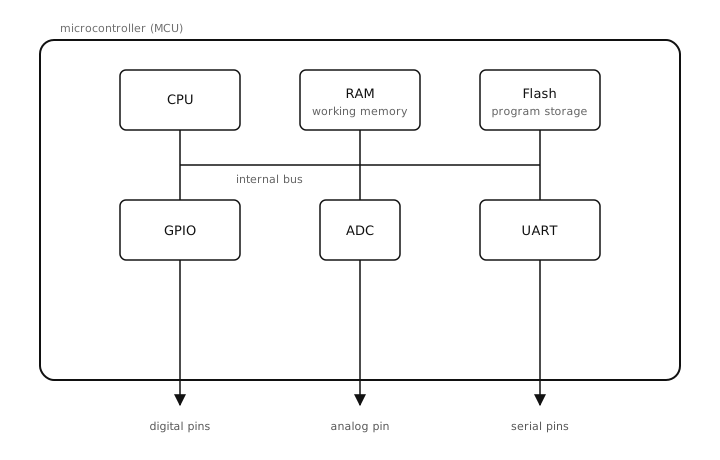
An MCU packages CPU, memory, and peripherals into a single
chip. Each peripheral is exposed to Python by a class in
the machine module.
6.1.1. The main loop
Almost every microcontroller program shares the same shape:
one-time setup at the top of the script (import modules,
configure pins, open buses), then an infinite while True:
loop at the bottom. Inside the loop, the program reads
inputs, makes decisions, and updates outputs over and over.
The loop is the program; when the script exits, the device
stops doing anything.
# setup, runs once
from machine import Pin
led = Pin("P0", Pin.OUT)

# main loop, runs forever
while True:
    led.value(1)
    # ... do work ...
    led.value(0)
    # ... do other work ...
This shape – setup once, then loop forever – is the main loop pattern. Everything that follows is about what goes inside it.
6.1.2. Real-time control
A desktop program runs alongside many others. The operating system schedules its work across one or more threads – independent streams of execution it switches between millisecond by millisecond. When one thread waits for I/O (disk, network, the user moving the mouse), the OS hands the CPU to another. The program is mostly event-driven: the window manager calls into your code when input arrives, the HTTP library resumes your code when bytes arrive on the socket. Some larger thing is calling you.
A microcontroller program is the opposite. By default there
is no operating system, no scheduler, and no other thread.
The main loop just shown is the only loop. Peripherals fire
interrupts or expose status flags; the loop polls them or
handles the interrupts directly. If the loop stalls in a
time.sleep_ms(1000), the device does nothing for that
second; there is no other thread to fill the gap.
Two consequences fall out and apply everywhere:
Time is real. Reading a pin twice in a tight loop takes microseconds; sleeping for ten milliseconds means ten milliseconds in which nothing else happens. The non-blocking timing pattern is the response.
Hardware is real. Setting
machine.Pin.valueto1puts roughly 3.3 V on a physical wire; setting it to0puts roughly 0 V there. Other parts of the circuit see that voltage immediately – including any components the pin can damage if it is driven wrong.