
 OpenMV MicroPython
6.2. Timing
The time module groups together functions for sleeping
(pausing the script for a known duration) and for measuring how
long something takes. On a microcontroller these are not nice-
to-haves; they are how the script paces interactions with the
outside world – how long to hold a pin high, how long to wait
between samples, how long since a button was last pressed.
6.2.1. Sleeping
Three sleep functions block the script for the requested duration:
time.sleep(s)– pause forsseconds. Accepts a float, sotime.sleep(0.5)waits half a second.time.sleep_ms(ms)– pause formsmilliseconds. Argument must be an integer.time.sleep_us(us)– pause forusmicroseconds.
import time

print("now")
time.sleep_ms(500)
print("half a second later")
Use time.sleep_ms() for typical “wait a bit” needs and
time.sleep_us() only when the timing must be tight. Plain
time.sleep() is also fine, but the integer-argument
variants avoid floating-point conversion and read more
naturally for short intervals.
Sleep is a blocking call. While the script is sleeping, it is
doing nothing else – not reading a pin, not servicing a UART,
not updating an LED. Reach for sleep when blocking is what
you want; use the non-blocking pattern below when it is not.
6.2.2. Reading the clock
To measure how long a piece of code takes, read the clock before and after:
time.ticks_ms()– the current tick value in milliseconds.time.ticks_us()– the same in microseconds.
import time

start = time.ticks_ms()
do_work()
elapsed = time.ticks_ms() - start
print("took", elapsed, "ms")
This works most of the time. The tick counter rolls over (wraps back to zero) after a large but finite number of ticks, and naive subtraction across that wrap produces a wildly wrong negative or positive number.
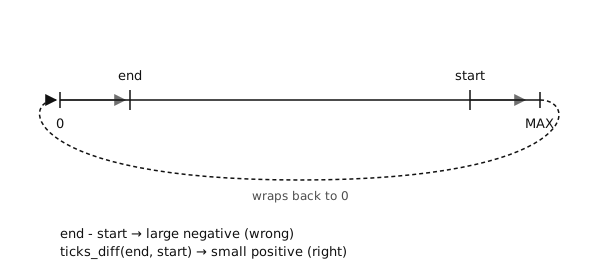
The tick counter wraps back to zero when it reaches the integer limit. A plain subtraction across that wrap is wrong.
6.2.3. ticks_diff
To get the elapsed ticks correctly, even across a wrap, use
time.ticks_diff():
import time

start = time.ticks_ms()
do_work()
elapsed = time.ticks_diff(time.ticks_ms(), start)
print("took", elapsed, "ms")
The argument order is ticks_diff(later, earlier) – the
expression reads “how far is later after earlier”. The
result is a signed integer; positive means later is in
fact later, negative means it is in the past. The function
handles the wrap internally.
Tip
Always pair time.ticks_ms() / time.ticks_us()
with time.ticks_diff(). The raw subtraction is correct
most of the time; the time it is wrong is when a script
has been running for a long time – usually the worst time
to debug a timing glitch.
6.2.4. Non-blocking timing
A microcontroller script usually has more than one thing to do
“at the same time”: read a button, blink an LED, poll a
sensor, service a UART. sleep is no good for that – while
one sleep is running, the other tasks are stalled.
The standard pattern is to keep a deadline per task, and to
check each loop whether the deadline has passed. The decision
to act is built on time.ticks_diff(), never on
sleep:
import time

next_blink = time.ticks_ms()
next_poll  = time.ticks_ms()
state = False

while True:
    now = time.ticks_ms()

    if time.ticks_diff(now, next_blink) >= 0:
        state = not state
        # update LED here
        next_blink = time.ticks_add(next_blink, 500)

    if time.ticks_diff(now, next_poll) >= 0:
        # read sensor here
        next_poll = time.ticks_add(next_poll, 100)
The LED toggles every 500 ms, the sensor is polled every 100
ms, and neither task blocks the other. time.ticks_add()
advances a deadline by a known increment without falling foul
of the wrap.
This shape – a single loop, several timed tasks, no sleep
in the body – shows up everywhere hardware code goes: software
debouncing of switches, motor sequencing, UART read timeouts.
The same three functions (time.ticks_ms(),
time.ticks_diff(), time.ticks_add()) cover every
case.