
 OpenMV MicroPython
2.9. Dictionaries
A dictionary is a mapping from keys to values. Each key is looked up directly; the dictionary remembers what value was last associated with that key.
2.9.1. Creating dictionaries
Use braces with key: value pairs, or the dict
constructor:
empty   = {}
person  = {"name": "OpenMV", "id": 42}
counts  = dict(a=1, b=2, c=3)            # keyword form
pairs   = dict([("x", 1), ("y", 2)])     # from a list of pairs
Values can be any types – strings, numbers, lists, even other dicts:
config = {
    "name":  "OpenMV",
    "id":    42,
    "width": 320,
    "tags":  ["red", "round"],
}
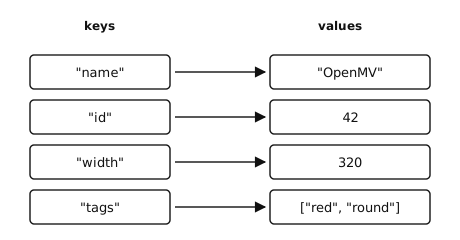
Each key in a dictionary maps to exactly one value.
2.9.2. Access and membership
Indexing with [] retrieves the value for a key. A missing key
raises KeyError:
>>> person = {"name": "OpenMV", "id": 42}
>>> person["name"]
'OpenMV'
>>> person["missing"]
Traceback (most recent call last):
  File "<stdin>", line 1, in <module>
KeyError: 'missing'
For a forgiving lookup, use dict.get(). It returns
None for a missing key, or a value you pass as the second
argument:
>>> person.get("name")
'OpenMV'
>>> person.get("missing")            # returns None
>>> person.get("missing", "n/a")
'n/a'
The in keyword tests for key membership – not value:
>>> "name" in person
True
>>> "OpenMV" in person
False
2.9.3. Adding, updating, and removing
Assigning to d[key] adds the entry if the key is new and
overwrites it if it already exists:
>>> person["seen"] = 1
>>> person["seen"] = 2               # overwrites
>>> person
{'name': 'OpenMV', 'id': 42, 'seen': 2}
Removal has a few forms:
del d[key]– remove an entry; raisesKeyErrorif the key is missing.dict.pop()– remove and return the value; an optional default lets you avoid the exception.dict.clear()– remove every entry.
dict.update() merges another dictionary (or a list of
(key, value) pairs) into the receiver, overwriting any
matching keys:
>>> person.update({"id": 100, "owner": "alice"})
>>> person
{'name': 'OpenMV', 'id': 100, 'seen': 2, 'owner': 'alice'}
2.9.4. Iterating
Iterating a dictionary directly yields its keys, in insertion order:
for k in person:
    print(k)
Three views give explicit access:
dict.keys()– the keys (same as iterating the dict).dict.values()– the values.dict.items()–(key, value)tuples, perfect for unpacking in a loop.
for key, value in person.items():
    print(key, "=", value)
2.9.5. What can be a key
Dictionary keys must be hashable – their value cannot change over their lifetime. Common hashable types are:
Mutable types like list, dict, and
bytearray cannot be keys; using one raises
TypeError. Tuples of immutable values are the standard way
to key a dictionary by a composite identifier such as a 2-D grid
coordinate:
>>> grid = {}
>>> grid[(0, 0)] = "start"
>>> grid[(5, 7)] = "end"
2.9.6. Length
len() returns the number of entries:
>>> len(person)
4