
 OpenMV MicroPython
2.2. Variables and basic types
A variable is a name you bind to a value with the = operator.
After assignment, the name can be used anywhere the value can:
width = 320
height = 240
pixels = width * height
print(pixels)               # prints 76800
The right-hand side of = is evaluated first, then the result is
bound to the name on the left. Reading a name that was never
assigned raises NameError.
A variable is just a label. It points at a value – the value lives somewhere else, and the same value can have any number of labels.
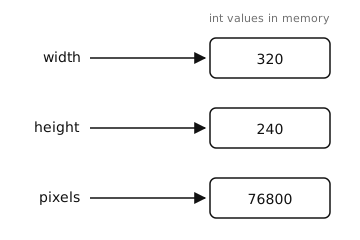
Variables are labels pointing at values. Reassigning a variable moves the label; it does not change the value the label used to point at.
2.2.1. Naming rules
Names start with a letter or underscore and may contain letters, digits, and underscores.
frame_countand_internalare fine;1st_frameis a syntax error.Names are case-sensitive:
Widthandwidthare two different variables.Avoid reusing built-in names like
list,str,id(), orprint()– shadowing them does not raise an error, but the original built-in becomes unreachable for the rest of the script.Convention:
snake_casefor variables and functions,ALL_CAPSfor constants you do not intend to change,CamelCasefor class names.
2.2.2. Basic types
Every value in Python has a type that determines what operations it supports. The four types you will write the most are:
int – whole numbers, positive or negative. MicroPython integers grow as large as memory allows. Literals are written as plain digits:
0,42,-7. Hex (0x1A), octal (0o17), and binary (0b1010) literals are also valid and useful for registers and bitmasks.float – numbers with a decimal point or an exponent:
3.14,1.0,-0.5,2e6(= 2,000,000.0). All floats on the camera are IEEE 754 32-bit – precise to about seven significant digits.bool – one of the two literals
TrueorFalse(note the capitalisation).str – text, written as characters between single or double quotes:
"hello",'OpenMV'. Both quote styles are equivalent; pick whichever lets you avoid escaping the quote characters that appear inside the string.
There is also a fifth value worth knowing immediately:
None – the single value of type
NoneType. Used to mean “no value” or “not yet set”. Functions that do not explicitly return anything implicitly returnNone.
2.2.3. Checking and converting types
The built-in type() function returns the type of any value:
>>> type(42)
<class 'int'>
>>> type(3.14)
<class 'float'>
>>> type("hello")
<class 'str'>
Each type also doubles as a conversion function. Pass it a value of a different type and you get the equivalent value of the new type back – when the conversion is well-defined:
>>> int("42")
42
>>> int(3.9)
3                           # truncates toward zero, not rounds
>>> float("1.5")
1.5
>>> str(255)
'255'
>>> bool(0), bool(1), bool("")
(False, True, False)
Conversions that are not well-defined raise ValueError:
>>> int("hello")
Traceback (most recent call last):
  File "<stdin>", line 1, in <module>
ValueError: invalid syntax for integer with base 10
2.2.4. Reassignment and dynamic typing
A name can be reassigned to a value of any type at any time. The following is legal:
x = 42
x = "now I'm a string"
x = 3.14
Python does not bind a variable to a type. Code that depends on
x being an integer simply expects an integer at the point
where it uses it; if it gets something else, you get a runtime
TypeError.
Note
Reassigning x does not change the value the old binding
pointed to. If two names share the same value, reassigning one
does not affect the other:
a = [1, 2, 3]
b = a                       # both point at the same list
a = "different now"
print(b)                    # still [1, 2, 3]
Mutating a shared value is different: a method like
list.append changes the value the binding points at, so
every other name pointing at that same value sees the change.