
 OpenMV MicroPython
2.4. Strings
A string is a sequence of Unicode characters written between quotes. Single quotes and double quotes are equivalent – pick the style that lets you avoid escaping the quotes that appear inside the text:
name    = "OpenMV Cam"
company = 'OpenMV, LLC'
message = "She said \"hi\""        # both styles can be used
same    = 'She said "hi"'
Triple-quoted strings ("""...""" or '''...''') span
multiple lines and preserve the newlines literally:
banner = """boot ok
firmware v1.28
"""
print(banner)
Output:
boot ok
firmware v1.28
2.4.1. Escape sequences
Inside a regular string, \ introduces a special character:
\n– newline\t– tab\\– a literal backslash\'/\"– a literal quote (when it would otherwise end the string)\xHH– the character with hex codeHH\uHHHH– the Unicode codepointHHHH
When a string contains many backslashes, prefix the literal with
r to make it a raw string. Backslashes are then taken
literally – \n stays two characters long instead of being
replaced with a newline:
win_path = r"C:\Users\OpenMV\camera.py"
literal  = r"\n is two characters, not a newline"
2.4.2. Concatenation and repetition
Two strings are joined with +; a string is repeated with
*:
greeting = "Hello, " + name + "!"
line     = "-" * 40              # 40-character separator
Repeated + in a loop allocates a fresh string on every
iteration. For building larger strings from many pieces, use
str.join().
2.4.3. Length, indexing, and slicing
len() returns the number of characters in a string. Indexing
with [] returns a one-character string at the given position;
negative indices count from the end:
>>> s = "OpenMV"
>>> len(s)
6
>>> s[0]
'O'
>>> s[-1]
'V'
A slice s[start:stop] returns the substring from position
start up to but not including stop. Either end can be
omitted to mean “the beginning” or “the end”, and an optional
third value s[start:stop:step] lets you skip characters.
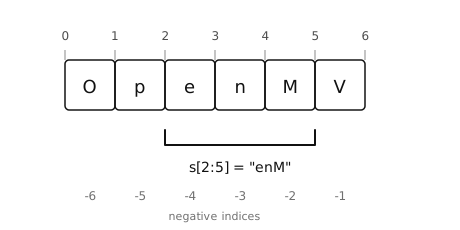
Slice positions sit between characters. s[2:5] selects
the characters in positions 2, 3, and 4.
>>> s = "OpenMV"
>>> s[2:5]
'enM'
>>> s[:3]
'Ope'
>>> s[3:]
'nMV'
>>> s[::-1]
'VMnepO'                     # whole string, reversed
An out-of-range slice silently returns whatever portion exists –
s[100:200] is the empty string "", not an error. Indexing
out of range, on the other hand, raises IndexError.
2.4.4. Immutability
Strings cannot be modified in place. Operations that look like they mutate a string actually return a new string and leave the original alone:
>>> name = "OpenMV"
>>> name.upper()
'OPENMV'
>>> name
'OpenMV'                     # unchanged
To “change” a string, rebind the name to the new value:
name = name.upper().