
 OpenMV MicroPython
2.29. Struct and binary data
The struct module packs Python values into a fixed binary
layout and unpacks bytes back into Python values. Reach for it
when working with a binary file format, a network protocol, or a
device that exchanges fixed-size records.
Two functions cover most cases:
struct.pack()– take Python values and a format string, return abytesobject of the exact layout.struct.unpack()– take a format string and abytesobject, return a tuple of Python values.
2.29.1. Format strings
A format string lists one code per field in the record. The codes describe both the size and the interpretation of each field.
Python’s int has no fixed size – it grows to fit
whatever value you assign. Binary formats do have fixed
sizes: every integer field uses an agreed number of bytes.
struct converts between unbounded Python ints and these
fixed-size representations.
An integer’s width is the number of bits it uses. One byte is eight bits. The lowercase code is the signed variant; the uppercase code is the unsigned one (only non-negative values):
b/B– 8-bit (one byte).-128..127signed,0..255unsigned.h/H– 16-bit (two bytes).-32768..32767signed,0..65535unsigned.i/I– 32-bit (four bytes). About ±two billion signed, four billion unsigned.q/Q– 64-bit (eight bytes). Effectively unbounded for everyday use.
Pick a width that comfortably covers the range you expect.
Packing a value outside the declared range either silently
wraps around or raises struct.error, depending on the
build.
The remaining common codes are for floats and byte strings:
f– 32-bit float (single precision; about seven decimal digits). Python’s regularfloaton MicroPython is already this size, so packing one intofis lossless.d– 64-bit float (double precision; about fifteen decimal digits). Packing a 32-bit MicroPythonfloatintodwidens it to eight bytes but adds no precision.s– fixed-length byte string, preceded by a count (8sfor an eight-byte field).
2.29.2. Byte order
A multi-byte integer can be stored in memory two ways. The
number 0x12345678 in a 32-bit field is laid out like this:
Little-endian – least significant byte first:
78 56 34 12.Big-endian – most significant byte first:
12 34 56 78.
Both encode the same value; they only disagree on which end of the field is the low byte. A file written by one system is garbled when read by the other if the byte order does not match.
The leading character of the format string picks the order:
<– little-endian. Common on x86 and ARM.>– big-endian. Common in network protocols.!– network order, equivalent to>.
Without a leading character, native byte order and native
alignment are used; setting < or > explicitly removes
that ambiguity and is usually what you want when reading a file
or talking to another machine.
Note
The OpenMV Cam is little-endian – the same as its host
PC. Use < in format strings for camera-local files and
for binary data that travels to or from a desktop. Use >
(or !) for network protocols and for any format whose
specification calls for big-endian.
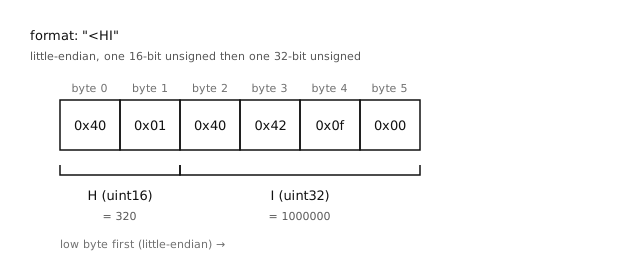
"<HI" packs a 16-bit value followed by a 32-bit value
into six little-endian bytes.
2.29.3. Packing
import struct

blob = struct.pack("<HI", 320, 1000000)
print(blob, len(blob))
Output:
b'@\x01@B\x0f\x00' 6
The <HI format produces six bytes: two for the H field
and four for the I field, all little-endian. Pass exactly
the number of values the format expects – a mismatch raises
struct.error.
2.29.4. Unpacking
width, count = struct.unpack("<HI", blob)
print(width, count)
Output:
320 1000000
struct.unpack() always returns a tuple, even when the
format describes a single field. Unpack it on the same line for
readability.
2.29.5. Fixed-length byte strings
The s code reads or writes a chunk of bytes verbatim. The
count goes before the s – 4s means “four bytes
treated as a single byte string”. This is the usual way to
embed a magic value, a fixed-size tag, or a padded name field
in a record:
header = struct.pack("<4sHI", b"OMV0", 320, 1000000)
print(header)
Output:
b'OMV0@\x01@B\x0f\x00'
The first four bytes are the literal magic b"OMV0"; the
next two are the H field (320); the last four are the I
field (1000000). Unpacking returns the bytes back as a
bytes object:
magic, width, count = struct.unpack("<4sHI", header)
print(magic, width, count)
Output:
b'OMV0' 320 1000000
If the source value is shorter than the declared count, the
result is padded on the right with \x00; if longer, the
excess bytes are silently dropped:
struct.pack("4s", b"hi")        # b'hi\x00\x00'
struct.pack("4s", b"toolong")   # b'tool'
The count is a byte length, not a character count – s
deals in raw bytes, so a UTF-8 string with multi-byte characters
needs to be .encode()’d and counted in bytes first.
2.29.6. Sizing and partial reads
struct.calcsize() returns the number of bytes a format
string consumes:
struct.calcsize("<HI") # 6
When reading a stream of records from a file, read exactly that many bytes per record:
record_size = struct.calcsize("<HI")
with open("data.bin", "rb") as f:
    while True:
        chunk = f.read(record_size)
        if len(chunk) < record_size:
            break
        width, count = struct.unpack("<HI", chunk)
        print(width, count)
A short read at the end of the file produces a chunk smaller
than record_size – treat that as the end-of-stream
condition rather than trying to unpack a partial record.