
 OpenMV MicroPython
2.40. Memory and garbage collection
MicroPython manages memory the same way CPython does: every object lives on the heap, and a garbage collector (GC) frees objects that nothing references anymore. On a device with a few hundred kilobytes of RAM, paying attention to how the heap is being used is occasionally necessary; on desktop Python, it rarely is.
2.40.1. The heap
The heap is the region of RAM – on most OpenMV cameras actually split across more than one physical memory pool – that the runtime hands out to Python objects. Each time a Python expression creates a new object (a list, a string, a dict, a tuple, anything that is not a small integer or a singleton), a block of bytes comes out of the heap to hold it. When the GC notices that an object is unreachable, it returns the block to the free pool it came from.
Two functions in the gc module are worth knowing:
gc.mem_free()– approximate number of free bytes on the heap right now.gc.collect()– run a collection cycle immediately instead of waiting for the runtime to trigger one.
import gc

print("before:", gc.mem_free())
big = [0] * 10000
print("after :", gc.mem_free())
del big
gc.collect()
print("freed :", gc.mem_free())
The exact numbers depend on the build; the direction of the
change is what matters: allocating big things decreases
mem_free, and dropping the references plus a gc.collect
gives the heap back.
2.40.2. Fragmentation
The free pool is not magically contiguous. As objects come and
go at different lifetimes, the free space breaks into smaller
and smaller chunks even when its total size is still large.
Allocating an object bigger than the largest single free chunk
fails with MemoryError – even though there is technically
enough total free RAM.
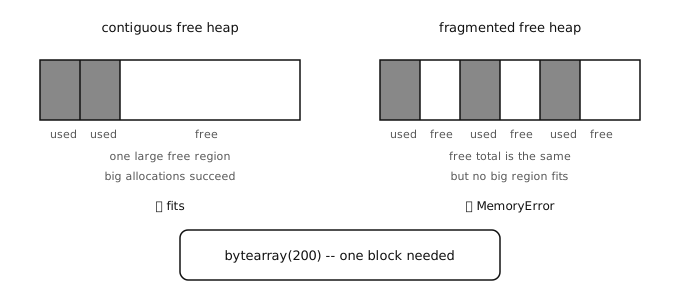
The same total free RAM can hold a big buffer (left) or refuse to (right) depending on how fragmented it is.
Fragmentation is mostly a worry on long-running scripts that keep allocating and freeing differently-sized buffers. The single most effective mitigation is to pre-allocate long-lived buffers near the start of the program, before lots of short-lived allocations have had a chance to scatter them.
2.40.3. Pre-allocation
Two patterns make the heap behave:
Allocate fixed-size buffers once and reuse them, instead of building a new list or
bytearrayper iteration.Pull constants and lookup tables out of inner loops so they are created once.
buf = bytearray(64)        # one allocation, reused below

def fill(value):
    for i in range(len(buf)):
        buf[i] = value

fill(0)
fill(255)
Compare to a version that creates a new bytearray inside the loop: each iteration produces garbage that the GC has to clean up later. The pre-allocated version makes no garbage at all.
2.40.4. When to call gc.collect
gc.collect() is normally automatic – the runtime triggers
it when allocations cannot find enough free memory. Calling it
by hand is useful in two situations:
Right after a large batch of objects has gone out of scope, to free them immediately instead of waiting for the next allocation to pay the cost.
Right before a section that needs a known maximum amount of free memory, to avoid the GC firing partway through a time-sensitive operation.
Sprinkling gc.collect calls everywhere does not make a
program faster – collection itself takes time. Use it
deliberately, at points where the cost of an unscheduled
collection would be worse than the cost of one you ran on
purpose.