
 OpenMV MicroPython
2.6. Text vs bytes
Python has two sequence types for raw character data:
str– a sequence of Unicode codepoints. Used for all human-readable text: file paths, log messages, JSON payloads.bytes– a sequence of integers in the range 0 – 255. Used for raw binary data: UART frames, image buffers, network packets, register values.
They cannot be mixed without an explicit conversion. Passing a
str to a hardware write method raises
TypeError, and the inverse is also rejected.
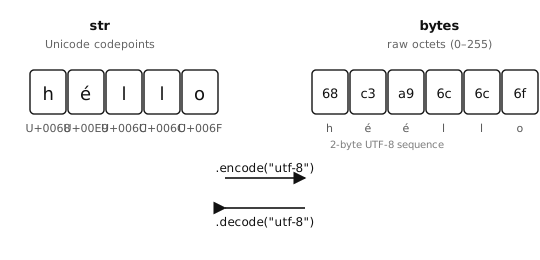
A str stores Unicode characters; a bytes
stores raw octets. Going between them is encoding
(str → bytes) and decoding (bytes → str).
2.6.1. bytes literals
A bytes literal is a string-like literal prefixed with b:
header  = b"OMV"
crlf    = b"\r\n"
payload = b"\x01\x02\x03"
Only ASCII characters are allowed directly inside a bytes
literal; non-ASCII values must be written as \xHH hex escapes.
2.6.2. Encoding and decoding
str.encode()converts a string to bytes using a named encoding (default"utf-8").bytes.decode()does the reverse.
>>> "hello".encode()
b'hello'
>>> "héllo".encode()
b'h\xc3\xa9llo'              # é is two bytes in UTF-8
>>> b"hello".decode()
'hello'
UTF-8 is the default and the right choice for anything that might
contain non-ASCII characters. Use "ascii" only when the data
is guaranteed to be plain ASCII; that way a stray non-ASCII byte
raises UnicodeError instead of silently passing through.
2.6.3. Indexing and slicing
A bytes value behaves like a sequence of integers when indexed, not a sequence of one-byte strings:
>>> data = b"abc"
>>> data[0]
97                           # the int 97, not 'a'
>>> data[0:1]
b'a'                         # slicing returns bytes
A common mistake is comparing data[0] == "a" and being
surprised it is False – data[0] is an integer, not
a one-character string, so the two values can never match.
2.6.4. ord and chr – bridging characters and integers
Because indexing a bytes returns an integer but the rest
of the program likely thinks in characters, Python provides two
built-ins for moving between them:
ord()– takes a one-character string and returns its integer codepoint.chr()– the inverse: given an integer, returns the one-character string for that codepoint.
>>> ord("a")
97
>>> chr(97)
'a'
>>> ord("A"), chr(0x41)
(65, 'A')
For ASCII characters the codepoint equals the byte value, so
ord("a") and b"a"[0] both give 97. That makes byte
comparisons read in terms of the character you actually care
about:
>>> data = b"abc"
>>> data[0] == ord("a")          # instead of the magic number 97
True
And chr() is handy for logging or debugging when you want to
see the printable form of a byte:
>>> chr(data[0])
'a'
For non-ASCII characters ord() returns the Unicode
codepoint, which is not the same as any single byte in the
encoded form; the byte representation depends on the encoding.
2.6.5. bytearray for mutable buffers
bytes is immutable – every “modification” returns a new
object and leaves the original alone. For data you intend to
modify, append to, or fill in piece by piece, use
bytearray. It holds the same content as bytes
but supports in-place mutation:
>>> s = b"hello"
>>> s[0] = ord("H")
Traceback (most recent call last):
  File "<stdin>", line 1, in <module>
TypeError: 'bytes' object does not support item assignment

>>> s = bytearray(b"hello")
>>> s[0] = ord("H")
>>> s
bytearray(b'Hello')
2.6.5.1. Creating a bytearray
The bytearray constructor accepts several inputs:
bytearray(8)– a buffer of 8 zero bytes.bytearray(b"hello")– a mutable copy of a bytes value.bytearray("hello", "utf-8")– a bytearray from a string, using the given encoding.bytearray([72, 73, 74])– a bytearray from a sequence of integers in 0 – 255 (here,b"HIJ").
>>> bytearray(4)
bytearray(b'\x00\x00\x00\x00')
>>> bytearray(b"abc")
bytearray(b'abc')
>>> bytearray("café", "utf-8")
bytearray(b'caf\xc3\xa9')
2.6.5.2. Modifying a bytearray
Indexed and sliced assignment work just like a list:
>>> buf = bytearray(8)        # 8 zero bytes
>>> buf[0] = 0xFF             # one byte at a time
>>> buf[1:4] = b"ABC"         # replace a slice
>>> buf
bytearray(b'\xffABC\x00\x00\x00\x00')
Individual bytes must be integers in 0 – 255; assigning any other
type raises TypeError or ValueError.
Slice assignment can change the length of the buffer. Replacing a
slice with a longer value grows the bytearray; replacing with a
shorter value shrinks it. Replacing with b"" deletes the slice
entirely:
>>> buf = bytearray(b"abcdef")
>>> buf[1:3] = b"XYZ"         # 2 bytes replaced with 3
>>> buf
bytearray(b'aXYZdef')
>>> buf[1:4] = b""            # delete the inserted run
>>> buf
bytearray(b'adef')
The bytearray.append() and bytearray.extend() methods
add bytes at the end without reallocating the whole buffer each
time:
>>> buf = bytearray()
>>> buf.append(0x01)
>>> buf.extend(b"abc")
>>> buf
bytearray(b'\x01abc')
2.6.5.3. Reading from a bytearray
Indexing, slicing, iteration, and the bytes inspection
methods (bytes.startswith(), bytes.find(),
bytes.strip(), etc.) all work the same as on a bytes
value. Indexing returns an integer; slicing returns another
bytearray:
>>> buf = bytearray(b"OpenMV")
>>> buf[0]
79
>>> buf[0:4]
bytearray(b'Open')
>>> buf.startswith(b"Open")
True
2.6.5.4. Converting between bytes and bytearray
bytes and bytearray convert to each other with
their constructors. Use this when an API requires one form
specifically:
>>> ba = bytearray(b"hello")
>>> snapshot = bytes(ba)      # immutable copy
>>> ba[0] = ord("H")
>>> ba, snapshot
(bytearray(b'Hello'), b'hello')
2.6.5.5. memoryview for zero-copy slicing
Slicing a bytes or bytearray normally copies
the bytes into a new buffer. memoryview exposes the
same bytes without copying:
>>> buf = bytearray(b"OpenMV Cam")
>>> view = memoryview(buf)
>>> view[0:6]                 # shares storage with buf
<memoryview ...>
>>> bytes(view[0:6])          # materialise as bytes when needed
b'OpenMV'
A view over a bytearray is also writable – mutating
the view mutates the underlying buffer:
>>> view[0] = ord("o")
>>> buf
bytearray(b'openMV Cam')
Reach for memoryview when copying a slice would be
wasteful – typically when the same large buffer is passed
around or processed in pieces. For everyday string-style work
on small bytes, plain slicing is fine.