
 OpenMV MicroPython
Touch LCD Shield
Touch LCD Shield는 OpenMV Cam에 2.3인치 320x240 정전식 멀티터치 디스플레이를 제공하여 호스트 컴퓨터 없이도 카메라 출력을 미리 보고 입력을 받을 수 있게 합니다. 두 개의 Qwiic 헤더 덕분에 추가 I2C 장치를 손쉽게 연결할 수 있습니다.
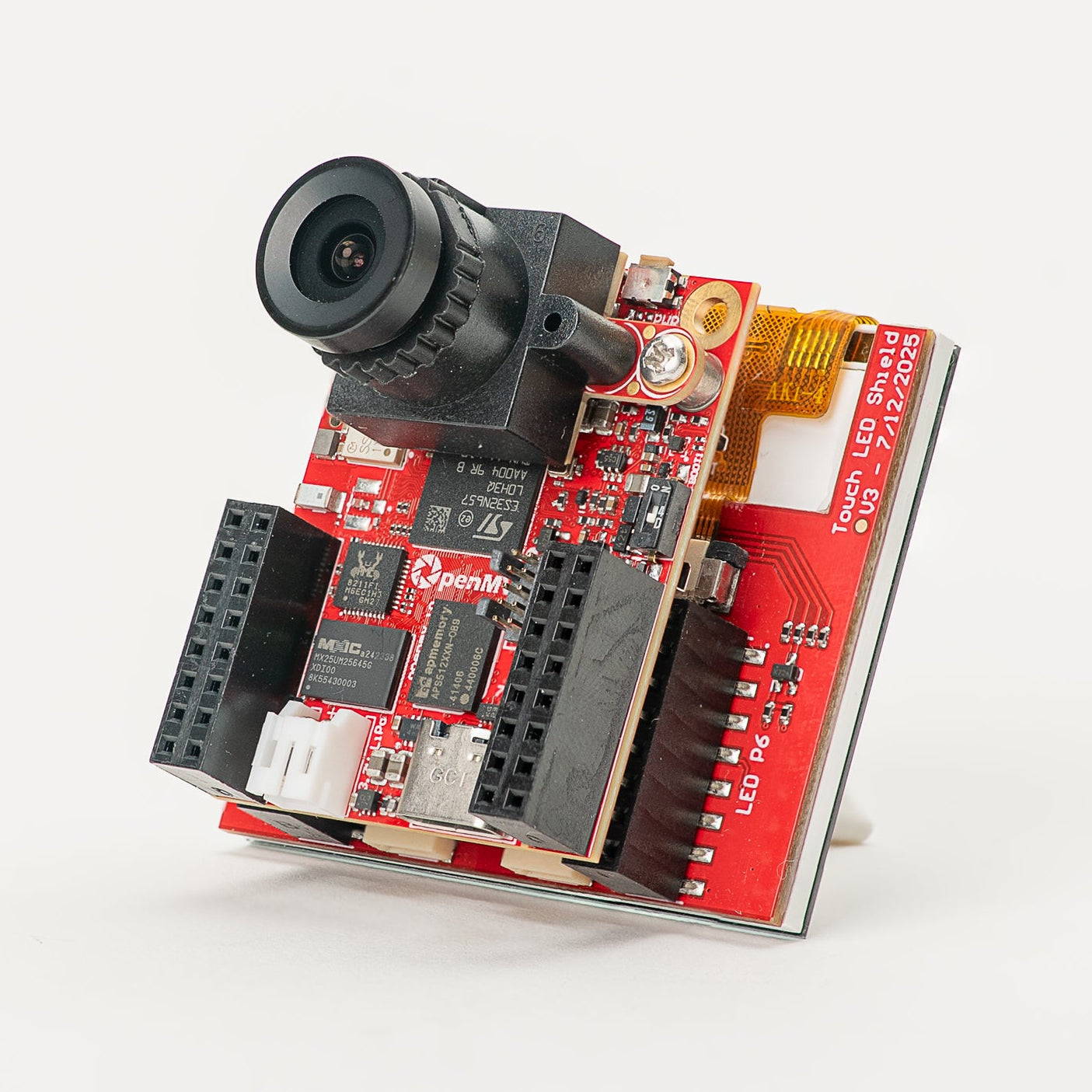
전체 데이터시트, 사진 및 주문 정보는 Touch LCD Shield 제품 페이지 를 참조하세요.
주요 특징
2.3인치 TFT LCD, 320x240, 16비트 RGB565
정전식 멀티터치 입력
PWM으로 제어 가능한 백라이트
I2C 장치 체이닝을 손쉽게 하는 두 개의 Qwiic 커넥터
핀아웃
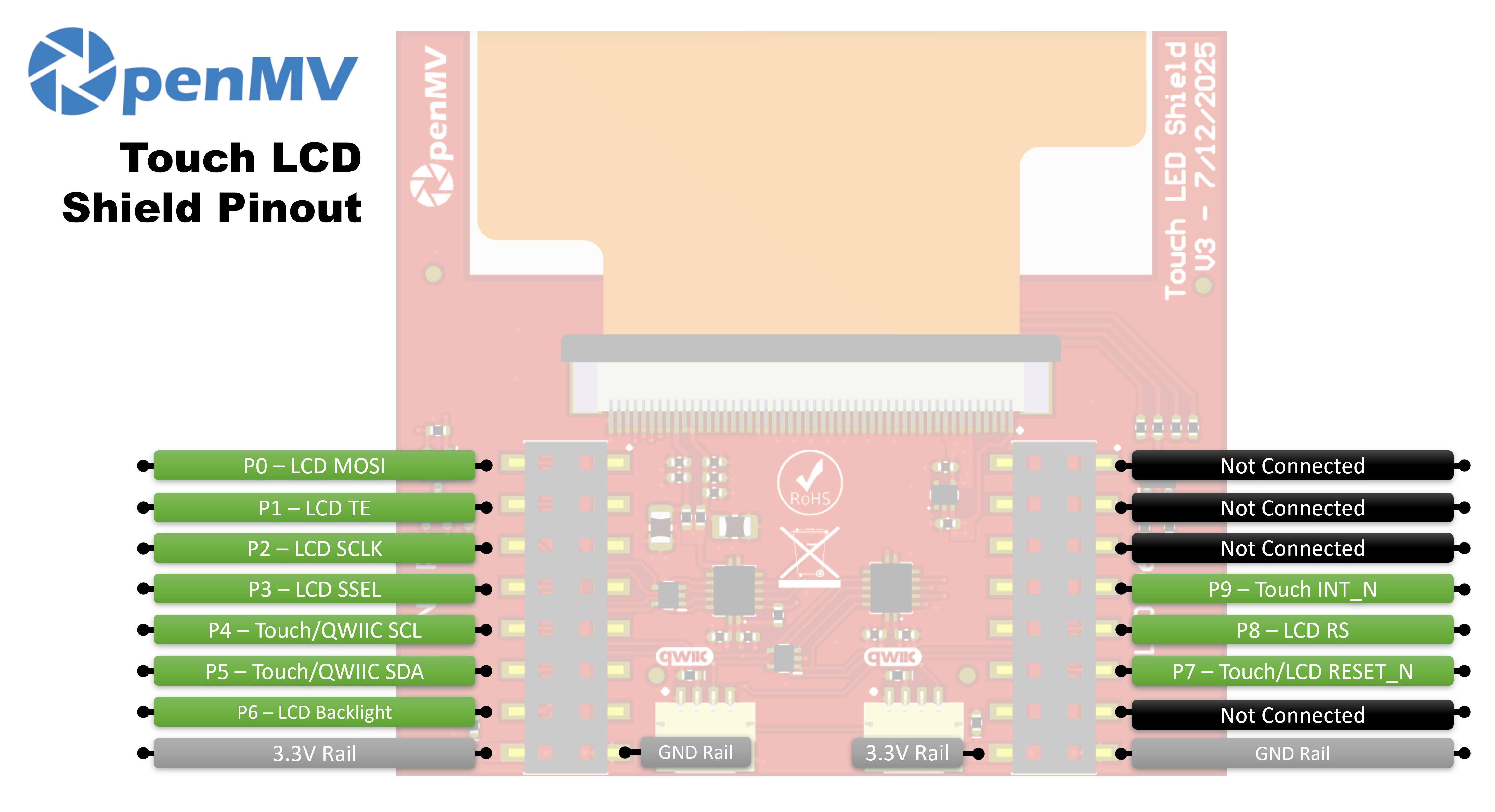
핀 참조
핀 |
기능 |
|---|---|
P0 |
LCD MOSI (디스플레이로의 SPI 데이터) |
P1 |
LCD TE (테어링 효과 출력) |
P2 |
LCD SCLK (SPI 클럭) |
P3 |
LCD SSEL (SPI 칩 선택) |
P4 |
Touch / Qwiic SCL (I²C 클럭 — Qwiic 헤더와 공유) |
P5 |
Touch / Qwiic SDA (I²C 데이터 — Qwiic 헤더와 공유) |
P6 |
LCD 백라이트 |
P7 |
Touch / LCD RESET_N |
P8 |
LCD RS (데이터 / 명령 선택) |
P9 |
Touch INT_N |
3.3V 레일 |
LCD 및 터치 컨트롤러에 전원을 공급합니다 |
GND 레일 |
공통 접지 |
사용법
display.SPIDisplay 클래스를 통해 실드를 구동합니다. 카메라 프레임을 320×240 LCD로 스트리밍합니다:
import csi
import time
import display
import image

csi0 = csi.CSI()
csi0.reset()
csi0.pixformat(csi.RGB565)
csi0.framesize(csi.QVGA)

lcd = display.SPIDisplay(width=320,
                         height=240,
                         bgr=True,
                         vflip=False,
                         hmirror=False)
clock = time.clock()

while True:
    clock.tick()
    lcd.write(csi0.snapshot(), hint=image.CENTER | image.SCALE_ASPECT_KEEP)
    print(clock.fps())
밝기를 조절할 수 있도록 PWM을 통해 백라이트를 구동합니다. machine.PWM 을 작은 백라이트 컨트롤러 클래스로 감싸고 backlight 인자를 통해 SPIDisplay 에 전달하면 됩니다 — SPIDisplay 는 레벨을 업데이트해야 할 때마다 해당 객체에서 backlight(value) 를 호출합니다:
import csi
import time
import display
import image
from machine import Pin, PWM


class PWMBacklight:
    """Drives a backlight pin with machine.PWM (0–100 %)."""

    def __init__(self, pin, frequency=200):
        self._pwm = PWM(Pin(pin), freq=frequency, duty_u16=0)

    def backlight(self, value):
        self._pwm.duty_u16(int(value * 65535 / 100))

    def deinit(self):
        self._pwm.deinit()


csi0 = csi.CSI()
csi0.reset()
csi0.pixformat(csi.RGB565)
csi0.framesize(csi.QVGA)

lcd = display.SPIDisplay(width=320,
                         height=240,
                         bgr=True,
                         vflip=False,
                         hmirror=False,
                         backlight=PWMBacklight("P6"))
lcd.backlight(50)  # 0–100
clock = time.clock()

while True:
    clock.tick()
    lcd.write(csi0.snapshot(), hint=image.CENTER | image.SCALE_ASPECT_KEEP)
    print(clock.fps())
온보드 FT6x36 정전식 컨트롤러에서 멀티터치 입력을 읽습니다 — 이 컨트롤러는 P4/P5의 카메라 I²C 버스에 연결되어 있으며 리셋은 P7, IRQ는 P9에 연결되어 있습니다. 아래 예제는 터치와 실시간 카메라 스트리밍을 결합하여 손가락이 눌리는 위치마다 LCD에 빨간 원을 그립니다:
from time import sleep_ms
from array import array
from machine import Pin, SoftI2C
import csi
import display
import image
import time

_DEFAULT_ADDR = const(0x38)

_DEV_MODE = const(0x00)
_TD_STATUS = const(0x02)


class FT6X36:
    FLAG_PRESSED = 0
    FLAG_RELEASED = 1
    FLAG_MOVED = 2

    def __init__(
        self,
        bus,
        reset_pin,
        irq_pin,
        address=_DEFAULT_ADDR,
        width=320,
        height=240,
        reverse_x=False,
        reverse_y=False,
        touch_callback=None,
    ):
        self.bus = bus
        self.address = address
        self.width = width
        self.height = height
        self.reverse_x = reverse_x
        self.reverse_y = reverse_y
        self.touch_callback = touch_callback
        # reset_pin=None skips the reset pulse — useful when another
        # peripheral on the same line (e.g. the LCD) has already done it.
        if reset_pin is not None:
            self.rst_pin = Pin(reset_pin, Pin.OUT_PP, value=0)
        else:
            self.rst_pin = None
        self.irq_pin = None
        self.irq_pin_label = irq_pin

        # Reset the touch panel controller.
        self.reset()

        # Put the controller into normal operating mode.
        self._write_reg(_DEV_MODE, 0x00)

        # Scratch buffer for points (x, y, flag, id) — chip max 2.
        self.points_data = [array("H", [0, 0, 0, 0]) for _ in range(2)]
        self._touch_points_old = 0
        self._touch_points = 0

    def _read_reg(self, reg, size=1, buf=None):
        # FT6X36 expects two separate START/STOP transactions
        # (no repeated start), so don't use readfrom_mem here.
        self.bus.writeto(self.address, bytes([reg]))
        if buf is not None:
            self.bus.readfrom_into(self.address, buf)
        else:
            return self.bus.readfrom(self.address, size)

    def _write_reg(self, reg, val, size=1):
        if size == 1:
            buf = bytes([reg, val & 0xFF])
        else:
            buf = bytes([reg, val & 0xFF, val >> 8])
        self.bus.writeto(self.address, buf)

    def reset(self):
        if self.irq_pin is not None:
            self.irq_pin.irq(handler=None)
        if self.rst_pin is not None:
            self.rst_pin(0)
            sleep_ms(1)
            self.rst_pin(1)
            sleep_ms(39)
        self.irq_pin = Pin(self.irq_pin_label, Pin.IN, Pin.PULL_UP)
        if self.touch_callback is not None:
            self.irq_pin.irq(
                handler=self.touch_callback,
                trigger=Pin.IRQ_FALLING,
                hard=False,
            )

    def read_points(self):
        regs = self._read_reg(_TD_STATUS, 13)
        n_points = min(regs[0] & 0x0F, 2)

        for i in range(0, n_points):
            base = 1 + i * 6
            x = ((regs[base] & 0xF) << 8) | regs[base + 1]
            y = ((regs[base + 2] & 0xF) << 8) | regs[base + 3]
            if self.reverse_x:
                x = self.width - 1 - x
            if self.reverse_y:
                y = self.height - 1 - y
            self.points_data[i][0] = x
            self.points_data[i][1] = y
            self.points_data[i][2] = regs[base] >> 6
            self.points_data[i][3] = regs[base + 2] >> 4

        # Mark previously-active slots as released so the caller
        # sees a release event after a finger lifts.
        for i in range(n_points, 2):
            self.points_data[i][2] = self.FLAG_RELEASED

        # Latch touch count: rising immediate, falling debounced one read.
        if n_points >= self._touch_points:
            self._touch_points = n_points
        elif n_points <= self._touch_points_old:
            self._touch_points = self._touch_points_old
        self._touch_points_old = n_points

        return self._touch_points, self.points_data


csi0 = csi.CSI()
csi0.reset()
csi0.pixformat(csi.RGB565)
csi0.framesize(csi.QVGA)

lcd = display.SPIDisplay(width=320,
                         height=240,
                         bgr=True,
                         vflip=False,
                         hmirror=False)

# The LCD and touch controllers share P7 as a reset line. The LCD
# has already pulsed it during its own init, so init the touch
# controller after with reset_pin=None to skip a redundant pulse.
bus = SoftI2C(scl=Pin("P4"), sda=Pin("P5"), freq=100_000)
touch = FT6X36(bus, reset_pin=None, irq_pin="P9", reverse_y=True)
clock = time.clock()

# Some sensors return less than 240 lines at QVGA (e.g. 320x200 on
# the N6). The display centers the frame, so map touch Y to image Y.
y_offset = (touch.height - csi0.height()) // 2

while True:
    clock.tick()
    img = csi0.snapshot()
    n, points = touch.read_points()
    for i in range(n):
        x, y, flag, tid = points[i]
        if flag != FT6X36.FLAG_RELEASED:
            iy = y - y_offset
            if 0 <= iy < csi0.height():
                img.draw_circle(
                    (x, iy, 18), color=(255, 0, 0), thickness=2
                )
    lcd.write(img, hint=image.CENTER | image.SCALE_ASPECT_KEEP)
    print(clock.fps())