
 OpenMV MicroPython
Touch LCD Shield
Il Touch LCD Shield dota la OpenMV Cam di un display capacitivo multi-touch da 2,3 pollici 320x240, in modo da poter visualizzare l’anteprima dell’uscita della camera (e accettare input) senza un computer host. Due connettori Qwiic rendono semplice concatenare ulteriori dispositivi I2C.
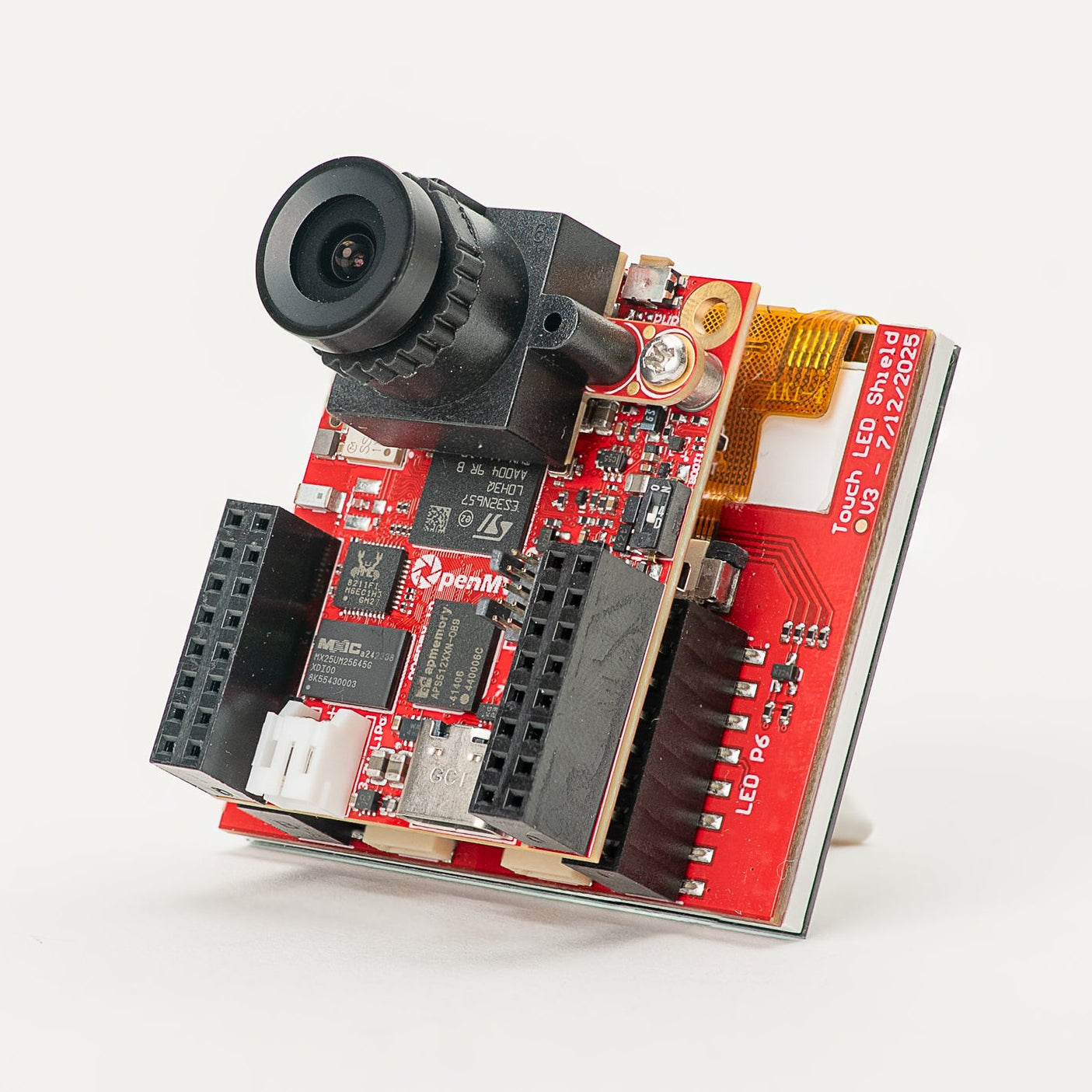
Per il datasheet completo, le foto e gli ordini, consulta la pagina prodotto del Touch LCD Shield.
In evidenza
LCD TFT da 2,3 pollici, 320x240, RGB565 a 16 bit
Input capacitivo multi-touch
Retroilluminazione controllabile via PWM
Due connettori Qwiic per concatenare facilmente dispositivi I2C
Pinout
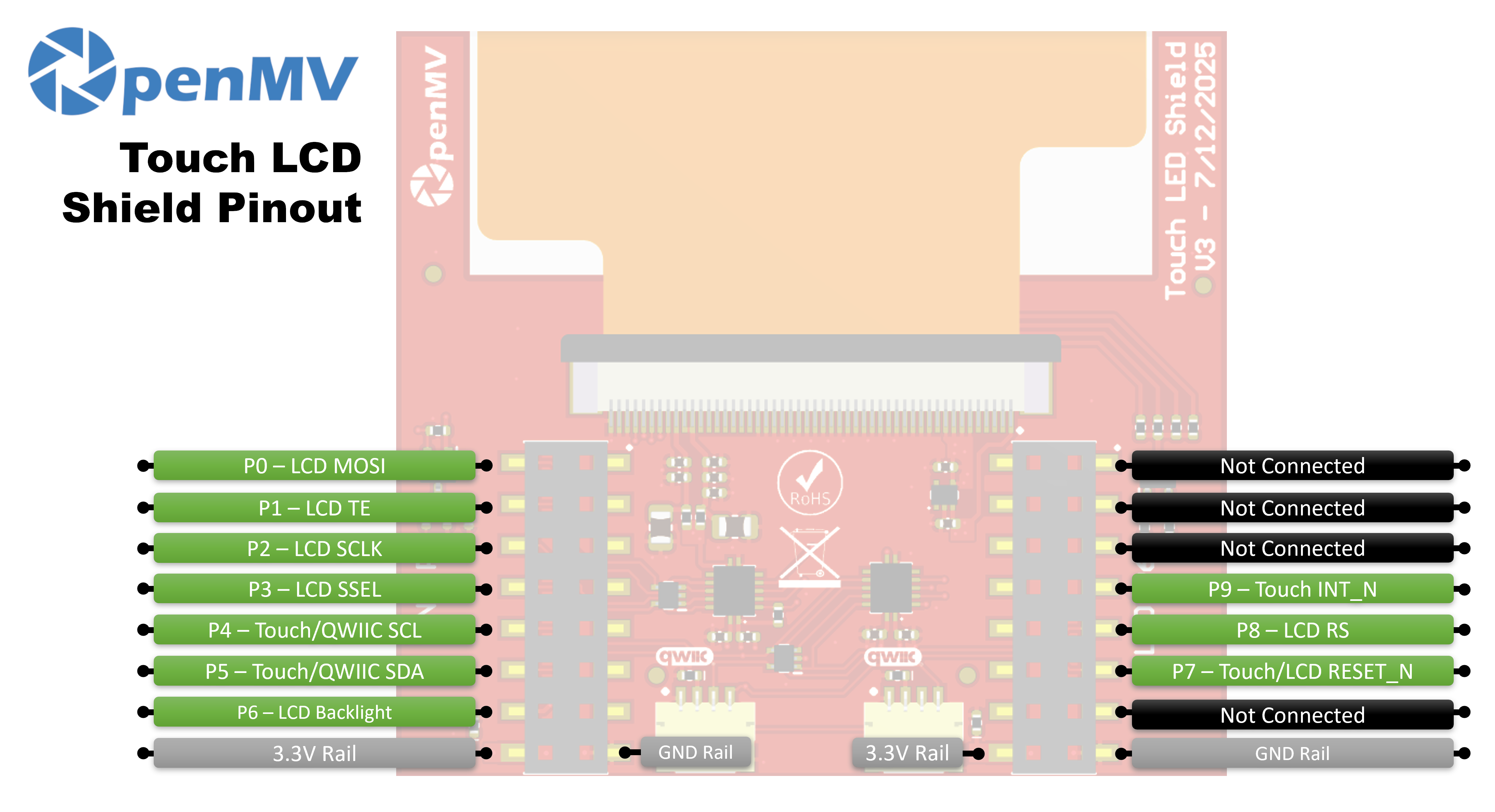
Riferimento dei pin
Pin |
Funzione |
|---|---|
P0 |
LCD MOSI (dati SPI verso il display) |
P1 |
LCD TE (uscita tearing-effect) |
P2 |
LCD SCLK (clock SPI) |
P3 |
LCD SSEL (chip select SPI) |
P4 |
Touch / Qwiic SCL (clock I²C — condiviso con i connettori Qwiic) |
P5 |
Touch / Qwiic SDA (dati I²C — condivisi con i connettori Qwiic) |
P6 |
Retroilluminazione LCD |
P7 |
Touch / LCD RESET_N |
P8 |
LCD RS (selezione dati / comando) |
P9 |
Touch INT_N |
Linea 3,3V |
Alimenta i controller LCD e touch |
Linea GND |
Massa comune |
Utilizzo
Pilota lo shield tramite la classe display.SPIDisplay. Trasmetti i frame della camera all’LCD 320×240:
import csi
import time
import display
import image

csi0 = csi.CSI()
csi0.reset()
csi0.pixformat(csi.RGB565)
csi0.framesize(csi.QVGA)

lcd = display.SPIDisplay(width=320,
                         height=240,
                         bgr=True,
                         vflip=False,
                         hmirror=False)
clock = time.clock()

while True:
    clock.tick()
    lcd.write(csi0.snapshot(), hint=image.CENTER | image.SCALE_ASPECT_KEEP)
    print(clock.fps())
Pilota la retroilluminazione via PWM per una luminosità regolabile. Incapsula machine.PWM in una piccola classe controller della retroilluminazione e passala a SPIDisplay tramite il suo argomento backlight — SPIDisplay chiama backlight(value) sull’oggetto ogni volta che deve aggiornare il livello:
import csi
import time
import display
import image
from machine import Pin, PWM


class PWMBacklight:
    """Drives a backlight pin with machine.PWM (0–100 %)."""

    def __init__(self, pin, frequency=200):
        self._pwm = PWM(Pin(pin), freq=frequency, duty_u16=0)

    def backlight(self, value):
        self._pwm.duty_u16(int(value * 65535 / 100))

    def deinit(self):
        self._pwm.deinit()


csi0 = csi.CSI()
csi0.reset()
csi0.pixformat(csi.RGB565)
csi0.framesize(csi.QVGA)

lcd = display.SPIDisplay(width=320,
                         height=240,
                         bgr=True,
                         vflip=False,
                         hmirror=False,
                         backlight=PWMBacklight("P6"))
lcd.backlight(50)  # 0–100
clock = time.clock()

while True:
    clock.tick()
    lcd.write(csi0.snapshot(), hint=image.CENTER | image.SCALE_ASPECT_KEEP)
    print(clock.fps())
Leggi l’input multi-touch dal controller capacitivo FT6x36 integrato — collegato al bus I²C della camera su P4/P5 con reset su P7 e IRQ su P9. L’esempio seguente abbina il touch allo streaming live della camera, disegnando un cerchio rosso sull’LCD ovunque venga premuto un dito:
from time import sleep_ms
from array import array
from machine import Pin, SoftI2C
import csi
import display
import image
import time

_DEFAULT_ADDR = const(0x38)

_DEV_MODE = const(0x00)
_TD_STATUS = const(0x02)


class FT6X36:
    FLAG_PRESSED = 0
    FLAG_RELEASED = 1
    FLAG_MOVED = 2

    def __init__(
        self,
        bus,
        reset_pin,
        irq_pin,
        address=_DEFAULT_ADDR,
        width=320,
        height=240,
        reverse_x=False,
        reverse_y=False,
        touch_callback=None,
    ):
        self.bus = bus
        self.address = address
        self.width = width
        self.height = height
        self.reverse_x = reverse_x
        self.reverse_y = reverse_y
        self.touch_callback = touch_callback
        # reset_pin=None skips the reset pulse — useful when another
        # peripheral on the same line (e.g. the LCD) has already done it.
        if reset_pin is not None:
            self.rst_pin = Pin(reset_pin, Pin.OUT_PP, value=0)
        else:
            self.rst_pin = None
        self.irq_pin = None
        self.irq_pin_label = irq_pin

        # Reset the touch panel controller.
        self.reset()

        # Put the controller into normal operating mode.
        self._write_reg(_DEV_MODE, 0x00)

        # Scratch buffer for points (x, y, flag, id) — chip max 2.
        self.points_data = [array("H", [0, 0, 0, 0]) for _ in range(2)]
        self._touch_points_old = 0
        self._touch_points = 0

    def _read_reg(self, reg, size=1, buf=None):
        # FT6X36 expects two separate START/STOP transactions
        # (no repeated start), so don't use readfrom_mem here.
        self.bus.writeto(self.address, bytes([reg]))
        if buf is not None:
            self.bus.readfrom_into(self.address, buf)
        else:
            return self.bus.readfrom(self.address, size)

    def _write_reg(self, reg, val, size=1):
        if size == 1:
            buf = bytes([reg, val & 0xFF])
        else:
            buf = bytes([reg, val & 0xFF, val >> 8])
        self.bus.writeto(self.address, buf)

    def reset(self):
        if self.irq_pin is not None:
            self.irq_pin.irq(handler=None)
        if self.rst_pin is not None:
            self.rst_pin(0)
            sleep_ms(1)
            self.rst_pin(1)
            sleep_ms(39)
        self.irq_pin = Pin(self.irq_pin_label, Pin.IN, Pin.PULL_UP)
        if self.touch_callback is not None:
            self.irq_pin.irq(
                handler=self.touch_callback,
                trigger=Pin.IRQ_FALLING,
                hard=False,
            )

    def read_points(self):
        regs = self._read_reg(_TD_STATUS, 13)
        n_points = min(regs[0] & 0x0F, 2)

        for i in range(0, n_points):
            base = 1 + i * 6
            x = ((regs[base] & 0xF) << 8) | regs[base + 1]
            y = ((regs[base + 2] & 0xF) << 8) | regs[base + 3]
            if self.reverse_x:
                x = self.width - 1 - x
            if self.reverse_y:
                y = self.height - 1 - y
            self.points_data[i][0] = x
            self.points_data[i][1] = y
            self.points_data[i][2] = regs[base] >> 6
            self.points_data[i][3] = regs[base + 2] >> 4

        # Mark previously-active slots as released so the caller
        # sees a release event after a finger lifts.
        for i in range(n_points, 2):
            self.points_data[i][2] = self.FLAG_RELEASED

        # Latch touch count: rising immediate, falling debounced one read.
        if n_points >= self._touch_points:
            self._touch_points = n_points
        elif n_points <= self._touch_points_old:
            self._touch_points = self._touch_points_old
        self._touch_points_old = n_points

        return self._touch_points, self.points_data


csi0 = csi.CSI()
csi0.reset()
csi0.pixformat(csi.RGB565)
csi0.framesize(csi.QVGA)

lcd = display.SPIDisplay(width=320,
                         height=240,
                         bgr=True,
                         vflip=False,
                         hmirror=False)

# The LCD and touch controllers share P7 as a reset line. The LCD
# has already pulsed it during its own init, so init the touch
# controller after with reset_pin=None to skip a redundant pulse.
bus = SoftI2C(scl=Pin("P4"), sda=Pin("P5"), freq=100_000)
touch = FT6X36(bus, reset_pin=None, irq_pin="P9", reverse_y=True)
clock = time.clock()

# Some sensors return less than 240 lines at QVGA (e.g. 320x200 on
# the N6). The display centers the frame, so map touch Y to image Y.
y_offset = (touch.height - csi0.height()) // 2

while True:
    clock.tick()
    img = csi0.snapshot()
    n, points = touch.read_points()
    for i in range(n):
        x, y, flag, tid = points[i]
        if flag != FT6X36.FLAG_RELEASED:
            iy = y - y_offset
            if 0 <= iy < csi0.height():
                img.draw_circle(
                    (x, iy, 18), color=(255, 0, 0), thickness=2
                )
    lcd.write(img, hint=image.CENTER | image.SCALE_ASPECT_KEEP)
    print(clock.fps())