
 OpenMV MicroPython
Touch LCD Shield
Touch LCD Shield poskytuje kameře OpenMV Cam 2,3palcový kapacitní vícedotykový displej s rozlišením 320x240, takže můžete náhled výstupu kamery sledovat (a přijímat vstup) bez hostitelského počítače. Dva konektory Qwiic usnadňují řetězení dalších I2C zařízení.
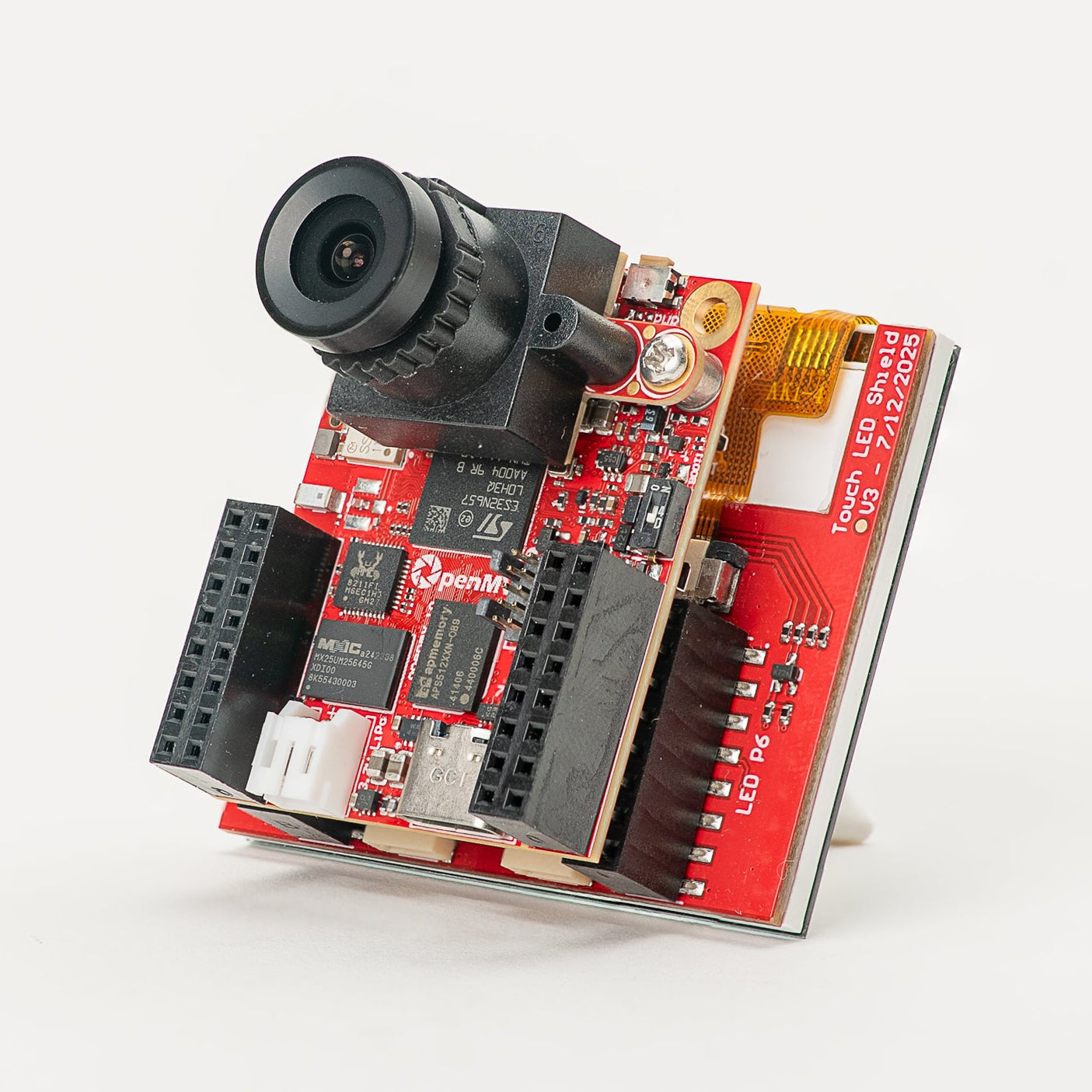
Kompletní datasheet, fotografie a možnosti objednání najdete na produktové stránce Touch LCD Shield.
Hlavní vlastnosti
2,3palcový TFT LCD, 320x240, 16bitový RGB565
Kapacitní vícedotykový vstup
Podsvícení ovladatelné pomocí PWM
Dva konektory Qwiic pro snadné řetězení I2C zařízení
Rozložení pinů
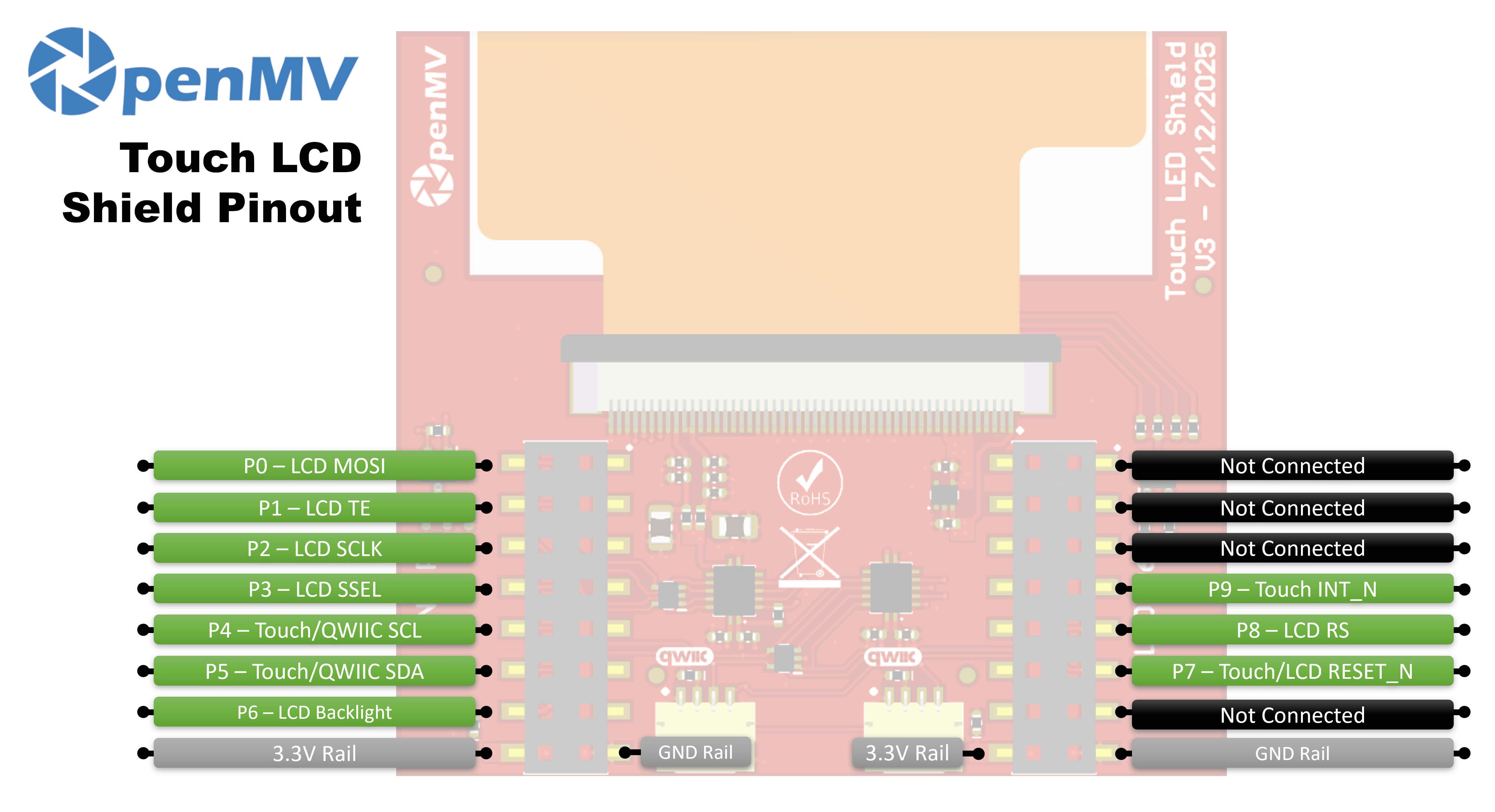
Přehled pinů
Pin |
Funkce |
|---|---|
P0 |
LCD MOSI (SPI data do displeje) |
P1 |
LCD TE (výstup tearing-effect) |
P2 |
LCD SCLK (SPI hodiny) |
P3 |
LCD SSEL (SPI výběr čipu) |
P4 |
Touch / Qwiic SCL (I²C hodiny — sdílené s konektory Qwiic) |
P5 |
Touch / Qwiic SDA (I²C data — sdílená s konektory Qwiic) |
P6 |
Podsvícení LCD |
P7 |
Touch / LCD RESET_N |
P8 |
LCD RS (výběr data / příkaz) |
P9 |
Touch INT_N |
Napájecí větev 3,3V |
Napájí řadiče LCD a dotykové vrstvy |
Napájecí větev GND |
Společná zem |
Použití
Shield ovládejte prostřednictvím třídy display.SPIDisplay. Streamujte snímky z kamery na LCD 320×240:
import csi
import time
import display
import image

csi0 = csi.CSI()
csi0.reset()
csi0.pixformat(csi.RGB565)
csi0.framesize(csi.QVGA)

lcd = display.SPIDisplay(width=320,
                         height=240,
                         bgr=True,
                         vflip=False,
                         hmirror=False)
clock = time.clock()

while True:
    clock.tick()
    lcd.write(csi0.snapshot(), hint=image.CENTER | image.SCALE_ASPECT_KEEP)
    print(clock.fps())
Podsvícení ovládejte pomocí PWM pro nastavitelný jas. Zabalte machine.PWM do malé třídy řadiče podsvícení a předejte ji třídě SPIDisplay přes její argument backlight — SPIDisplay volá backlight(value) na tomto objektu, kdykoli potřebuje aktualizovat úroveň:
import csi
import time
import display
import image
from machine import Pin, PWM


class PWMBacklight:
    """Drives a backlight pin with machine.PWM (0–100 %)."""

    def __init__(self, pin, frequency=200):
        self._pwm = PWM(Pin(pin), freq=frequency, duty_u16=0)

    def backlight(self, value):
        self._pwm.duty_u16(int(value * 65535 / 100))

    def deinit(self):
        self._pwm.deinit()


csi0 = csi.CSI()
csi0.reset()
csi0.pixformat(csi.RGB565)
csi0.framesize(csi.QVGA)

lcd = display.SPIDisplay(width=320,
                         height=240,
                         bgr=True,
                         vflip=False,
                         hmirror=False,
                         backlight=PWMBacklight("P6"))
lcd.backlight(50)  # 0–100
clock = time.clock()

while True:
    clock.tick()
    lcd.write(csi0.snapshot(), hint=image.CENTER | image.SCALE_ASPECT_KEEP)
    print(clock.fps())
Čtěte vícedotykový vstup z palubního kapacitního řadiče FT6x36 — připojeného k I²C sběrnici kamery na P4/P5, s resetem na P7 a IRQ na P9. Příklad níže kombinuje dotyk s živým streamováním z kamery a kreslí na LCD červený kruh všude tam, kde je stisknut prst:
from time import sleep_ms
from array import array
from machine import Pin, SoftI2C
import csi
import display
import image
import time

_DEFAULT_ADDR = const(0x38)

_DEV_MODE = const(0x00)
_TD_STATUS = const(0x02)


class FT6X36:
    FLAG_PRESSED = 0
    FLAG_RELEASED = 1
    FLAG_MOVED = 2

    def __init__(
        self,
        bus,
        reset_pin,
        irq_pin,
        address=_DEFAULT_ADDR,
        width=320,
        height=240,
        reverse_x=False,
        reverse_y=False,
        touch_callback=None,
    ):
        self.bus = bus
        self.address = address
        self.width = width
        self.height = height
        self.reverse_x = reverse_x
        self.reverse_y = reverse_y
        self.touch_callback = touch_callback
        # reset_pin=None skips the reset pulse — useful when another
        # peripheral on the same line (e.g. the LCD) has already done it.
        if reset_pin is not None:
            self.rst_pin = Pin(reset_pin, Pin.OUT_PP, value=0)
        else:
            self.rst_pin = None
        self.irq_pin = None
        self.irq_pin_label = irq_pin

        # Reset the touch panel controller.
        self.reset()

        # Put the controller into normal operating mode.
        self._write_reg(_DEV_MODE, 0x00)

        # Scratch buffer for points (x, y, flag, id) — chip max 2.
        self.points_data = [array("H", [0, 0, 0, 0]) for _ in range(2)]
        self._touch_points_old = 0
        self._touch_points = 0

    def _read_reg(self, reg, size=1, buf=None):
        # FT6X36 expects two separate START/STOP transactions
        # (no repeated start), so don't use readfrom_mem here.
        self.bus.writeto(self.address, bytes([reg]))
        if buf is not None:
            self.bus.readfrom_into(self.address, buf)
        else:
            return self.bus.readfrom(self.address, size)

    def _write_reg(self, reg, val, size=1):
        if size == 1:
            buf = bytes([reg, val & 0xFF])
        else:
            buf = bytes([reg, val & 0xFF, val >> 8])
        self.bus.writeto(self.address, buf)

    def reset(self):
        if self.irq_pin is not None:
            self.irq_pin.irq(handler=None)
        if self.rst_pin is not None:
            self.rst_pin(0)
            sleep_ms(1)
            self.rst_pin(1)
            sleep_ms(39)
        self.irq_pin = Pin(self.irq_pin_label, Pin.IN, Pin.PULL_UP)
        if self.touch_callback is not None:
            self.irq_pin.irq(
                handler=self.touch_callback,
                trigger=Pin.IRQ_FALLING,
                hard=False,
            )

    def read_points(self):
        regs = self._read_reg(_TD_STATUS, 13)
        n_points = min(regs[0] & 0x0F, 2)

        for i in range(0, n_points):
            base = 1 + i * 6
            x = ((regs[base] & 0xF) << 8) | regs[base + 1]
            y = ((regs[base + 2] & 0xF) << 8) | regs[base + 3]
            if self.reverse_x:
                x = self.width - 1 - x
            if self.reverse_y:
                y = self.height - 1 - y
            self.points_data[i][0] = x
            self.points_data[i][1] = y
            self.points_data[i][2] = regs[base] >> 6
            self.points_data[i][3] = regs[base + 2] >> 4

        # Mark previously-active slots as released so the caller
        # sees a release event after a finger lifts.
        for i in range(n_points, 2):
            self.points_data[i][2] = self.FLAG_RELEASED

        # Latch touch count: rising immediate, falling debounced one read.
        if n_points >= self._touch_points:
            self._touch_points = n_points
        elif n_points <= self._touch_points_old:
            self._touch_points = self._touch_points_old
        self._touch_points_old = n_points

        return self._touch_points, self.points_data


csi0 = csi.CSI()
csi0.reset()
csi0.pixformat(csi.RGB565)
csi0.framesize(csi.QVGA)

lcd = display.SPIDisplay(width=320,
                         height=240,
                         bgr=True,
                         vflip=False,
                         hmirror=False)

# The LCD and touch controllers share P7 as a reset line. The LCD
# has already pulsed it during its own init, so init the touch
# controller after with reset_pin=None to skip a redundant pulse.
bus = SoftI2C(scl=Pin("P4"), sda=Pin("P5"), freq=100_000)
touch = FT6X36(bus, reset_pin=None, irq_pin="P9", reverse_y=True)
clock = time.clock()

# Some sensors return less than 240 lines at QVGA (e.g. 320x200 on
# the N6). The display centers the frame, so map touch Y to image Y.
y_offset = (touch.height - csi0.height()) // 2

while True:
    clock.tick()
    img = csi0.snapshot()
    n, points = touch.read_points()
    for i in range(n):
        x, y, flag, tid = points[i]
        if flag != FT6X36.FLAG_RELEASED:
            iy = y - y_offset
            if 0 <= iy < csi0.height():
                img.draw_circle(
                    (x, iy, 18), color=(255, 0, 0), thickness=2
                )
    lcd.write(img, hint=image.CENTER | image.SCALE_ASPECT_KEEP)
    print(clock.fps())