
 OpenMV MicroPython
Touch LCD Shield
Touch LCD Shield oferă plăcii OpenMV Cam un ecran capacitiv multi-touch de 2,3 inchi cu rezoluție 320x240, astfel încât să poți previzualiza ieșirea camerei (și să accepți date de intrare) fără un computer gazdă. Două conectoare Qwiic facilitează înlănțuirea unor dispozitive I2C suplimentare.
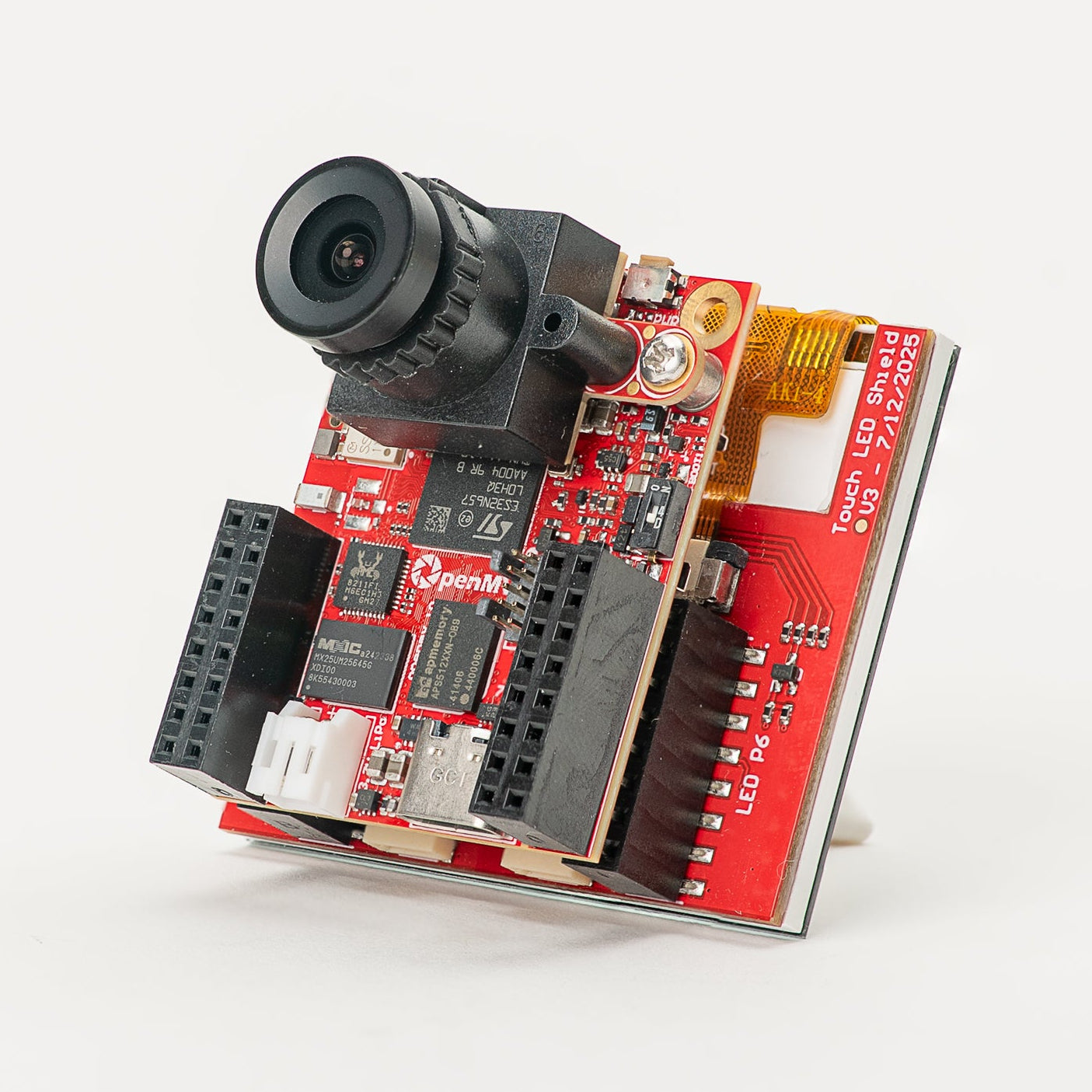
Pentru fișa tehnică completă, fotografii și comenzi, consultă pagina de produs Touch LCD Shield.
Puncte forte
Ecran TFT LCD de 2,3 inchi, 320x240, RGB565 pe 16 biți
Intrare capacitivă multi-touch
Iluminare de fundal controlabilă prin PWM
Două conectoare Qwiic pentru înlănțuirea ușoară a dispozitivelor I2C
Configurația pinilor
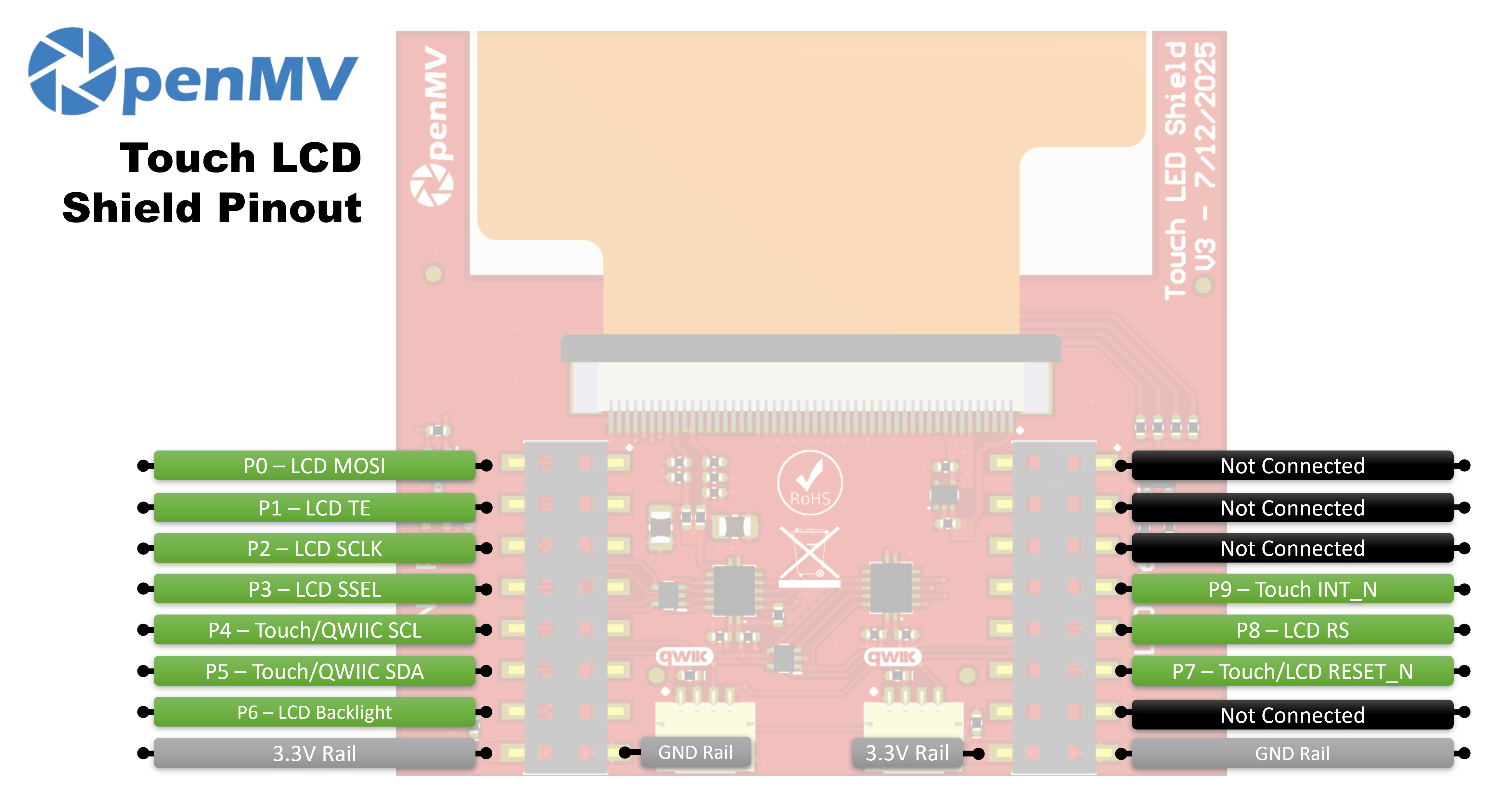
Referință pini
Pin |
Funcție |
|---|---|
P0 |
LCD MOSI (date SPI către ecran) |
P1 |
LCD TE (ieșire tearing-effect) |
P2 |
LCD SCLK (ceas SPI) |
P3 |
LCD SSEL (selecție chip SPI) |
P4 |
Touch / Qwiic SCL (ceas I²C — partajat cu conectoarele Qwiic) |
P5 |
Touch / Qwiic SDA (date I²C — partajate cu conectoarele Qwiic) |
P6 |
Iluminare de fundal LCD |
P7 |
Touch / LCD RESET_N |
P8 |
LCD RS (selecție date / comandă) |
P9 |
Touch INT_N |
Magistrala de 3,3V |
Alimentează controlerele LCD și touch |
Magistrala GND |
Masă comună |
Utilizare
Controlează shield-ul prin clasa display.SPIDisplay. Transmite cadrele camerei către ecranul LCD de 320×240:
import csi
import time
import display
import image

csi0 = csi.CSI()
csi0.reset()
csi0.pixformat(csi.RGB565)
csi0.framesize(csi.QVGA)

lcd = display.SPIDisplay(width=320,
                         height=240,
                         bgr=True,
                         vflip=False,
                         hmirror=False)
clock = time.clock()

while True:
    clock.tick()
    lcd.write(csi0.snapshot(), hint=image.CENTER | image.SCALE_ASPECT_KEEP)
    print(clock.fps())
Controlează iluminarea de fundal prin PWM pentru o luminozitate reglabilă. Încapsulează machine.PWM într-o mică clasă de controler al iluminării de fundal și transmite-o către SPIDisplay prin argumentul său backlight — SPIDisplay apelează backlight(value) pe obiect ori de câte ori trebuie să actualizeze nivelul:
import csi
import time
import display
import image
from machine import Pin, PWM


class PWMBacklight:
    """Drives a backlight pin with machine.PWM (0–100 %)."""

    def __init__(self, pin, frequency=200):
        self._pwm = PWM(Pin(pin), freq=frequency, duty_u16=0)

    def backlight(self, value):
        self._pwm.duty_u16(int(value * 65535 / 100))

    def deinit(self):
        self._pwm.deinit()


csi0 = csi.CSI()
csi0.reset()
csi0.pixformat(csi.RGB565)
csi0.framesize(csi.QVGA)

lcd = display.SPIDisplay(width=320,
                         height=240,
                         bgr=True,
                         vflip=False,
                         hmirror=False,
                         backlight=PWMBacklight("P6"))
lcd.backlight(50)  # 0–100
clock = time.clock()

while True:
    clock.tick()
    lcd.write(csi0.snapshot(), hint=image.CENTER | image.SCALE_ASPECT_KEEP)
    print(clock.fps())
Citește intrarea multi-touch de la controlerul capacitiv FT6x36 încorporat — conectat la magistrala I²C a camerei pe P4/P5, cu reset pe P7 și IRQ pe P9. Exemplul de mai jos îmbină atingerea cu transmisia live a camerei, desenând un cerc roșu pe LCD oriunde este apăsat un deget:
from time import sleep_ms
from array import array
from machine import Pin, SoftI2C
import csi
import display
import image
import time

_DEFAULT_ADDR = const(0x38)

_DEV_MODE = const(0x00)
_TD_STATUS = const(0x02)


class FT6X36:
    FLAG_PRESSED = 0
    FLAG_RELEASED = 1
    FLAG_MOVED = 2

    def __init__(
        self,
        bus,
        reset_pin,
        irq_pin,
        address=_DEFAULT_ADDR,
        width=320,
        height=240,
        reverse_x=False,
        reverse_y=False,
        touch_callback=None,
    ):
        self.bus = bus
        self.address = address
        self.width = width
        self.height = height
        self.reverse_x = reverse_x
        self.reverse_y = reverse_y
        self.touch_callback = touch_callback
        # reset_pin=None skips the reset pulse — useful when another
        # peripheral on the same line (e.g. the LCD) has already done it.
        if reset_pin is not None:
            self.rst_pin = Pin(reset_pin, Pin.OUT_PP, value=0)
        else:
            self.rst_pin = None
        self.irq_pin = None
        self.irq_pin_label = irq_pin

        # Reset the touch panel controller.
        self.reset()

        # Put the controller into normal operating mode.
        self._write_reg(_DEV_MODE, 0x00)

        # Scratch buffer for points (x, y, flag, id) — chip max 2.
        self.points_data = [array("H", [0, 0, 0, 0]) for _ in range(2)]
        self._touch_points_old = 0
        self._touch_points = 0

    def _read_reg(self, reg, size=1, buf=None):
        # FT6X36 expects two separate START/STOP transactions
        # (no repeated start), so don't use readfrom_mem here.
        self.bus.writeto(self.address, bytes([reg]))
        if buf is not None:
            self.bus.readfrom_into(self.address, buf)
        else:
            return self.bus.readfrom(self.address, size)

    def _write_reg(self, reg, val, size=1):
        if size == 1:
            buf = bytes([reg, val & 0xFF])
        else:
            buf = bytes([reg, val & 0xFF, val >> 8])
        self.bus.writeto(self.address, buf)

    def reset(self):
        if self.irq_pin is not None:
            self.irq_pin.irq(handler=None)
        if self.rst_pin is not None:
            self.rst_pin(0)
            sleep_ms(1)
            self.rst_pin(1)
            sleep_ms(39)
        self.irq_pin = Pin(self.irq_pin_label, Pin.IN, Pin.PULL_UP)
        if self.touch_callback is not None:
            self.irq_pin.irq(
                handler=self.touch_callback,
                trigger=Pin.IRQ_FALLING,
                hard=False,
            )

    def read_points(self):
        regs = self._read_reg(_TD_STATUS, 13)
        n_points = min(regs[0] & 0x0F, 2)

        for i in range(0, n_points):
            base = 1 + i * 6
            x = ((regs[base] & 0xF) << 8) | regs[base + 1]
            y = ((regs[base + 2] & 0xF) << 8) | regs[base + 3]
            if self.reverse_x:
                x = self.width - 1 - x
            if self.reverse_y:
                y = self.height - 1 - y
            self.points_data[i][0] = x
            self.points_data[i][1] = y
            self.points_data[i][2] = regs[base] >> 6
            self.points_data[i][3] = regs[base + 2] >> 4

        # Mark previously-active slots as released so the caller
        # sees a release event after a finger lifts.
        for i in range(n_points, 2):
            self.points_data[i][2] = self.FLAG_RELEASED

        # Latch touch count: rising immediate, falling debounced one read.
        if n_points >= self._touch_points:
            self._touch_points = n_points
        elif n_points <= self._touch_points_old:
            self._touch_points = self._touch_points_old
        self._touch_points_old = n_points

        return self._touch_points, self.points_data


csi0 = csi.CSI()
csi0.reset()
csi0.pixformat(csi.RGB565)
csi0.framesize(csi.QVGA)

lcd = display.SPIDisplay(width=320,
                         height=240,
                         bgr=True,
                         vflip=False,
                         hmirror=False)

# The LCD and touch controllers share P7 as a reset line. The LCD
# has already pulsed it during its own init, so init the touch
# controller after with reset_pin=None to skip a redundant pulse.
bus = SoftI2C(scl=Pin("P4"), sda=Pin("P5"), freq=100_000)
touch = FT6X36(bus, reset_pin=None, irq_pin="P9", reverse_y=True)
clock = time.clock()

# Some sensors return less than 240 lines at QVGA (e.g. 320x200 on
# the N6). The display centers the frame, so map touch Y to image Y.
y_offset = (touch.height - csi0.height()) // 2

while True:
    clock.tick()
    img = csi0.snapshot()
    n, points = touch.read_points()
    for i in range(n):
        x, y, flag, tid = points[i]
        if flag != FT6X36.FLAG_RELEASED:
            iy = y - y_offset
            if 0 <= iy < csi0.height():
                img.draw_circle(
                    (x, iy, 18), color=(255, 0, 0), thickness=2
                )
    lcd.write(img, hint=image.CENTER | image.SCALE_ASPECT_KEEP)
    print(clock.fps())