
 OpenMV MicroPython
7.18. Histograms and statistics
Alongside the operations that change an
image’s pixels, the Image class
carries a family of methods that measure
them – summarise the distribution of pixel
values, return the mean and median brightness,
find the optimal cutoff between dark and
bright pixels, report the spread of the colour
channels. The measurements feed applications
in two ways: as inputs to the code that
decides what threshold to use, what gain to
set, what the scene’s tonal profile looks
like; and as diagnostic signals – “is the
scene bright enough?” – that an application
can act on without making a decision about any
particular pixel.
The starting point for almost every measurement is the histogram.
7.18.1. The histogram
A histogram of an image is a count of how many
pixels have each possible brightness value.
For a grayscale image, that is a list of
counts indexed by the values 0 through
255. For a colour image, it is three such
lists – one per channel.
get_histogram() computes
one:
h = img.get_histogram()
The returned object is a histogram
result that exposes the per-channel bin lists
and a few high-level queries on them. The bin
counts are normalised so that they sum to
1.0 – the histogram describes the
profile of the distribution rather than the
absolute pixel count, which makes the
measurements comparable across images of
different sizes.
For grayscale images the histogram has one
channel of bins, available as
h.bins() (or equivalently h[0]). For
RGB565 images the histogram is computed in
the LAB colour space introduced on the
binary-thresholding page, with three bin
channels available as h.l_bins(),
h.a_bins(), h.b_bins() (or
h[0], h[1], h[2]). LAB is the
same choice the threshold and tracking
methods use; histograms agree with
thresholds about what space colour is being
measured in.
7.18.2. Bins and the bin count
The default histogram has one bin per
possible pixel value – 256 bins for an
8-bit channel. Sometimes that is finer
resolution than the application needs. A
classifier that only cares about the rough
profile of the distribution might be better
served by a smaller bin count – 32 or
even 8 bins – which both runs faster
and produces a cleaner result against noise.
The bins keyword (and the per-channel
l_bins, a_bins, b_bins for colour)
sets the count:
h = img.get_histogram(bins=32)
ROI and threshold scoping work the same way
as on every other measurement method. Pass
an roi to confine the histogram to a
rectangle of pixels; pass a thresholds
list to include only pixels that match those
ranges. The threshold form is what makes
“compute the histogram of the matching
pixels only” a one-call operation – a
common pattern when an application wants
to characterise the texture of an
already-detected region without having to
walk the pixels itself.
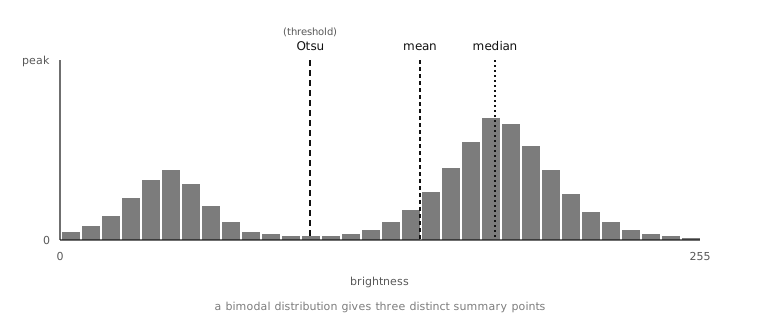
A grayscale histogram with three summary measurements overlaid: Otsu’s threshold (the cutoff that best splits the dark and bright clusters), the mean, and the median. Each measurement says something different about the same distribution.
7.18.3. Statistics
A histogram is a description of every value’s
prevalence; statistics are the numerical
summaries derived from it. The
statistics object returned by
get_statistics() carries
the standard set:
mean– the arithmetic mean of pixel values.median– the value below which half the pixels lie.mode– the most common single value.stdev– the standard deviation, a measure of the spread around the mean.minandmax– the brightest and darkest pixel values present.lqanduq– the lower and upper quartile cutoffs.
For an RGB565 image the per-channel forms
(l_mean, a_median, b_mode,
and so on) deliver the same measurements
channel by channel.
Most of those numbers come up in specific
contexts. mean and stdev together
give a noise estimate: a scene that should
be uniform has small stdev, while a noisy
sensor gives the same scene a larger stdev.
min and max give the contrast of
the image: the closer they are, the flatter
the scene; the further apart, the more
dynamic range the algorithm has to work
with. median is the robust centre when
the distribution has outliers (a few very
bright pixels do not pull the median the
way they pull the mean). mode is the
single most-common value, useful for finding
the background level of an image whose
background covers most of the pixels.
get_statistics() runs the
histogram pass internally and then summarises
it; passing the same thresholds and
roi arguments as a previously-computed
histogram produces the statistics for the
same set of pixels.
7.18.4. Percentiles and CDF lookups
The histogram object exposes a
get_percentile() method
that turns a fraction into a pixel value – the value
below which the requested fraction of pixels
lies. h.get_percentile(0.5) is the
median; h.get_percentile(0.05) and
h.get_percentile(0.95) together give a
robust min/max that ignores the bottom and
top 5% as outliers.
That is the form an application uses when it wants to characterise the range of pixel values without letting a handful of stray bright or dark pixels skew the answer. The robust min/max from the 5th and 95th percentiles is also the natural input to a contrast-stretching pass – the per-pixel remap that Tonal corrections covers.
7.18.5. Otsu’s method
Histograms answer another question worth
calling out on its own: given an image whose
pixels split into a “dark” and a “bright”
cluster, what is the cutoff between them?
The thresholding page already named the
mechanism by its result – a single global
threshold the application can hand to
binary() – but deferred
the how. The how is Otsu’s method, and it
lives on the histogram.
The intuition: an image with a clear foreground and background has two clusters in its brightness histogram, with a valley between them. The right place to threshold is the bottom of the valley – the value where the two clusters are best separated. Otsu’s method searches every possible cutoff and picks the one where the within-cluster variances are smallest (which is the same as saying the between-cluster variance is largest), and the result is the optimal binary split for that particular image’s distribution.
The histogram object exposes Otsu
through get_threshold:
h = img.get_histogram()
t = h.get_threshold()
The returned threshold object has
value (for grayscale) or
l_value / a_value / b_value
(for colour) attributes carrying the chosen
cutoff. Feeding the result straight back into
binary() gives a
self-tuning global threshold whose cutoff is
chosen by the image itself:
img.binary([(t.value, 255)])
That pattern does not solve the uneven-illumination problem the filter-based adaptive threshold solves; what it solves is the “what value should I cut at?” question when global thresholding is already the right approach. For a scene whose foreground / background distinction is well-defined, the value Otsu picks is usually within a few units of what a human would pick by eye.
7.18.6. Computing on a difference image
A useful detail on
get_histogram() and
get_statistics(): both
accept a difference keyword that takes
another Image and computes the
histogram (or statistics) of the per-pixel
difference between the source and that image,
without allocating a separate difference
image. That is the cheap way to ask “how
much has the scene changed since the
reference frame?” without paying for an
explicit difference()
call to produce an image whose only purpose
is to be measured. For a continuously
running motion-detection script, the saving
adds up.