
 OpenMV MicroPython
7.1. The Image object
An image-processing algorithm walks across an image one
pixel at a time. At each position it does something
simple – read a value, compare it against a
threshold, combine it with the corresponding pixel of
a second image, write a result back. Repeated across
a whole frame, those simple per-pixel decisions are
what edge detection, blob tracking, QR-code decoding,
and every other classical computer-vision technique
are built out of. To do that work efficiently, the
algorithm has to know where each pixel sits in
memory, what each pixel’s value actually means, and
which portion of the image it should be looking at.
The image.Image is the object that organises
that information.
Vision Sensors ended at the moment
csi.CSI.snapshot() returns. Whatever the
camera-side machinery did to produce the captured
frame is already done; the application has the
Image in hand and needs to know what to do with
it.
7.1.1. The buffer and its properties
Inside the Image is a pointer to a contiguous
block of bytes in RAM and a small header carrying
three pieces of metadata: the image’s width in
pixels, its height in pixels, and the pixel format
the bytes are in. The bytes are the pixels
themselves, stored in row-major order – all of the
top row’s pixels first, then all of the second row’s,
and so on down to the bottom. The properties describe
how to read them.
Width and height are plain integer counts. The pixel
format is the more interesting property, because it sets
how many bytes each pixel takes and what those bytes
encode. A grayscale image carries one byte per pixel
holding a brightness value. An RGB565 image carries
two bytes per pixel holding red, green, and blue
fields packed into a 16-bit word. A Bayer image
carries one byte per pixel, but each pixel is sampled
through one of three colour filters chosen by its
position in the mosaic.
Vision Sensors
enumerated the whole catalogue; what matters here is that
exactly
one of those formats is set on every Image, and
the choice drives the bytes-per-pixel arithmetic and
the meaning of any single byte in the buffer.
With a pointer to the buffer, the width, the height,
and the format, every other property an algorithm
might want falls out as a short calculation. The byte
that begins pixel (x, y) sits at offset
(y * width + x) * bytes_per_pixel from the start
of the buffer. The total byte count is
width * height * bytes_per_pixel. The address of
the next row down is exactly width *
bytes_per_pixel bytes after the start of the
current one. The Image exposes the three
properties through plain method calls –
width(),
height(),
format() – plus the derived
size through size(). Methods
elsewhere in the module use those values to do the
offset arithmetic themselves; application code rarely
has to.
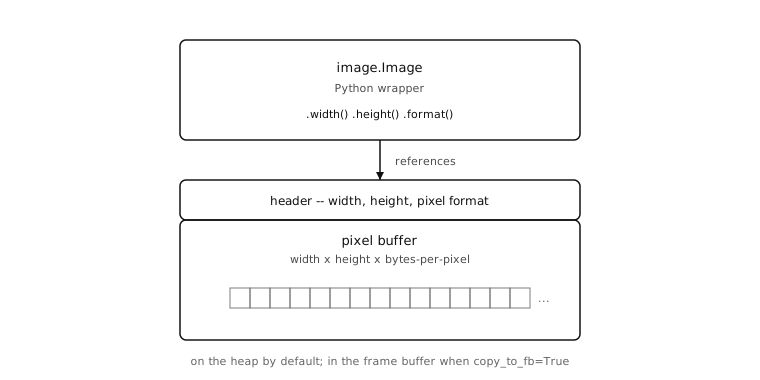
An Image is a small Python wrapper that points
at a contiguous block of memory: a header carrying
the width, height, and pixel format, followed by
the pixel buffer itself.
7.1.2. Where the buffer comes from
The default story throughout this chapter is the one
Vision Sensors already covered: a captured frame
arrives from snapshot, the bytes are sitting in
the camera’s frame buffer, and the returned Image
points at them. Three other ways of obtaining one
come up regularly, and each implies something
different about where the buffer ends up.
Loading from a file looks like passing a path to the
constructor: image.Image("/sdcard/saved.jpg"). The
module reads the file into a freshly allocated
buffer on the Python heap. BMP, PGM, and PPM files
get decoded on the way in and the resulting
Image carries an uncompressed pixel format.
JPEG and PNG files stay compressed – the
Image carries the format
JPEG or PNG, and the
buffer holds the file’s byte stream essentially
unchanged. To do any pixel-level work on a
compressed image, the application converts it
through to_rgb565() or
to_grayscale() first, and that
conversion is where decompression – and the
corresponding heap balloon, where a 30 KB JPEG can
become 600 KB of RGB565 – actually happens.
Loading from file is most useful during development,
when an algorithm needs to be tested against a
known reference frame stored alongside the script.


Building one from scratch is the canvas case:
image.Image(320, 240, image.RGB565) asks the
module to allocate that many bytes in that format,
zero the contents, and hand the wrapper back. The
pixels do not mean anything yet – they are all
zero – but the empty image is the workhorse for a
handful of recurring patterns: reference frames
against which a current frame gets subtracted,
canvases on which graphics overlays get composed,
binary buffers that get filled in and used as masks.
Constructing from an ndarray bridges in the other
direction, from any numerical computation back into
the image module. Passing a float32
ulab.numpy.ndarray to the constructor
produces an Image whose dimensions match the
ndarray – a two-axis (h, w) shape becomes a
grayscale image, a three-axis (h, w, 3) shape
becomes RGB565 – with the float values scaled from
0.0 – 255.0 into the integer pixel range. A
neural-network heatmap, a numerical array of any kind,
anything produced by ml or ulab becomes
something the drawing and inspection side of the
image module can use.
All four sources hand back the same kind of
Image. Code that uses the returned object never
has to track where it came from.
7.1.3. Two views over the bytes
Most of the time application code treats an Image
as a typed image object – a thing with named
methods. The other half of the story is that the same
object also appears, transparently, as a flat
sequence of bytes to any MicroPython API that takes a
bytes argument. The bytes are not a copy of the
buffer; they are a direct view of it.
That arrangement is what makes pushing a captured frame out of the cam a one-liner. Hashing it, sending it over a serial port, forwarding it to a network socket – none of those needs a separate “convert the image to bytes” step:
import csi
import hashlib

csi0 = csi.CSI()
csi0.reset()
csi0.pixformat(csi.RGB565)
csi0.framesize(csi.QQVGA)

img = csi0.snapshot()
uart.write(img)              # transmits the raw pixel bytes
hashlib.sha256(img)          # hashes the same bytes
sock.send(img)               # sends them over a socket
The bytes-like view is read-only by default, on
purpose. Image buffers are large and sometimes shared
between layers of the imaging stack, so giving a
casual buf[0] = 0 somewhere deep in a call stack
the power to silently corrupt one is too sharp an
edge to leave exposed. When read-write byte-level
access is what the application actually needs –
writing a calibration value into a known offset, for
instance – bytearray() returns a
separate, explicitly read-write view over the same
memory, signposting the intent at the call site.
7.1.4. Where the buffer lives
Pixel buffers are large enough that where they sit in RAM matters. A QQVGA RGB565 frame is 160 × 120 × 2 = 38,400 bytes; a VGA RGB565 frame is 614,400 bytes; a 224 × 224 RGB565 input that a neural-network classifier might consume is about 100 KB. The Python heap on the smallest cams can be only a few tens of kilobytes once the runtime has booted. Holding more than a frame or two of image data on the heap would crowd everything else off it.
The way out is that image buffers mostly do not live
on the Python heap. They live in the dedicated
region of RAM
Vision Sensors
introduced as the frame buffer – the same memory the
camera DMA
writes captured frames into and the IDE preview
reads finished frames out of. Most operations on an
Image modify their source in place: the
algorithm reads pixels, decides, writes new values
back, and no separate result image is allocated. The
operations that do produce a separate result –
format conversions and a handful of others – can
be asked to place that result in the frame buffer
through the copy_to_fb keyword argument.
copy_to_fb=True does two things at once: it
puts the result image into the frame buffer rather
than on the heap (sidestepping the heap pressure)
and it makes the result the next frame the IDE
preview will display. Tacking copy_to_fb=True
onto the final step of a pipeline, watching the
result appear on screen, and iterating from there
is one of the most useful debugging idioms in image
processing.
With a wrapper holding a labelled buffer, four ways
of getting one into existence, two views over its
bytes, and a switch deciding where new ones land,
the Image is no longer a mystery. The remaining
foundational questions – how a pixel position is
named, what each pixel actually holds, how to scope
an operation to a portion of one – are built on top
of it.