
 OpenMV MicroPython
7.4. Reading and writing pixels
Most operations on an image hide their per-pixel work inside a single method call, where the loops that touch every pixel happen at native speed. There are cases, though, where application code wants to touch one specific pixel directly: to read what is at a particular position, to write a new value into one, to sample a single point for a calibration step, or to debug a value at a known location. The image module exposes that level of access through two addressing forms, each fitting a different way of thinking about where a pixel lives.
7.4.1. Addressing by coordinate
The most natural form is the one Coordinates
already developed the vocabulary for: name a pixel
by its Cartesian (x, y).
get_pixel() takes (x, y) and
returns the value at that position;
set_pixel() takes the same
(x, y) along with a value and writes it.
What those calls return or accept depends on the
image’s format. Grayscale, binary, and Bayer
images carry a single value per pixel – a
brightness for grayscale, a 0 or 1 for
binary, a single colour-channel sample for Bayer
– so get_pixel() returns a
single integer. RGB565 carries three colour
channels packed into 16 bits, and get_pixel
unpacks them into an (r, g, b) tuple by
default, with each channel mapped into the
0 – 255 range.
The default behaviour can be flipped on either
end. Passing rgbtuple=False to get_pixel
on an RGB565 image falls back to the raw 16-bit
packed word – the same form the linear index
returns, and the efficient form when the
application is going to write the same packed
value straight back. Passing rgbtuple=True on
a single-channel image does the opposite: the
stored value is converted into an RGB888 tuple
before returning, with Bayer images going through
an on-the-spot debayer step. The argument exists
so that calling code can ask for pixels in a
uniform colour space regardless of how the
underlying image stores them.
Compressed images – JPEG and PNG – are not
supported by get_pixel or set_pixel.
Their bytes do not represent pixels at known
positions, and the methods raise an error rather
than return a value that would not mean anything.
In practice the patterns look like:
v = img.get_pixel(40, 30)            # grayscale: int 0..255
img.set_pixel(40, 30, 255)           # write white

r, g, b = img.get_pixel(40, 30)      # RGB565: defaults to (r, g, b) tuple
img.set_pixel(40, 30, (255, 0, 0))   # write red
If the requested (x, y) is outside the image,
get_pixel returns None and
set_pixel does nothing. That is forgiving by
design: many algorithms walk close to the edges of
an image and briefly index out-of-range positions,
and a quiet no-op is less disruptive than an
exception every time it happens.
7.4.2. Addressing by linear index
The other form is to address pixels by their
position in the underlying buffer. Recall the
buffer’s layout: pixels are stored row by row,
all of the top row’s pixels first, then all of the
next row’s, and so on down to the bottom. That
arrangement means every pixel has a single integer
index counting from 0 at the top-left and
incrementing along each row in turn. The pixel at
coordinate (x, y) has linear index
y * width + x.
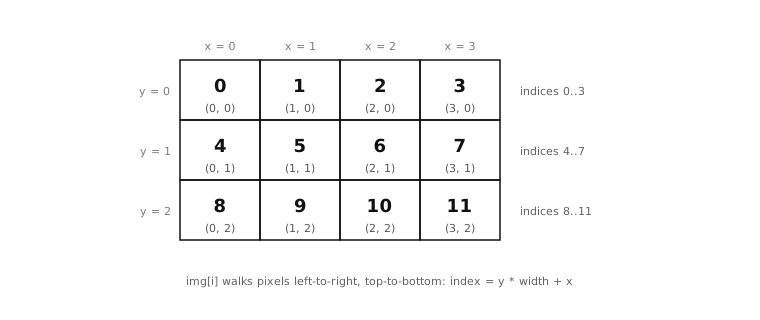
Pixels are addressed both by Cartesian
(x, y) and by a linear index that walks the
buffer row by row, left to right.
The image module exposes that index through
ordinary Python subscript notation: img[i]
reads the pixel at linear index i,
img[i] = value writes one. What the index form
returns is the raw stored value for the format,
not the unpacked tuple get_pixel()
returns by default. That distinction matters
because the format chosen earlier decides what the
raw value looks like:
Grayscale and Bayer pixels come back as 8-bit integers.
RGB565 and YUV422 pixels come back as 16-bit integers – the packed word.
Binary pixels come back as
0or1.JPEG and PNG pixels come back as 8-bit integers, one byte at a time of the compressed stream. Those values are opaque – they are pieces of a compressed encoding rather than pixels in any ordinary sense.
The index form fits code that is already thinking
in terms of buffer offsets: a loop that walks
every pixel once, an algorithm that needs to jump
by a row at a time, or a piece of code translating
between buffer layouts. Code that is thinking in
terms of x and y coordinates is better served by
get_pixel and set_pixel; the two forms
address the same pixels through different mental
models.
The Image is also iterable. for v in
img: walks the buffer in the same row-major
order, yielding the raw values one pixel at a
time, and len(img) is the pixel count for
uncompressed formats or the byte count for
compressed streams.
7.4.3. Why per-pixel Python is the slow path
A practical note worth being honest about.
Walking an image one pixel at a time from Python
is slow. A 320 × 240 grayscale image holds
76,800 pixels; calling
get_pixel() on each of them in
a for loop runs millions of MicroPython
bytecode instructions to do work that an
equivalent native method could finish in a few
hundred microseconds. That is not a small factor.
It is the difference between a script that
processes frames in real time and one that crawls
along well below the camera’s frame rate.
Almost every method on the Image surface
exists because there is a faster, native version of
a common per-pixel pattern. A loop that adds two
images together becomes a single native call. A loop
that smooths each pixel by averaging it with its
neighbours becomes another. A loop that
classifies each pixel against a threshold becomes
a third. The application’s job, most of the time,
is to recognise which whole-image method matches
the work the loop would have done, and reach for
that instead of writing the loop by hand.
Pixel-level read and write are still the right tool when nothing else fits – patching a specific measurement back into the buffer, sampling one position for a calibration step, debugging a value at a known location. The point is that they are the slow path, used when the whole-image methods do not have the form the application needs, not as the default way to operate on pixels.