
 OpenMV MicroPython
7.12. Binary thresholding
A lot of image-processing pipelines come down to a question about each pixel: is this brightness inside the range that means “foreground”? Is this colour close enough to red to be the marker the application is tracking? Is this pixel part of the candidate set the next stage of the pipeline should look at? Thresholding is the operation that turns those questions into a binary answer at every position – on if the pixel matches, off if it does not – and reduces the whole image to a mask the rest of the pipeline can work against.
7.12.1. The binary method
The binary() method runs that
classification across every pixel in one call. It
takes a list of threshold ranges – the
conditions a pixel can match to count as “on” –
and rewrites the image so every pixel that
matched at least one of the ranges is set to the
format’s maximum value, and every pixel that did
not is set to zero. The result is the binary mask
the rest of the pipeline can use directly.
In the simplest form, the threshold list has one range and the call returns a mask of pixels in that range:
img.binary([(120, 255)])
The list form is what makes binary powerful.
A pipeline that wants to track two coloured
markers, or a brightness range plus an isolated
saturation peak, passes both ranges in the same
list and gets a single output mask covering all
matches.
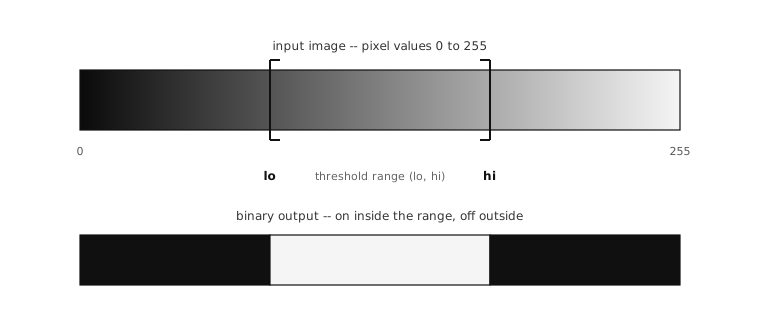
Thresholding turns a continuous-valued image into a binary mask: every pixel inside the threshold range becomes the format’s maximum, every pixel outside becomes zero.
7.12.2. The grayscale tuple
For a grayscale image, each entry in the
threshold list is a two-element tuple
(lo, hi) describing an inclusive brightness
range. Pixels at values between lo and
hi (inclusive) match; everything outside
that range does not. The natural patterns are
straightforward:
(0, 60)matches dark pixels – everything from black up through deep grey.(180, 255)matches bright pixels – everything from light grey up through white.(100, 160)matches mid-grey pixels – a band in the middle of the brightness range.
The order of the two values inside a tuple does
not matter; the method swaps them internally if
lo is greater than hi, so
(60, 0) works the same as (0, 60).
7.12.3. The LAB tuple for colour
For an RGB565 image, each entry is a six-element
tuple (l_lo, l_hi, a_lo, a_hi, b_lo, b_hi)
describing an inclusive range in the LAB
colour space rather than directly in red, green,
and blue. The thresholds are L (lightness), A
(green-to-red chromatic axis), and B
(blue-to-yellow chromatic axis), each compared
against the pixel’s value in that channel.
The reason for going through LAB rather than thresholding RGB directly is the property the LAB colour space was designed around: LAB separates lightness from chroma. Two pixels that show the same colour but at different brightnesses end up at different L values but at roughly the same A and B values. That separation lets the threshold ranges describe a colour by its position on the A and B axes and leave the L range wide open to accept that colour at every brightness from shadow through highlight. An RGB-based threshold cannot do that – any change in lighting moves all three of the R, G, B values at once, and a tracker built on RGB thresholds breaks down the first time a cloud goes past the sun.
The practical pattern: pick the A and B ranges
that describe the colour the application is
tracking, and leave the L range wide – often
(0, 100) to accept any brightness – unless
the application specifically wants to threshold
on brightness as well as colour.
For tuples with fewer than six values, the
missing components default to maximum range
(no constraint on that axis). A two-element
(l_lo, l_hi) tuple in an RGB565 threshold
list therefore thresholds only on lightness and
matches every colour.
Note
A truly wide-open L range has a catch at the
bottom end. As lightness falls toward zero
every colour converges on black, with the A
and B values collapsing toward zero and
becoming dominated by noise – so dark
pixels can drift into the A and B ranges and
get tracked as the target colour. If black
regions of the scene light up as matches,
raise l_lo until they drop out.
7.12.4. Flags
Three keyword arguments control the output:
invert=Trueflips the result. Every pixel that would have matched becomes zero, and every pixel that would have been zero becomes the maximum value. Useful when the natural way to describe the foreground is by what it is not.zero=Truechanges the mode of operation: matching pixels are zeroed and non-matching pixels keep their original values. Use this when the goal is to erase the matching pixels from the image rather than reduce the image to a binary mask of them.to_bitmap=Truereturns the result as aBINARYimage instead of overwriting the source’s existing format. The one-bit-per-pixel result is what later mask arguments accept directly, and the conversion often saves the memory pressure of carrying a full-format mask around.
Mask and ROI follow the same convention as the
rest of the surface: an roi rectangle
scopes the operation to a sub-area, a mask
image scopes it to an arbitrary pattern of
positions.
7.12.5. In place by default
Like the arithmetic operations, binary runs
in place by default: the source image’s pixels
are overwritten with the binary output, and the
original values are gone after the call. The
to_bitmap=True form is the alternative when
the source needs to be preserved and the output
should be a freshly allocated BINARY
image. The copy=True form is also accepted
for a same-format result on a new buffer.