
 OpenMV MicroPython
7.15. Morphological operations
Morphological operations work on binary images – the masks that come out of thresholding and edge detection. Each operation walks the same kind of sliding neighbourhood the smoothing filters use, but the question it asks at every position is yes/no: is every pixel in the neighbourhood on, is any pixel in the neighbourhood on, what does the on/off pattern look like? The answers grow regions, shrink them, and recut their boundaries in ways an averaging filter cannot.
Morphology is what comes between an initial binary mask – the output of thresholding, edge detection, or some other classifier – and the clean binary mask the rest of the pipeline can use. A raw threshold output usually has isolated noise pixels scattered through true-foreground areas, small holes punched into otherwise solid regions, and jagged boundaries where the threshold cut close to the edge of an object. Morphology removes those defects.
7.15.1. The four classical operations
Two primitive operations, and two compositions of them, make up the morphological toolkit:
dilate() grows every
foreground region. The rule is: any pixel that
has at least one foreground neighbour in its
(2 * size + 1) window becomes foreground.
The visible effect is that foreground regions
get bigger by size pixels in every
direction, and holes inside them shrink (or
disappear) by the same amount.
erode() does the inverse.
Any pixel that does not have every neighbour
in its window in the foreground becomes
background. Foreground regions get smaller by
size pixels in every direction, isolated
foreground pixels (which have no foreground
neighbours) disappear entirely, and small
connections between larger regions get cut.
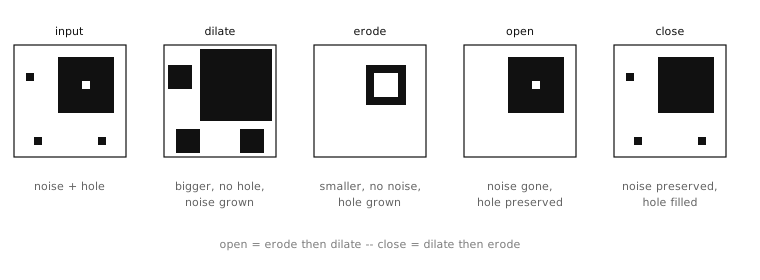
The four classical morphological operations applied to a noisy binary region. Erode shrinks; dilate grows; open is erode then dilate (removes noise); close is dilate then erode (fills holes).
open() is erode followed by
dilate. The eroded image has had every
isolated noise pixel removed, but it has also
been shrunk by size pixels in every
direction. Following the erode with a dilate of
the same size restores the genuine foreground
regions to roughly their original boundaries
while leaving the noise gone. The composition
is what makes open the standard “remove
noise” operation in classical morphology:
isolated foreground pixels disappear, real
regions come back unharmed.
close() is the mirror
image – dilate followed by erode. The dilate
fills small holes inside foreground regions
and connects regions separated by small gaps;
the erode shrinks the result back to its
original outer boundary while leaving the
filled-in interior solid. close is the
standard “fill small gaps” operation.
binary_mask.open(1)       # remove single-pixel noise
binary_mask.close(2)      # fill small holes and gaps
The size parameter has the same meaning as in
the brightness filters: size=1 means a
3-by-3 neighbourhood, size=2 means 5-by-5,
and so on. Larger sizes mean more aggressive
cleanup – and a longer per-pixel cost.
7.15.2. Top-hat and black-hat
Two further compositions are worth knowing
about because they extract exactly the
features that open and close remove:
top_hat() returns the
difference between the original image and
its opened version – the foreground pixels
that open would have removed. That is
literally a mask of the noise pixels, the
isolated small foreground regions, the thin
foreground structures that the open operation
could not preserve. Useful for extracting
small foreground features when those features
are the thing the application cares about,
rather than removing them.
black_hat() returns the
difference between the closed version of
the image and the original – the background
pixels that close would have filled in.
That is a mask of the small holes inside
foreground regions, the narrow gaps between
regions that the close operation would have
bridged.
Both are less commonly reached for than the four basic operations, but the pattern is worth remembering – when an application needs to extract small or thin features that the standard cleanup pass removes, the top-hat and black-hat are the natural way to get them back.
7.15.3. Threshold mode
The four basic morphological operations all
accept an integer threshold keyword that
softens the on/off test at each position.
Without it, the operations behave the way the
descriptions above said:
erode() requires every
neighbour to be on, dilate()
requires at least one. With threshold
set, each operation tolerates that many
neighbours voting the other way. For erode,
threshold is the number of background
neighbours a pixel may have and still survive:
threshold=4 keeps any pixel with at least
four of its eight neighbours on (in a 3-by-3
window the centre pixel has eight neighbours),
so it does not erode as aggressively. For
dilate, threshold is the number of
foreground neighbours a background pixel must
have more of before it turns on:
threshold=2 requires at least three
foreground neighbours instead of one, so it
grows less aggressively.
The threshold form is useful for tuning the aggressiveness of a morphological pass without changing the size of its window, which would also change the scale of features it acts on. Most applications stick with the default behaviour; the threshold form is there for the cases where the default is just slightly too much or too little.