
 OpenMV MicroPython
7.3. Pixel formats
An algorithm that detects edges expects each pixel
to hold a brightness value. An algorithm that
tracks a coloured object expects each pixel to
carry colour. An algorithm that runs morphological
closing expects each pixel to be either on or off.
The pixel format an Image carries – one
of the catalogue Vision Sensors enumerated – is
what makes those expectations checkable up front:
the format says, in advance, what form the pixels
are in, and which algorithms can therefore run on
them without a conversion step.
This page is about how that constraint plays out in practice. Which format is the right choice depends on what the pipeline is going to do, and the conversion methods between formats are how a pipeline that needs more than one of them strings the stages together.
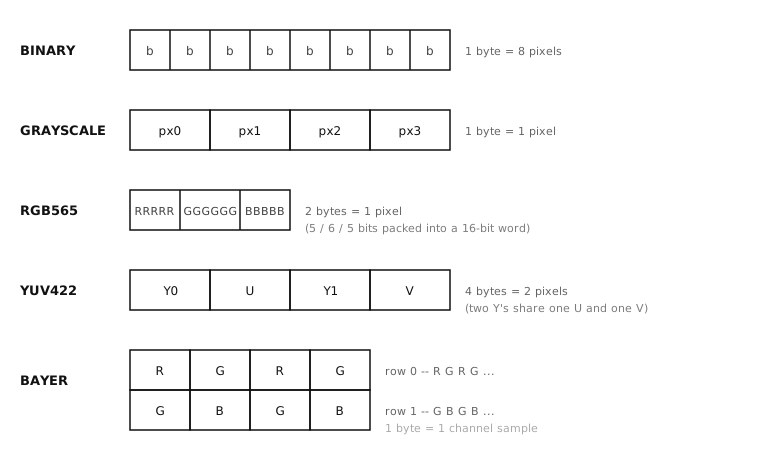
The five uncompressed pixel formats and how their bytes pack. JPEG and PNG aren’t drawn here because they’re variable-length compressed streams rather than fixed-size pixel grids.
7.3.1. The grayscale workhorse
Most of classical machine vision comes down to working with brightness values. Edge detection, template matching, AprilTag decoding, optical-flow estimation, the morphological operators, blob analysis – all of them, at the level the algorithms operate at, are looking at how bright each pixel is and how the brightness compares to the brightness of nearby pixels. The colour of the scene is often useful to the application that calls them, but the algorithms themselves do not need it.
The grayscale format hands the algorithms exactly
that, with no overhead. One byte per pixel holds a
brightness value from 0 (black) through 255
(white). The format is half the size of RGB565 and
YUV422 and a third the size of RGB888, so every
operation runs through less data – both faster and
with less buffer pressure. On the smaller cams,
where the frame buffer competes with the rest of
the script for RAM, that footprint difference can
be what decides whether a pipeline fits at all. If
colour is not the cue the algorithm needs,
grayscale is the right answer.
7.3.2. Colour through RGB565
When colour is the cue – tracking a coloured marker, distinguishing red apples from green ones, picking out a UI element by its hue – two bytes per pixel buy enough colour for the kinds of classification the algorithms perform. RGB565 is the default colour format on the cam, and the one the colour-aware methods on the surface expect.
Rendering an annotated frame – drawing detection boxes, writing diagnostic text, getting the frame onto a screen or out to a remote viewer – also naturally calls for RGB565. The IDE preview, the on-board display controllers, and most network destinations either consume the format directly or convert from it cheaply.
7.3.3. Bayer as the storage format
A Bayer image is the raw sensor output, before the ISP debayered it into a finished colour representation. Each pixel is one byte holding a single colour channel – the one the colour filter at that position in the mosaic passed through. That makes a Bayer image the same size as a grayscale image and a third the size of RGB888, which lines up with what Bayer is actually useful for: storing many frames at once when RAM is the binding constraint.
The catch is that the algorithms in the image
module do not operate on Bayer images directly.
Without debayering, no pixel carries enough
information to make a colour judgement on its
own, and the patterns the algorithms are looking
for – edges, corners, blobs – would be distorted
by the mosaic. The only ways to read or modify a
Bayer image are get_pixel()
and set_pixel(); everything
else expects a finished representation.
The pattern that falls out is to store frames as Bayer for as long as they need to sit in a queue and convert each one to either grayscale or RGB565 at the moment its processing actually starts. The conversion costs CPU cycles but saves the RAM that would otherwise be tied up holding finished frames for the lifetime of the application.
Note
The image module’s only operations on Bayer
pixels directly are
get_pixel(),
set_pixel(), and the
JPEG-encoding path that feeds the IDE preview
or a remote viewer. Drawing, analysis, and
filtering all require converting to grayscale,
RGB565, or binary first.
7.3.4. YUV422 for pipelines that want both
YUV422 separates each pixel’s information into a luminance channel (Y) and two chrominance channels (U and V), and subsamples the chrominance so adjacent pixel pairs share a single U and a single V. The bytes per pixel average out to two – the same as RGB565 – but they are laid out so that the Y channel is already a continuous 8-bit grayscale image sitting at known offsets in the buffer.
That layout is exactly what a pipeline wants when some of its stages are grayscale work and some need colour. Reading the Y values directly for the grayscale stages skips the cost of an explicit conversion; the U and V channels are there when a later stage actually needs colour. Outside that specific pattern, RGB565 is usually the simpler choice for colour and grayscale is the simpler choice for brightness-only work – YUV422’s value comes from being good at both at the same time.
Note
The image module operates on YUV422 in a more limited way than on grayscale, RGB565, or binary – direct Y-channel reads for grayscale work and the JPEG-encoding path that feeds the IDE preview or a remote viewer. Colour-aware methods expect RGB565; YUV422 frames need an explicit conversion before colour analysis or drawing.
7.3.5. Binary, masks, and thresholded output
A binary image is one bit per pixel: each pixel
is either 0 or 1. The format rarely
shows up as a sensor capture; instead it appears
as the natural output of thresholding (where a
colour or brightness test classifies each pixel
into “yes, matches” or “no, doesn’t”) and as the
natural input to morphological operations and to
the mask argument that many methods accept.
The format’s practical advantage is its size. A
binary image is one eighth of a grayscale
image’s footprint, so carrying a large mask
around – a per-pixel choice of which positions
some downstream operation should touch – is
cheap. The fact that many operations accept a
binary image as a mask= keyword argument is
the other side of the same point: the format is
small, and chaining the binary output of one
stage into the mask input of another is a
common pipeline pattern.
7.3.6. JPEG and PNG at the boundary
JPEG and PNG Image objects are
different from the others on the catalogue. They
are not pixel grids; they are compressed byte
streams that encode pixel data in a form
pixel-level operations cannot read. Calling
get_pixel() on a JPEG does
not return the pixel at a position; the pixel is
not sitting unpacked anywhere in the buffer for
the method to fetch.
JPEG and PNG show up at the boundary of image processing, where pixel data is leaving or entering the cam in compressed form. Saving a frame to disk as JPEG keeps the file small; sending a frame over a network as JPEG keeps the transmission cheap; loading a reference frame from a JPEG file lets it sit on disk in a much smaller form than the raw pixels would. For any of those use cases the compressed representation is the right answer. To do any actual processing on a JPEG, though, the application converts it to a workable format first – and that conversion is where the compressed bytes get expanded into pixels and where the buffer balloon (a 30 KB JPEG can become 600 KB of RGB565) actually happens.
7.3.7. Converting between formats
The conversion path is what stitches different
formats into a single pipeline. Five methods on
the Image class take an existing image
and return a new one in a different format:
to_grayscale()produces a single-byte-per-pixel image, the format the classical algorithms want.to_rgb565()produces the two-byte-per-pixel colour format the colour-aware methods and the IDE preview both speak.to_bitmap()produces a one-bit binary image, the format morphology andmaskarguments accept.to_jpeg()produces a JPEG-compressed image suitable for saving or transmission.to_png()produces a PNG-compressed image when lossless encoding is preferred over JPEG’s smaller files.
Each conversion runs in place by default: the source image’s buffer is overwritten with the converted result, and the source’s original pixels are gone after the call returns. That is the cheapest option both for CPU and for memory, and it is the right answer when the source frame will not be needed for anything else.
When the source is still needed – when a later
stage of the pipeline has to see the original
frame – two keyword arguments override the
in-place default. copy=True allocates a
separate buffer for the converted image on the
Python heap and leaves the source intact.
copy_to_fb=True does the same allocation but
puts it in the frame buffer instead of the
heap – which is what an application reaches for
when the converted image needs to land in the
IDE preview, since the IDE reads from the frame
buffer.
Two further methods produce RGB565
images coloured through a palette instead of by
a straight conversion.
to_rainbow() maps each
single-channel input value to a colour along a
smooth gradient that runs through the visible
spectrum. to_ironbow() maps
each input value to the non-linear thermal-imager
palette that runs from black through dark reds
and oranges to white. Both are visualisation
tools rather than measurement ones; the point is
to make a single-channel image whose raw values
would otherwise be invisible to the eye readable
at a glance.
7.3.8. Buffer size
One last detail about formats worth being explicit
about. size() always reports
the byte buffer size, not the pixel count. For
uncompressed formats that follows directly from
the dimensions and the bytes-per-pixel:
width * height * bytes_per_pixel. For JPEG
and PNG it is the size of the compressed stream,
which varies frame to frame depending on what the
scene contains. Code that allocates buffers from
byte budgets uses size() for the former case;
code that streams compressed frames out of the
cam reads it after each compression to know how
many bytes the stream actually contains.