
 OpenMV MicroPython
7.24. Polar transforms
Polar coordinates name each pixel by an angle
from a reference direction and a distance from
a chosen centre, in place of the horizontal and
vertical offsets from the top-left origin. The
representation earns its keep through one
identity: rotation about the chosen centre
becomes translation along the angle axis,
which lets a rotation-invariant algorithm
search a far simpler parameter space than
rotations directly.
linpolar() and
logpolar() run the
re-projection.
7.24.1. The two methods
linpolar() runs the
Cartesian-to-polar re-projection with a
linear distance axis. Each output column
corresponds to a fixed angle around the
centre; each output row corresponds to a
fixed distance from the centre.
img.linpolar()
logpolar() runs the same
re-projection with a logarithmic distance
axis. The angle handling is identical; what
differs is that distances grow exponentially
down the rows of the output rather than
linearly. The difference matters because of
the second geometric identity polar
coordinates expose: scaling the source about
the chosen centre becomes translation along
the distance axis – but only when that axis
is logarithmic. With a linear distance axis,
scaling stretches the polar image; with a log
distance axis, scaling shifts it by a fixed
amount.
img.logpolar()
Both methods take x= and y= keywords
that set the centre of the polar
re-projection in source pixel coordinates,
defaulting to half the image width and half
the image height respectively. The centre
choice matters: a polar transform around the
wrong point ends up with content shuffled
in ways that destroy the rotation /
translation identity.
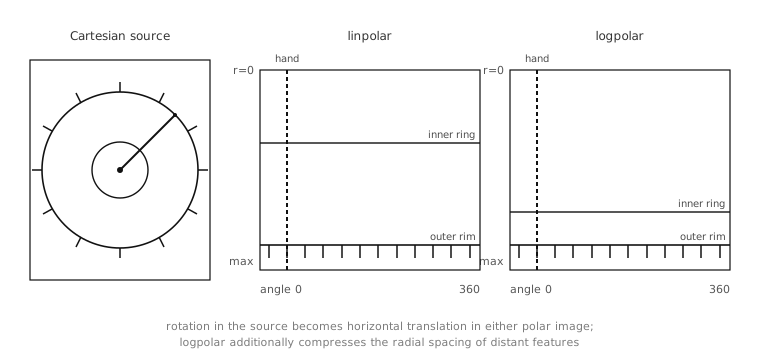
A clock face re-projected by
linpolar() and
logpolar(). Concentric
circles in the source become horizontal
lines in the output; angular tick marks
become evenly-spaced vertical lines along
the angle axis. The log-polar variant
compresses the radial spacing.
7.24.2. When to reach for each
The choice between linpolar()
and logpolar() is the
choice of which invariance the application
needs. For rotation invariance alone –
detecting that the same scene appears in two
frames, the second rotated by an unknown
angle – linpolar() is
enough: the rotation becomes a horizontal
shift in the polar image, and a
translation-only matcher like
find_displacement()
recovers the angle as the size of the shift.
When scale invariance matters too – the
second frame is rotated and zoomed –
logpolar() collapses both
unknowns to translations: horizontal for
rotation, vertical for scale.
That is the standard recipe for a tracker
that is robust against rotation and scale
changes: re-project the reference frame and
each live frame to log-polar around the same
centre, run
find_displacement() on the
pair, and read the rotation and scale
fields off the result.
7.24.3. Unwrapping circular features
A separate use of the polar transforms is unwrapping features that are naturally circular in the image. A clock face, a gauge dial, an inspection target that is circular by design – all of them become linear in the polar projection, which is the form most algorithms find easier to work with.
The figure above shows it directly: the twelve tick marks on a clock face, evenly spaced around the circumference in Cartesian, become twelve evenly-spaced vertical lines in the polar image. A rectangle around any one tick mark in the polar image identifies that tick mark’s position regardless of which way the clock face was rotated when captured. A template matcher run across the polar image finds every tick mark in one pass.
7.24.4. The inverse mapping
reverse=True runs the inverse of the
forward polar projection: given a polar
image, produce the Cartesian image whose
polar projection it is. The application
calls the forward form to run an algorithm
in polar coordinates, then calls the
reverse form to project the result back
into Cartesian for whatever downstream
stage needs to see it.
The most common use is modifying a polar image and projecting back: a filter applied to the polar image – a horizontal smoothing that, in polar terms, blurs across angles but preserves radial structure – produces a Cartesian result that has been angularly blurred, which is not something a Cartesian filter can do directly.