
 OpenMV MicroPython
7.6. Drawing shapes and text
An algorithm that decides something about an image
often needs that decision to be visible. A blob
detector finds a region the application cares
about; the application wants the region drawn on
the frame so an operator – or the developer
running the script – can see what was found. A
coordinate transformation maps an input position
to an output one; debugging it usually means
marking the two positions on the same image. The
IDE preview reads whatever sits in the frame
buffer at the moment it polls, so the simplest
way to make algorithm output visible is to write
annotations into the frame buffer itself. The
drawing family on the Image class is
the toolkit for exactly that work.
7.6.1. The primitives
Each drawing method places one specific kind of mark on the image. The catalogue is small and stays close to the geometric primitives an annotation actually needs:
draw_line()– a straight line segment between two endpoints.draw_rectangle()– an axis-aligned rectangle, hollow or filled.draw_circle()– a circle around a centre, hollow or filled.draw_ellipse()– an ellipse with arbitrary rotation.draw_cross()– a plus sign at a point, the usual mark for a centroid or a click target.draw_arrow()– an arrow from a start point to an end point.draw_edges()– the four sides of an arbitrary quadrilateral, given the four corner points; the natural way to outline a detected tag or a perspective-warped region.draw_string()– text from a built-in bitmap font.
Every one of these modifies the source image in place and returns the same image for chaining, following the operating-method convention established earlier.
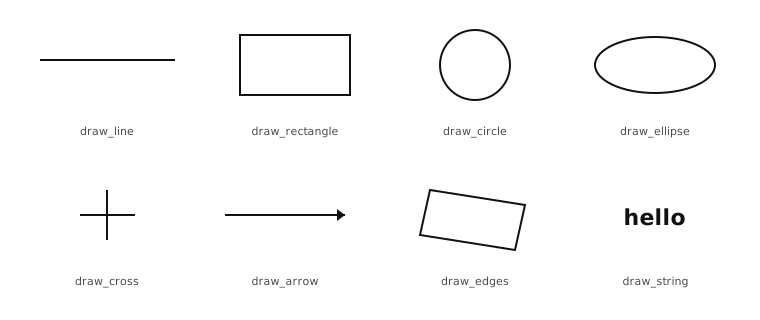
The eight drawing primitives, one per panel. Each method makes one kind of mark.
7.6.2. Colour
Every drawing method takes a color argument
that decides what value to write into each
painted pixel. The form that argument takes
depends on the image’s format. For an RGB565
image, the natural form is an (r, g, b)
tuple with each channel in 0 – 255; the
module packs that down into the 16-bit RGB565
word before writing it. For a grayscale image
the natural form is a single integer brightness
from 0 (black) through 255 (white). The
methods also accept the format’s raw stored
value – a 16-bit packed word for RGB565, an
8-bit integer for grayscale – which is the
efficient form when the colour was computed
elsewhere and is already in the stored form.
Omitting the color argument paints white.
That default is convenient for grayscale work,
where white is the maximum value and reads
clearly against most backgrounds. For RGB565
debug overlays it is almost always wrong: green
or red usually reads better against the kind of
scene a camera actually sees, and an explicit
colour communicates intent.
7.6.3. Thickness and fill
Most of the geometric methods take two flags that decide how the mark is drawn:
thickness=Nsets the line width in pixels. The default is1, which is fine for most overlays; a larger value is useful when an annotation has to remain visible against a busy scene or after a subsequent stage of the pipeline modifies the image further.fill=Trueswitches the mark from an outline to a solid one, painting every interior pixel with the chosen colour. The default isFalse.
These flags do not apply to the primitives that
have no interior to fill – the line, the
cross, the arrow, the quadrilateral – where
only thickness is meaningful.
7.6.4. Drawing text
draw_string() writes
characters out of a built-in 8-by-10-pixel
bitmap font. x and y are the top-left
corner of the first character’s cell, text
is the string to draw, and color follows
the same convention as the geometric methods.
The font carries the full printable ASCII range
and has no kerning – each character occupies
the same 8-pixel-wide cell – which makes the
output easy to position.
img.draw_string(10, 10, "blobs: 3", color=(0, 255, 0))
The string can include newlines (\n); each
newline moves the next character to the start
of a new line ten pixels below the previous
one. The scale argument draws every
character at a larger size by a floating-point
factor, and x_spacing and y_spacing add
padding around each character. A small set of
rotate / mirror / flip flags applies either to
the whole string or to each character on its
own – enough control to lay text out along an
angle or against a non-horizontal edge when the
layout calls for it.
7.6.5. Clearing the canvas
One method on the family does not draw any specific mark. It just resets every pixel of the image to zero:
clear()– zero every pixel, optionally restricted to an ROI or scoped through a mask.
clear() is the right answer when an
application is composing an annotation from
scratch each frame – start with a black
canvas, draw the new annotations, hand the
result to the display – rather than overlaying
on top of the captured frame. It is also the
cheapest way to prepare a scratch image for use
as a mask buffer.
A freshly allocated image is already zero from
the constructor, so clear() matters
specifically for buffers reused between frames.