
 OpenMV MicroPython
7.5. Regions and masks
Every operation in the image module touches every pixel of its source image by default. That is the simplest behaviour to describe, and the right one when the algorithm’s job genuinely spans the whole frame – a uniform colour correction, a global histogram, an encoding pass for transmission. But most algorithms in practice want to look at less than that. A blob tracker watching a coloured marker cares about the part of the scene the marker can appear in, not the wall behind it. A morphological cleanup pass is only safe over the pixels that an earlier stage marked as candidates. A face detector might only run inside the bounding box a coarser detector already narrowed down. The image module supports that work through two mechanisms that scope an operation to a subset of pixels: rectangular regions of interest, and binary masks. They compose freely, and almost every method that touches pixels accepts one or the other – or both – as a keyword argument.
7.5.1. Regions of interest
A region of interest is a rectangle of pixels
named by the (x, y, w, h) four-tuple
introduced on the coordinates page. About thirty
methods on the surface accept an roi keyword
argument; when present, the operation runs only on
the pixels inside that rectangle and leaves the
rest of the image untouched. When roi is
None or omitted, the operation runs over
the whole image – the same as if
roi=(0, 0, width, height) had been passed.
In code the keyword sits alongside whatever other arguments the operation takes:
# Compute a histogram over a centred crop of the image.
h = img.get_histogram(roi=(64, 64, 128, 128))
The first thing ROIs buy is false-positive control. A colour tracker that only looks at the table will never trigger on the shirt walking past it; an edge detector that only runs inside the defined work area will never report the edges of the camera mount itself. Cutting the search area down to the part of the scene the algorithm actually cares about is the cheapest improvement a pipeline can make to its own reliability.
The second thing they buy is the coarse-to-fine
pipeline. Detection result objects – a blob,
a rect, an apriltag, and so on – expose
their bounding boxes as the same (x, y, w, h)
four-tuple that roi accepts. So a coarse first
stage can return a bounding box, the box drops
directly into the next stage’s roi, and the
second stage runs over the narrower area. Each
progressive narrowing both speeds the next stage
up and makes its results more reliable, because
the search space has already been filtered.
7.5.2. Binary masks
A rectangle is the right form when the area of
interest is axis-aligned. When it is not – a
curved region, a non-convex one, the pixels that
some earlier stage classified as “matches” – the
operation has to be told to scope itself to an
arbitrary pattern of pixels instead. The mechanism
for that is a binary mask: a separate
Image, the same dimensions as the source,
used as a per-pixel on / off switch. A non-zero
pixel in the mask says “include the matching
source pixel”; a zero pixel says “leave the source
pixel alone.”
A mask is usually a BINARY image –
the one-bit-per-pixel format that exists for
exactly this purpose – but any single-channel
image will work, because the consumer treats any
non-zero value as on.
Filtering, thresholding, and arithmetic methods
accept a mask keyword argument. The form is
the same on each: a separately allocated binary
image, the same dimensions as the source, passed
through.
ROIs and masks compose. Pass both, and the operation runs only on pixels that are inside the ROI and on in the mask. The two mechanisms give application code independent levers – one for the rectangular area of interest, one for the arbitrary pattern within it – without making either form inherit constraints from the other.
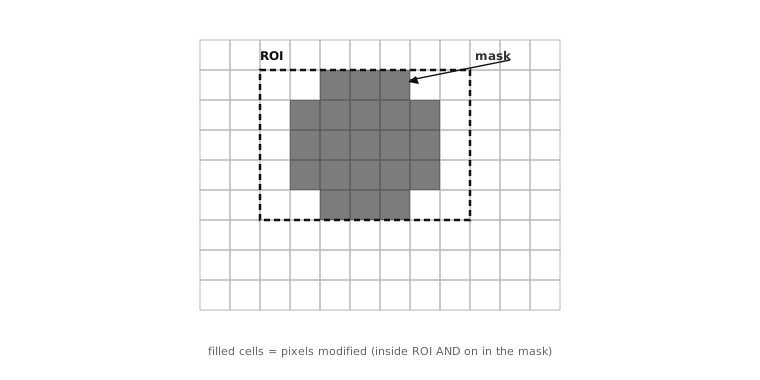
An ROI confines an operation to an axis-aligned rectangle. A mask further narrows it to an arbitrary pattern of pixels. The two compose: only pixels inside the ROI and on in the mask are modified.
7.5.3. Building masks
Three Image methods build common mask
geometries in place by zeroing the pixels outside
the chosen region:
mask_rectangle()keeps a rectangle.mask_circle()keeps a circle.mask_ellipse()keeps an ellipse.
Each takes (x, y, w, h) (for the rectangle and
the ellipse) or (x, y, radius) (for the
circle). Calling any of them without arguments
centres the geometry and sizes it to fill the
image, which is the form an application reaches
for when the goal is a simple full-image oval or
circle that hides nothing but the corners.
mask = image.Image(img.width(), img.height(), image.BINARY)
mask.clear()              # start from all zeros
mask.mask_ellipse()       # centred, full-size oval
The interesting masks rarely come from the
mask_* methods alone. They come from earlier
stages of the pipeline: a thresholding pass
produces a binary image whose non-zero pixels mark
the matches, exactly the right form to feed into
the next stage’s mask= argument. A
morphological cleanup pass refines that mask
without changing its form. Anything that ends up
as a single-channel image is itself a valid mask.
7.5.4. How operations modify the image
A pattern visible in every code snippet on the
last few pages – the operation returning the same
img for chaining – is worth pulling out
explicitly so it does not have to be re-stated
each time a new method is introduced. Three
families of methods appear on the Image
surface, each treating the source image
differently:
Operating methods modify the source’s pixels in place and return the same image for chaining. The drawing, arithmetic, threshold, and filter families all behave this way.
img.gaussian(1)blursimgand returns the sameimg; reassigning –img = img.gaussian(1)– is harmless but unnecessary.Conversion methods operate in place by default the same way operating methods do, but they accept
copy=Trueandcopy_to_fb=Trueto allocate a separate result image when the source needs to be preserved. The format conversions and the geometric copies are the main members of this family.Inspection methods read the pixels and return a result object – a list of detected features, a histogram, a set of statistics – without modifying the source image at all.
That trichotomy is consistent across the whole surface. Knowing which family a method belongs to tells the application what to expect from a call: whether the source’s pixels will survive intact, whether a separate result image will be allocated, and whether the return value is the source itself or something else.