
 OpenMV MicroPython
7.9. Arithmetic operations
The drawing family in the previous section paints into an image. The arithmetic family combines two images into a third – adding their pixel values together, subtracting one from the other, taking the minimum or maximum at every position. That small set of pixel-wise arithmetic operations is what frame differencing, background subtraction, exposure stacking, and a handful of other classical patterns are built on top of.
The arithmetic family on the Image class
is small enough to enumerate at once:
add()– per-pixelself + other, clipped to the format’s maximum.sub()– per-pixelself - other, clipped to0at the bottom.rsub()– per-pixelother - self, clipped to0(the same arithmetic assubwith the operands reversed).min()– per-pixel minimum of the two values.max()– per-pixel maximum.difference()– per-pixel|self - other|, the absolute difference.
Plus two related single-image operations:
invert()– replace each pixel with255 - pixel(or the equivalent maximum for the format).
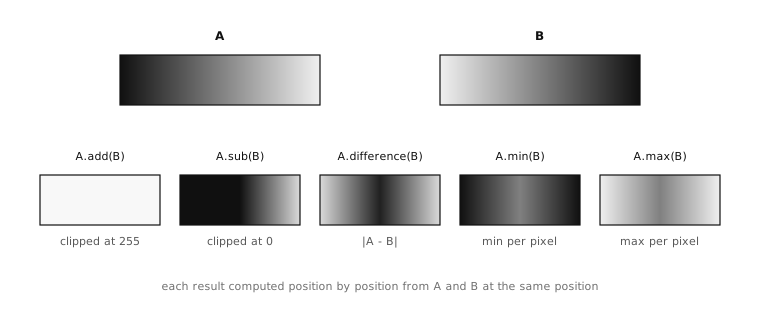
Two source gradients A and B, and the result of each pairwise operation applied to them. Every operation runs position by position – what shows in the result at any one location depends only on the two source pixels at that location.
7.9.1. Two operand forms
Each of the two-image methods accepts either form for its second operand:
Another
Imageof the same dimensions. The arithmetic runs position by position – the result at(x, y)is the operation applied to the source pixels at(x, y)of both images.A scalar value – an integer for grayscale, an
(r, g, b)tuple for RGB565. The same scalar applies at every position.
The scalar form is useful when the application
wants to shift every pixel by a constant amount.
img.add(40) brightens the whole image by 40;
img.sub((20, 20, 20)) darkens every pixel by
20 per channel; img.max(50) lifts any pixel
below 50 up to 50 and leaves the rest alone –
the kind of operation that turns a near-black
sensor floor into a flat dark grey for
subsequent stages to work against.
7.9.2. Clipping
Pixel values stay inside the format’s range
through every operation. For an 8-bit channel
that means 0 – 255: anything that would
have overflowed past 255 is clipped back to
255, and anything that would have gone
below 0 is clipped up to 0. There is no
wrap-around.
That choice matters in practice. add
brightening pixels never produces a sudden
darkening artefact at the bright end where the
maths would otherwise overflow; sub
darkening pixels never produces a sudden
brightening artefact at the dark end where it
would otherwise underflow. The results stay
visually meaningful at the cost of some
information loss at the saturated extremes.
The clipping is also why sub and rsub
return different results from each other.
img_a.sub(img_b) gives the part of a
that is brighter than b and zero everywhere
else; img_a.rsub(img_b) gives the part of
b that is brighter than a. Either is
useful for one-sided change detection – if
the application only cares about pixels that
got brighter, or only about pixels that got
darker – but neither captures all the change
between two frames.
7.9.3. The difference operation
For two-sided change detection, the operation
to reach for is difference(),
which computes |self - other| at every
position – the absolute difference, sign-free.
Every pixel that changed in either direction
shows up as a non-zero value in the result,
with the magnitude proportional to how much it
changed at that position.
That property – non-zero exactly where the two
images disagree – is what makes difference
the workhorse of frame-by-frame change
detection. A reference frame stored at startup
and a fresh capture, run through difference,
produce an image whose non-zero pixels mark
every position where something in the scene
moved or changed brightness.
7.9.4. Scoping with mask
All of the arithmetic methods accept the
mask keyword argument introduced on the
regions-and-masks page. When a mask is passed,
the operation runs only at positions where the
mask is non-zero; everywhere else the
destination image is left alone.
That composition shows up in two patterns. The
first is constraining an operation to a known
area: adding two frames together only inside a
detected marker’s bounding box, for example.
The second is building up a composite frame
piece by piece – min over a sequence of
frames inside a foreground mask, max over
the same sequence inside the complementary
mask – that kind of pattern.
7.9.5. In place, and preserving inputs
The arithmetic methods all follow the operating convention established earlier: each modifies the source image in place and returns the same image for chaining. The source’s pixels are gone after the call – replaced with the result of the operation against whatever was passed as the second operand.
When the application needs to preserve both inputs, the safe pattern is to copy one of them first:
diff = current.copy()       # leaves current intact
diff.difference(reference)  # diff now holds the absolute difference
That pattern – copy, then operate – is the backbone of any frame-differencing pipeline, where the reference frame has to survive the comparison so it can be reused on the next captured frame.
With six combining operations, two single-image operations, an absolute-difference workhorse, and the mask keyword for scoping, the pixel-arithmetic toolkit covers the brightness-and-channel combinations classical machine vision needs. The remaining arithmetic-like tools on the surface work bit by bit rather than value by value.